
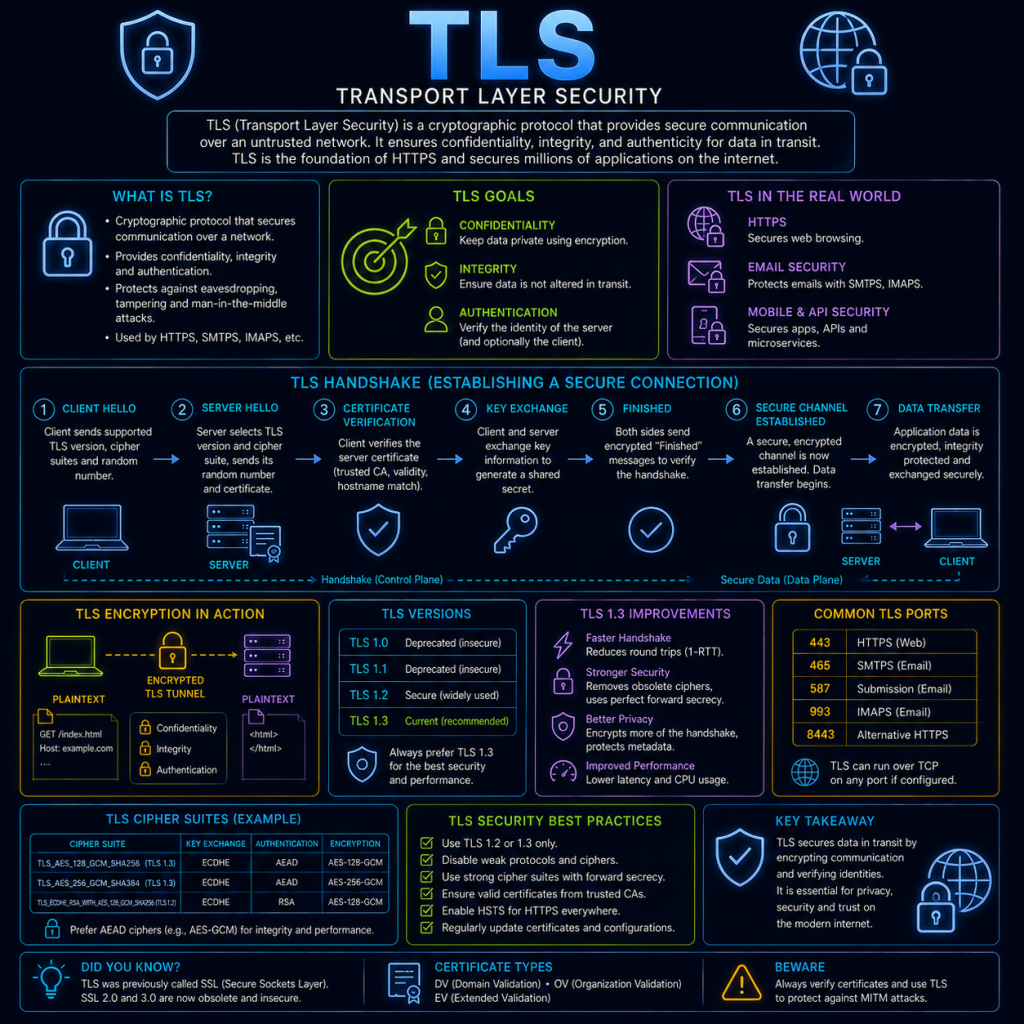
TLS (Transport Layer Security) is a protocol that provides encryption, authentication, and data integrity for network connections. It’s most commonly associated with HTTPS (see the HTTP & HTTPS page), but TLS itself isn’t tied to HTTP specifically — it’s a general-purpose security layer used to protect all sorts of traffic, including email (via STARTTLS, see the Email protocols page), LDAPS (see the LDAP page), and many custom application protocols.
TLS is the modern successor to an older protocol called SSL (Secure Sockets Layer). SSL is now considered obsolete and insecure, but the name has stuck around informally — people (and even some software settings) still say “SSL certificate” or “SSL/TLS” even though what’s actually in use today is exclusively TLS.
What TLS actually provides
TLS is often described in terms of three separate guarantees it provides for a connection:
- Encryption: Data exchanged between the two parties is unreadable to anyone else observing the connection.
- Authentication: At least the server (and optionally the client too) can prove its identity, via a digital certificate.
- Integrity: Either party can detect if data has been tampered with or corrupted in transit, since any modification would break a cryptographic check performed on the data.
TLS versions
TLS has gone through several versions, and which version a connection uses matters significantly for its security:
- SSL 2.0 and 3.0: The original protocol, now considered completely insecure and effectively unusable on the modern web.
- TLS 1.0 and 1.1: Early TLS versions. Both are now deprecated and disabled by default in modern browsers, due to known weaknesses.
- TLS 1.2: Released in 2008, and still very widely used today. Considered secure when configured with modern cipher suites (see below).
- TLS 1.3: Released in 2018, and the current recommended version. Simplifies the handshake considerably (see below), removes support for several older, weaker cryptographic options entirely, and is generally faster to establish a connection with than TLS 1.2.
The TLS handshake
The handshake is the process a client and server go through to agree on encryption settings and verify identity before any actual application data (like an HTTP request) is sent. The exact steps differ between TLS 1.2 and TLS 1.3.
TLS 1.2 handshake (simplified)
- Client Hello: The client sends a list of TLS versions and cipher suites it supports, along with a random value.
- Server Hello: The server picks a TLS version and cipher suite from the client’s list, sends its own random value, and presents its certificate.
- Key exchange: Both sides use the information exchanged so far to independently calculate a shared secret key, without that key itself ever being sent across the network.
- Finished: Both sides confirm the handshake completed correctly by sending a final message, encrypted with the newly agreed key.
This process takes two round trips between client and server before any application data can be sent.
TLS 1.3 handshake (simplified)
TLS 1.3 streamlines this considerably. The client, having a good idea of what the server is likely to support, sends its Hello and its proposed key exchange information in the very first message. In most cases, the server can respond with everything needed to complete the handshake in a single reply, bringing the whole process down to just one round trip — directly addressing the same kind of latency concern covered on the QUIC page.
TLS 1.3 also removed support for several older cryptographic algorithms that were still permitted (though not necessarily recommended) in TLS 1.2, closing off options that had become known weaknesses over time.
Cipher suites
A cipher suite is a named combination of algorithms that together define exactly how a TLS connection will handle key exchange, encryption, and integrity checking. A cipher suite name typically looks something like:
TLS_ECDHE_RSA_WITH_AES_256_GCM_SHA384Breaking this down:
- ECDHE: The key exchange algorithm — in this case, Elliptic Curve Diffie-Hellman Ephemeral.
- RSA: The algorithm used for authentication (i.e. what kind of certificate/key the server uses to prove its identity).
- AES_256_GCM: The symmetric encryption algorithm used to actually encrypt the data once the connection is established, and its key size.
- SHA384: The hashing algorithm used for integrity checking.
The client and server negotiate which cipher suite to use during the handshake, based on what both sides support — this is part of what’s exchanged in the Client Hello and Server Hello messages above.
Perfect Forward Secrecy
The “E” in ECDHE stands for Ephemeral, and it matters a great deal. A key exchange method is described as providing Perfect Forward Secrecy (PFS) if it generates a brand new, temporary key for every single session, rather than reusing the server’s long-term private key to derive the shared secret directly.
This matters because it limits the damage if a server’s long-term private key is ever compromised at some point in the future: without PFS, an attacker who had previously recorded encrypted traffic and later obtained the server’s private key could decrypt all of that old, previously-recorded traffic retroactively. With PFS, each session’s temporary key is discarded after use and never stored anywhere, so a compromised long-term key in the future can’t be used to unlock past traffic. Virtually all modern, correctly-configured TLS connections use a key exchange method that provides PFS.
Certificates in more detail
The HTTP & HTTPS page already introduced the basic idea of a certificate and the chain of trust — a quick recap of the key concepts, plus a bit more detail:
- A certificate binds a public key to an identity (typically a domain name), and is digitally signed by a Certificate Authority (CA) to vouch for that binding.
- Certificates have an expiry date, and must be renewed periodically — an expired certificate will cause browsers to show a hard warning, refusing the connection by default.
- Certificates can cover a single domain, multiple specific domains (a “Subject Alternative Name”, or SAN certificate), or an entire subdomain wildcard (e.g.
*.cybertrainer.uk, covering any subdomain of cybertrainer.uk). - Certificate revocation exists for situations where a certificate needs to be invalidated before its natural expiry — for example, if the corresponding private key is known to have been stolen. Browsers check revocation status via mechanisms like OCSP (Online Certificate Status Protocol), though this system has its own well-known limitations around reliability and privacy.
Inspecting TLS yourself
The openssl command introduced on the HTTP & HTTPS page can also be used to check specifically which TLS version and cipher suite a server negotiates:
openssl s_client -connect cybertrainer.uk:443 -tls1_2Forcing a specific version like this (here, -tls1_2) is a useful way to test whether a server still accepts an older, less secure version that you might expect to have been disabled.
TLS and security
Because TLS underpins the security of most Internet traffic today, it’s both a critical defence and a frequent target for both attack and misconfiguration.
Downgrade attacks attempt to trick a client and server into using an older, weaker version of TLS (or SSL) than they’d otherwise agree to, in the hope that the weaker version has known exploitable flaws. Modern TLS versions include specific protections against this, but it remains a reason why disabling old protocol versions on the server side entirely — rather than simply “supporting” newer ones alongside them — is considered better practice.
Weak or misconfigured cipher suites are a common finding in security assessments — a server that still permits older, weaker cipher suites alongside modern ones can potentially be manipulated into using the weaker option, even if stronger ones are also available. Free tools exist that will scan a server’s TLS configuration and specifically flag any weak ciphers or protocol versions still enabled.
Certificate mis-issuance is a serious risk given how much trust the entire system places in Certificate Authorities — if a CA is compromised or tricked into issuing a fraudulent certificate for a domain it shouldn’t have, an attacker could use that certificate to convincingly impersonate the real site as part of a Man in the Middle attack. Certificate Transparency (CT) logs, a public, auditable record of every certificate issued, exist specifically to make this kind of mis-issuance detectable after the fact.
Historical vulnerabilities, such as Heartbleed (a 2014 flaw in the widely-used OpenSSL library, unrelated to a flaw in the TLS protocol design itself) demonstrate that the security of TLS in practice also depends heavily on the quality of the software implementing it, not just the protocol’s design on paper. Keeping TLS libraries patched and up to date is just as important as choosing sensible protocol versions and cipher suites.