
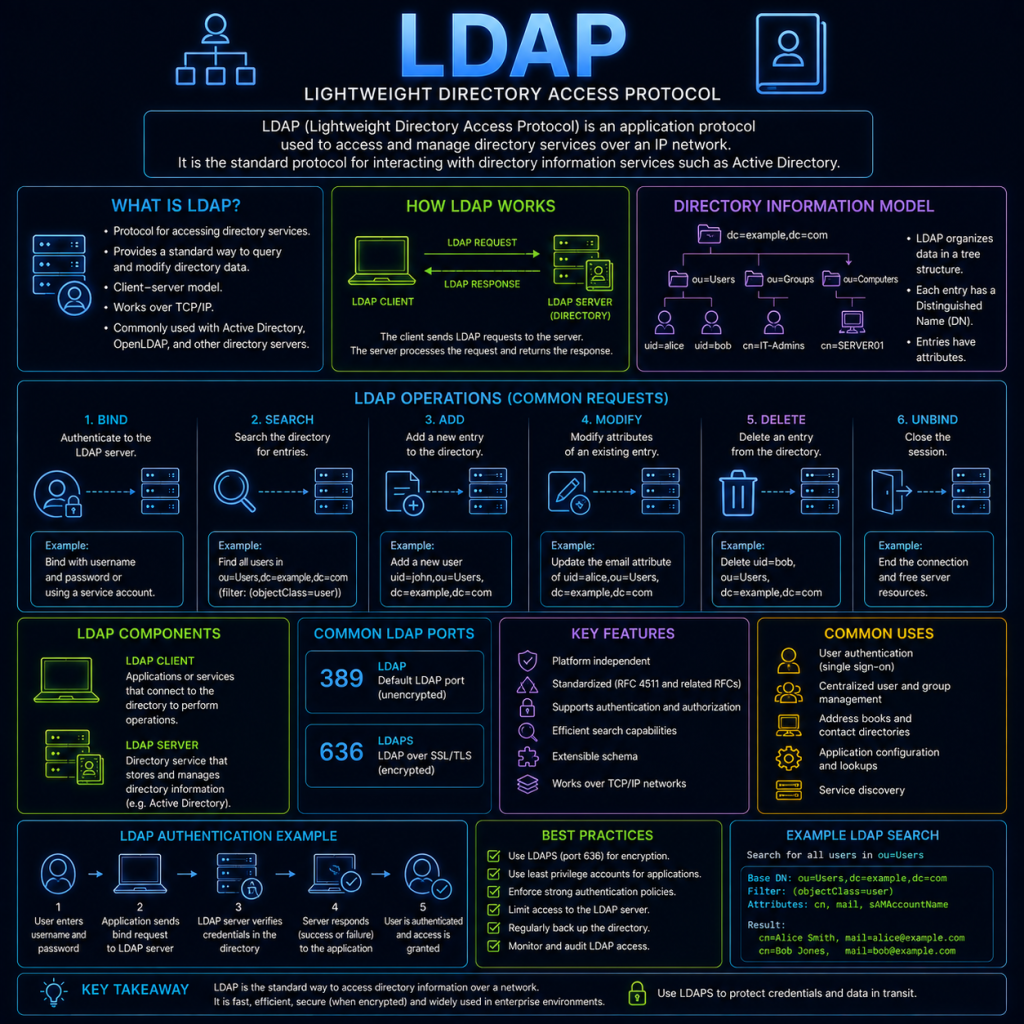
LDAP (Lightweight Directory Access Protocol) is a protocol used to read from, and write to a directory service — a structured, hierarchical database designed specifically for storing and quickly looking up information about users, computers, groups, and other network resources.
LDAP is the protocol underneath Microsoft’s Active Directory, as well as other directory services like OpenLDAP.
Where Kerberos handles proving who you are, LDAP is generally used to look up information about users and resources — things like a user’s group memberships, department, email address, or which computers exist on the network. The two are often used together: an application might use Kerberos to authenticate a user, then query LDAP to work out what that user is allowed to do.
The directory structure
LDAP organises information as a tree, known as the Directory Information Tree (DIT). Each entry in the tree represents an object — a user, a group, a computer, an organisational unit — and every entry has a unique position in that hierarchy.
Distinguished Names (DN)
Every object in the directory is identified by a Distinguished Name (DN) — a full path describing exactly where that object sits in the tree, read from the object itself back up to the root. For example:
CN=John Smith,OU=Sales,DC=cybertrainer,DC=ukReading this from left to right:
- CN (Common Name): The object itself — in this case, a user named John Smith.
- OU (Organisational Unit): A container used to group related objects — here, the Sales department.
- DC (Domain Component): Represents the domain the directory belongs to —
cybertrainer.ukis split into two DC components.
Attributes
Each object in the directory holds a set of attributes — individual pieces of information about it. A user object, for example, might have attributes like sAMAccountName (their login username), mail (their email address), memberOf (which groups they belong to), and many others. Which attributes an object can or must have is defined by its objectClass — essentially a template describing what kind of object it is (user, group, computer, etc.) and what attributes are relevant to it.
How LDAP works
An LDAP session typically follows this pattern:
- Connect: The client opens a connection to the LDAP server, typically on port 389 (or port 636 for the encrypted version, LDAPS).
- Bind: The client authenticates to the directory — usually by supplying a DN and a password, though anonymous binds (no credentials at all) are also possible if the server permits them.
- Search: The client sends a search request, specifying a starting point in the tree, how far down to search, and a filter describing what it’s looking for.
- Results: The server returns any matching entries, along with whichever attributes were requested.
- Unbind: The client closes the connection.
LDAP search filters
Search filters use a distinctive bracketed syntax. A few examples:
(sAMAccountName=jsmith)— find the user with this exact login name.(objectClass=user)— find every object of type “user”.(&(objectClass=user)(department=Sales))— find every user in the Sales department (the&combines two conditions, requiring both to match).
LDAP over TLS: LDAPS
Like several of the protocols covered elsewhere on this site, plain LDAP was not originally designed with encryption in mind — a bind request containing a username and password is sent as plain, readable text by default.
LDAPS (LDAP over SSL/TLS) wraps the entire LDAP session in encryption, in the same way HTTPS wraps HTTP (see the HTTP & HTTPS page), protecting both the bind credentials and any data returned by searches from being read in transit. A newer alternative, StartTLS, achieves a similar result by upgrading an existing plain LDAP connection to an encrypted one, rather than requiring a separate dedicated port.
Querying LDAP directly
On a domain-joined Windows machine, ldapsearch-style queries can be run using built-in tools, but the most common cross-platform option is the ldapsearch command-line utility (commonly available on Linux, or installable on Windows):
ldapsearch -x -H ldap://cybertrainer.uk -b "DC=cybertrainer,DC=uk" "(sAMAccountName=jsmith)"Breaking this down: -x uses simple authentication rather than a more complex method, -H specifies the server to connect to, -b sets the base DN to start searching from, and the final part is the search filter itself.
LDAP and security
Because LDAP directories hold detailed information about every user, group, and computer on a network, they’re a natural target for both reconnaissance and direct attack.
Anonymous binds are one of the most common LDAP misconfigurations. If a server is left permitting anonymous binds when it shouldn’t be, an attacker on the network can query the entire directory structure — usernames, group memberships, organisational layout — without needing any credentials at all. This kind of reconnaissance is often one of the very first steps an attacker takes after gaining any foothold on an internal network, since it reveals exactly who and what exists to target next.
LDAP injection is conceptually similar to SQL injection (see the Injection Attacks page): if an application builds LDAP search filters by directly inserting user-supplied input without properly sanitising it, an attacker can manipulate the filter’s logic — for example, injecting characters that alter a login filter to always evaluate as true, potentially bypassing authentication entirely.
Credential exposure over plain LDAP is a straightforward risk — a bind request sent over unencrypted LDAP contains a password in plain text, making it a valuable target for anyone in a position to intercept network traffic, similar to the risks already covered on the Man in the Middle page. This is why LDAPS (or StartTLS) should always be preferred over plain LDAP wherever possible.
Directory enumeration more broadly is often the reconnaissance phase that precedes the Kerberos-focused attacks already covered on this site — an attacker who has queried LDAP to identify which accounts are service accounts (a common, discoverable attribute pattern) now knows exactly which accounts to target with a Kerberoasting attack.
Because of these risks, common hardening steps include disabling anonymous binds unless there’s a specific, justified need for them, enforcing LDAPS/StartTLS and disabling plain LDAP entirely where possible, and applying the principle of least privilege to which accounts can query which parts of the directory.