
For many years I’ve taught people about the many ways owners of websites track users both on, and off platform.
The obvious one is the cookie – most people are aware of cookies and what they are used for – if not only due to the ever-pervasive “This site uses cookies” pop-up which appears whenever you access a website.
But the cookie is just one tool that developers have built that is used to track users as they navigate the web
I wrote about some of these mechanisms a few years ago during my “365 days of blogs” series – you can read about them here
Now there’s a new kid on the block… Well, I say new – the technique has been around for a while, but it is very rarely used, and depending on which browser you use – not very effective
This time however, the technique is being used by one of the worlds most popular websites – AliExpress, and with an impression rate between 450 – 530 million a month, with peaks of 700 million, it has the potential to track a lot of visitors.
Found by accident
The tracking technique in AliExpress was discovered by software developer Matt Callaghan who has written about the incident in his own blog, but in brief – he discovered that his multipoint Bluetooth earphones were silent whenever he visited the AliExpress website, but as soon as he closed the browser tab, they would resume playing music from his phone.
After a bit of experimentation, he discovered that whenever he opened a browser tab with AliExpress, something in the site took over the audio channel of his Bluetooth connection, even though there appeared to be no sounds being played.
He opened the tabs in the browser developer mode and eventually located two hidden audio contexts
During an idle capture of the AliExpress homepage, the page created two AudioContext objects. Both entered the running state and both connected nodes to AudioContext.destination
He eventually traced these to two files being executed by the browser:
https://assets.aliexpress-media.com/g/AWSC/uab/1.140.0/collina.js
https://assets.aliexpress-media.com/g/AWSC/fireyejs/1.231.67/fireyejs.js

AliExpress collina.js

As can be seen from the screenshots above – both file have been heavily uglified (obfuscated) to make it difficult to reverse engineer – difficult, but not impossible!
Callaghan started to examine the files in detail and discovered that they generate a WebAudio graph which creates an analyser and a known waveform.
The analyser measures the result of the waveform after it has passed through the browser’s audio implementation, and the script reads frequency data from it.
The gain of the signal is set to zero, which explains why there is no audible sound playing in the browser. however, the graph is still connected to the system audio destination which causes the browser to actively process the graph, even though the final volume is zero. As far as the web page is concerned, it is performing live audio processing.
The data produced by the audio signal can be turned into a unique hash value, which is the trackable part of the story.
Further examination of the scripts identified other telemetry tracking code, including:
- canvas rendering and toDataURL()
- WebGL renderer information, extensions, and shader precision
- audio oscillator and analyser output
- screen and viewport dimensions
- device pixel ratio
- hardware concurrency and device memory
- installed browser plugins
- supported audio and video formats
- WebRTC behaviour
- browser performance timing
- mouse, touch, focus, and scroll events
- device motion and orientation
- properties commonly associated with browser automation
Callaghan also identified code for serialising and encrypting the results of these data points and making requests to Alibaba telemetry services, and sending data with fetch() or sendBeacon() functions.
There could be perfectly legitimate reasons for this – Callaghan does explain that these scripts were found in a directory configured for security and anti-abuse. If this is the case, then these scripts could be used to identify the difference between legitimate users and bots, as typically bots don’t use browsers, and as such wouldn’t be able to process the audio signals.
However, this technology can, and is used to track browsers, and as such – people.
Another developer who works for Mozilla on the Firefox browser has taken the AliExpress code and created a webpage that reproduces the waveform graph and generates the unique hash data
https://ritter.vg/misc/ff/webaudio-alibaba.html
Running the code in your browser generates an output as shown below:
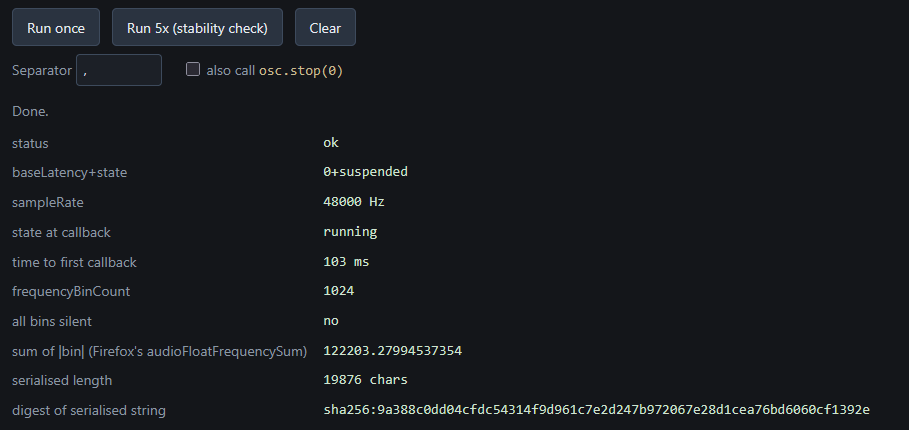
The developer states the FIreFox addressed this trackability quite a while ago and no matter what you do to your browser, the waveform generated is constant across all installations of the browser – so my hash data should be the same as yours, which should be the same as nearly everyone else’s.
You can read that post here
Regardless of whether your browser blocks this or not (hopefully it does) – It just shows the lengths corporations will go to in developing ways to track users on the WWW.