
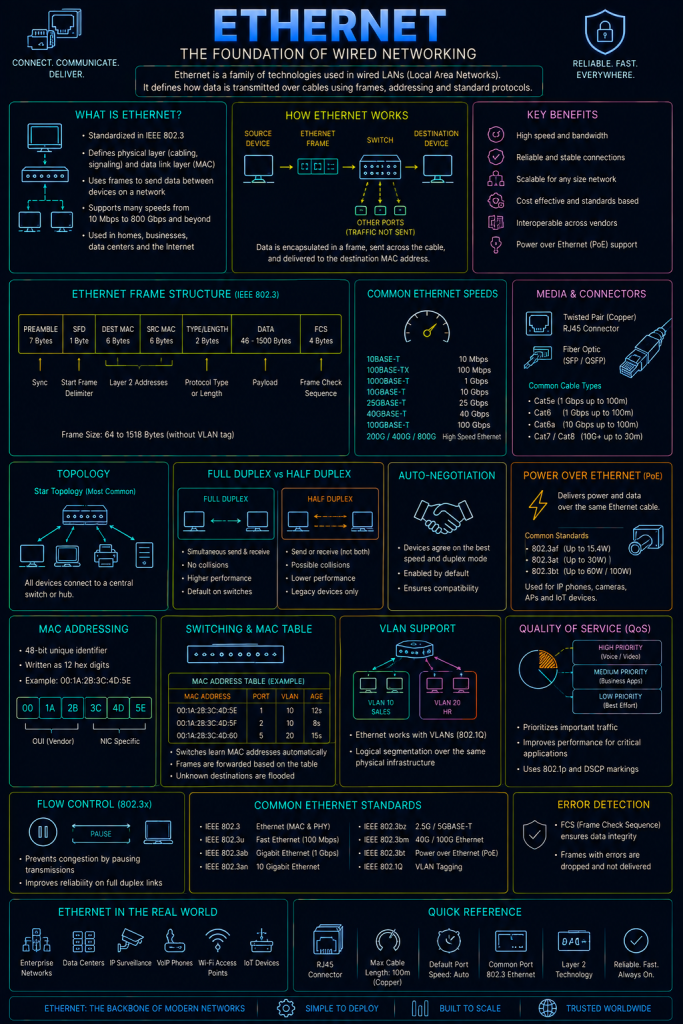
Ethernet is the dominant standard for wired local area networking, defining how devices physically connect to a network and how data is framed and delivered across that connection. Formalised as IEEE 802.3, Ethernet has been the near-universal choice for wired LANs since the 1980s, and underpins essentially every wired network covered elsewhere on this site, from a home router’s LAN ports to a data centre’s core switching infrastructure.
Where Wi-Fi (Wi-Fi Protocols ) covers wireless local networking, Ethernet is its wired counterpart — and, notably, sits at the same layer of the network stack (Layer 2, the Data Link layer — see the Network Models page), meaning many of the concepts discussed here (frames, MAC addresses) apply conceptually to Wi-Fi too, even though the physical medium is completely different.
MAC addresses
Every device with an Ethernet (or Wi-Fi) network interface has a MAC (Media Access Control) address — a 48-bit identifier, conventionally written as six pairs of hexadecimal digits (for example, 00:1A:2B:3C:4D:5E), that’s intended to be globally unique to that specific physical network interface.
A MAC address is split into two halves: the first half (the OUI, or Organisationally Unique Identifier) identifies the manufacturer of the network interface, while the second half is a unique value assigned by that manufacturer. Because of this, a MAC address’s first half can often reveal what kind of device or vendor is on a network, purely from its address.
Ethernet itself has no concept of IP addressing at all; it operates purely in terms of MAC addresses, which is exactly why ARP needs to exist as a translation layer between the two.
The Ethernet frame
Data travelling across an Ethernet network is organised into frames — recall from the Network Models page that “frame” is specifically the Data Link layer’s term for its unit of data, distinct from a packet (Network layer) or a segment (Transport layer).
A simplified Ethernet frame contains:
- Destination MAC address: Who the frame is being sent to.
- Source MAC address: Who sent it.
- EtherType: Identifies what kind of data the frame is carrying (most commonly, an IPv4 or IPv6 packet).
- Payload: The actual data being carried — typically an IP packet, handed down from the layer above.
- FCS (Frame Check Sequence): An error-detection value, allowing the receiving device to verify the frame wasn’t corrupted in transit.

How switches forward traffic
A modern Ethernet network is built around switches, which use MAC addresses to intelligently forward frames only to the specific port where the intended recipient is actually connected, rather than broadcasting every frame to every device.
A switch builds and maintains a MAC address table, learning which MAC address is reachable through which physical port by simply observing the source address of frames as they arrive. When a switch receives a frame destined for a MAC address it has already learned, it forwards that frame out only the correct single port. If it receives a frame for a MAC address it hasn’t learned yet, it floods the frame out every port except the one it arrived on, and waits to learn where that device actually lives from any reply.
Collision domains and duplex
Older Ethernet, running over shared coaxial cable or hub-based wiring, meant every device on a segment shared the same physical medium, and two devices transmitting simultaneously would cause their signals to interfere and corrupt each other — a collision.
Ethernet originally handled this with a mechanism called CSMA/CD (Carrier Sense Multiple Access with Collision Detection), where a device would listen before transmitting, and if a collision was detected anyway, both devices would back off and retry after a random delay.
Modern switched networks have almost entirely eliminated this problem. Because a switch forwards traffic only to the specific port where it’s needed, rather than every device sharing one medium, each individual switch port is effectively its own separate collision domain — and combined with full-duplex operation (where a device can send and receive simultaneously, rather than only doing one at a time), collisions in a modern, fully-switched Ethernet network are, in practice, essentially a thing of the past.
Ethernet standards and speeds
The formal 802.3 standard has been extended many times over the decades to support increasing speeds, generally referred to informally by their speed rather than their exact standard number: Fast Ethernet (100 Mbps), Gigabit Ethernet (1 Gbps), and multi-gigabit standards reaching 10, 25, 40, or 100+ Gbps in modern data centre and enterprise environments. Cabling has evolved alongside these speed increases — twisted-pair copper cabling (Cat5e, Cat6, Cat6a, and beyond) remains common for most LAN wiring, while fibre optic cabling is typically used for the highest speeds and longest distances.
Ethernet and security
Because Ethernet operates below IP addressing entirely, several of its foundational security considerations sit at a different, lower layer than most of the protocols covered elsewhere on this site.
MAC address spoofing is straightforward to carry out, since a device’s MAC address is typically just a software-configurable setting rather than something genuinely locked to the hardware. An attacker can change their own device’s MAC address to match a legitimate one already on the network — potentially bypassing simple MAC-based access controls, or as part of certain Man in the Middle techniques, alongside the ARP-based attacks already covered on the ARP page.
MAC flooding is an attack against the switch itself, rather than against another device on the network. By rapidly sending frames from a huge number of fake, forged source MAC addresses, an attacker can overflow a switch’s MAC address table entirely. Once full, some switches fail “open” — reverting to flooding every frame out every port, effectively behaving like an old, insecure hub, letting the attacker passively see traffic intended for other devices that they’d normally never receive.
Port security is the standard defensive countermeasure against both of the above, available on most managed switches. It allows an administrator to restrict how many (or which specific) MAC addresses are permitted on a given port, automatically disabling the port if that limit is exceeded or an unrecognised address appears — directly closing off both MAC flooding and simple spoofing attempts at the point where a device physically connects to the network.
Physical access to a switch port is often equivalent to a significant level of network access, unless further controls are layered on top. This is precisely the gap that 802.1X (mentioned on the RADIUS/TACACS+ and Wi-Fi Protocols pages) closes for wired networks too, not just Wi-Fi — requiring a device to authenticate via RADIUS before its switch port is even activated for normal traffic, rather than assuming that anyone who can physically plug into a wall socket should automatically be trusted.
Unused switch ports left active are a commonly overlooked exposure. A physically accessible, unused Ethernet socket in an office corridor or an empty desk that’s still live and connected to the production network gives anyone with brief physical access a direct route onto the internal network, bypassing perimeter defences entirely. Administratively disabling unused ports (or placing them into an isolated, unused VLAN) is a simple, frequently overlooked hardening step.