I’ve written about the use of passkeys in favour of passwords a few times over the last couple of years (see below), and this week sees a publication of a paper by the UK’s NCSC that re-enforces the fact that passwords are no longer regarded as suitably good enough to thwart threat actors, and that passkeys should be the default option for any accounts you create
My previous posts on the subject are:
The publication has been launched by the NCSC at the 2026 CYBERUK conference in Glasgow, and is titled – Comparing the security properties of traditional user credentials and FIDO2 credentials for personal use
This post summarizes the key points of that paper
The End of Passwords: Why FIDO2 and Passkeys Are Winning the Credential War
The abuse of legitimate credentials is responsible for the majority of cyber affecting people today, but for years the security industry has responded to these types of attacks by placing an increasingly heavy burden on users – first by demanding users generate complex passwords (which few rarely do well enough) and then by introducing traditional multi-factor authentication (tMFA) methods like SMS codes.
The problem is though that attacker tradecraft has continually adapted to circumvent these protections. The use of cloud-based systems to rapidly conduct brute-force attacks on complex passwords, the use of insiders to gain access to stored credentials, phishing attacks used to obtain password data, SIM swapping attacks to intercept SMS codes, email compromise to intercept password resets are just some of the approaches threat actors use to gain control of a users account data.
The industry group FIDO Alliance responded to this escalating arms race by creating FIDO2 authentication, a modern alternative designed to fundamentally solve the security issues inherent in traditional credentials. Featuring high entropy, per-account uniqueness, and robust phishing-resistance, FIDO2 credentials – including synchronised passkeys and single-device passkeys – represent a monumental shift in how we secure our digital lives.
The NCSC paper explores the security properties of traditional credentials versus FIDO2 credentials, examining how they hold up against modern threats throughout their lifecycle.
Before diving into the threat models and technical comparisons, it is essential to establish a baseline of terminology.
- tMFA (Traditional MFA): The most frequently observed multi-factor scenario, combining a password with a secondary element such as an SMS code, a time-based one-use password (TOTP) from an app or hardware token, or an app-based login approval.
- FIDO2 Authenticator: Any authenticator that adheres to FIDO2 specifications, which use public key cryptography rather than shared secrets.
- Passkey: A FIDO2 credential stored on a commodity device (like a smartphone, tablet, or laptop) that is securely backed up and synchronised through a vendor’s “sync fabric”.
- Single-device Passkey: A FIDO2 credential that cannot be exported, shared, or synchronised, permanently residing on the device where it was created.
- Sync Fabric: A vendor platform (like those provided by Apple, Google, or Microsoft) responsible for safely synchronising FIDO credentials across a user’s supported devices.
Understanding the Threat: Who is Attacking Us?
Individuals and organisations face vastly different threat actors, ranging from automated, low-capability bots to well-funded state groups. To evaluate credential security accurately, we must look at the specific capabilities of the attackers causing the most widespread harm.
Cybersecurity researchers classify attacker capability based on operational budget. For the general public, the most relevant threats are Operational Capability 1 (OC1 – Amateur) and Operational Capability 2 (OC2 – Professional Opportunist). While top-tier priority operations (OC5) exist with billion-dollar budgets, it is the OC1 and OC2 actors deploying credential harvesting, password brute-forcing, and credential stuffing that are responsible for the largest scale of harms to individuals.
To execute these attacks, threat actors must compromise a device. It is vital to understand that different devices are vulnerable to different attackers. Commodity malware targeting credentials is predominantly a desktop and laptop phenomenon (Windows and macOS) because these operating systems allow socially engineered, user-level payload execution. Malware running as the user can typically compromise data across all other applications.
In stark contrast, mobile operating systems (iOS and Android) require explicit user consent for application capabilities and do not broadly allow applications to access each other’s data without sophisticated operating system exploits. Because exploiting mobile devices requires tooling that can cost millions of dollars, we assume that while any attacker might successfully compromise a Windows or Mac device, only highly-resourced actors can extract arbitrary user data from an updated mobile phone.
The credential lifecycle
To properly compare tMFA and FIDO2, we must track a credential through its entire life. A user’s credential goes through distinct stages, each presenting unique attack vectors.
At each stage of this lifecycle, different capability actors will attempt specific attacks to compromise the authentication sequence.
Stage 1 & 2: Creation and Storage — The Foundation of Trust
Creation attacks target the creation of credentials, and focus on whether a third party can ascertain or predict the underlying secret used to generate the password.
The Traditional Flaw: Passwords created by users are inherently weak – Arguably, part of this problem is the subliminal effect that states passwords must be a word. The problem here is that words appear in dictionaries, so all an attacker has to do is try every word in the dictionary. This time to do this can be drastically reduced if you know a little about the target (what languages do they speak, what are their children’s names, where did they meet their spouse, etc.).
If the password is predictable, it is vulnerable to credential stuffing, which is where attackers take credentials breached from one website and test them across others.
If a password is semi-predictable, it is vulnerable to brute-forcing – As described above.
Microsoft reports that an overwhelming 97% of credential attacks can be mitigated simply by enabling two-step verification (2SV), highlighting how desperately fragile passwords are.
The FIDO2 Advantage: FIDO2 completely eliminates predictable secrets. During creation, the user’s client triggers the FIDO authenticator to generate a unique pair of cryptographic keys. The public key and metadata are sent to the relying party over a secure TLS channel. Because the FIDO Authenticator automatically generates unique credentials for each service, intentional reuse is impossible, rendering credential stuffing obsolete.
Storage attacks – Once created, credentials must be stored securely. Users are notoriously bad at storing traditional credentials; over 50% of users simply remember and reuse them, while roughly 33% still rely on pen and paper. For those using digital storage on Windows or macOS devices, an ecosystem of credential-stealing malware (infostealers) has emerged. These stealers log keystrokes, steal clipboard data, and aggressively target poorly secured password manager vaults.
Passkeys and FIDO2 credentials sidestep these vulnerabilities by relying on the hardware security elements built into modern commodity platforms (Apple, Google, Microsoft), providing hardware-backed protection that common malware cannot easily extract.
Stage 3: Logging In — The Phishing Battlefield
Logging into a service is the most fiercely contested battleground in the credential lifecycle. It is here that traditional MFA methods are currently failing at an alarming rate.
The Rise of Adversary-in-the-Middle (AitM) Phishing: Phishing, (A.K.A. credential harvesting) has evolved greatly over the years. In a traditional phishing attack, a user is tricked into visiting a fake site, enters their password, and the attacker harvests it.
If the user has basic 2SV enabled, the attacker gets the password but cannot log in to the account without the second factor.
To combat this, attackers have aggressively adopted Adversary-in-the-Middle (AitM) phishing which is where the attacker’s server actively proxies the connection between the victim and the legitimate website.
When the real website prompts for the 2SV SMS code, a TOTP code, or an app approval, the attacker’s server relays that prompt to the victim in real-time. When the victim inputs the valid code, the attacker passes it on to the legitimate site, and the attacker’s server intercepts and retains the highly-privileged post-authentication session cookie.
All forms of traditional MFA are vulnerable to AitM attacks because traditional credentials are not cryptographically bound to the real site.
Attackers also utilize fatigue attacks against notification-based MFA. A fatigue attack is one where attacks repeatedly attempting to log in to an account which has the result of spamming the user’s device with approval requests until the frustrated, or confused user finally clicks “approve” just to stop the notifications – thereby granting the attacker access.
How FIDO2 Defeats Modern Phishing: No FIDO2 credential type is vulnerable to AitM phishing.
This is because FIDO2 uses asymmetric cryptography where the user signs a unique, per-request challenge, and the private key never leaves the authenticator.
FIDO2 includes an automatic, cryptographically-backed domain binding process. This is where the user’s trusted browser checks the origin (domain) identifier of the site being visited and will only offer FIDO credentials that exactly match the cryptographic identifier set when the credential was initially registered.
So, if an attacker lures a user to google-security-alert.com, the authenticator simply will not produce the key for google.com because the two domains are not the same. With this protection, a person cannot be socially engineered into giving away a passkey, because they do not know it.
Logging in from a Different Device
If you need to log into a service such as a smart TV or a friend’s laptop where your credentials aren’t stored, with tMFA, you simply type your password and second factor into the new device.
However, do you trust that device? What if that device is infected with a keylogger or owned by a malicious party? You’ve just handed the attacker your credentials.
FIDO2 solves this issue with a process known as Cross-Device Flow (A.K.A. Hybrid Flow).
When logging into a new device, a QR code is generated. You scan this QR code with your primary smartphone (which holds the passkey) and the devices establish a Bluetooth LE connection using data from the QR code.
This Bluetooth handshake is genius as it proves physical proximity to the device you are logging into, entirely preventing remote AitM phishing attacks. Your smartphone then securely signs the login challenge without ever transferring the FIDO2 private key to the secondary device.
Stage 4: Synchronisation — The Passkey Debate
One critique of passkeys is that they rely on a “sync fabric” (like iCloud Keychain or Google Password Manager) to synchronise credentials across a user’s various devices. Critics argue that this introduces a central point of failure: if an attacker gains access to the sync fabric account, they gain access to all the passkeys.
However, this argument often compares FIDO2 to an idealized, non-existent version of tMFA where users perfectly memorize unique, complex passwords for every site. In reality, users rely on password managers, which utilize the exact same sync fabrics. Furthermore, email accounts serve as de-facto sync fabrics; if an email account is compromised, the attacker can reset almost all passwords and receive email-based 2SV codes.
To protect passkeys, the major first-party sync fabrics (Apple, Google, Microsoft) mandate two-factor authentication just to store passkeys, and they support FIDO2/phishing-resistant authentication to secure the sync fabric itself.
If users ensure their sync fabric account is protected against phishing and has a secure account recovery option, the synchronized nature of passkeys is a massive usability and availability upgrade, not a security downgrade.
Stage 5 & 6: Revocation and Recovery
If you lose your device (or it fails), how do you regain access to your accounts?
With tMFA, losing an unsynchronised TOTP app means permanently losing access to the access codes, forcing the user into tedious account recovery flows for every single website (assuming they can remember all their favourite sites).
Many of the legacy account recovery flows rely on email links or SMS codes, effectively reducing the security of the target service to the security of the email inbox or phone number of the user. This is where compromised email accounts, or SIM-swap attacks are used to obtain the password reset data.
Because passkeys are inherently synchronised, all a a user needs to do to recover their accounts is to simply sign into their sync fabric on a new device to instantly restore all their passkeys.
Why FIDO2 is the Future
When comparing these systems against the threats observed in the wild, the conclusion is unavoidable:
At all stages of a credential’s lifecycle, and against all commonly observed attacks, FIDO2 credentials including passkeys are as secure or more secure than all forms of traditional MFA for individuals.
The NCSC asserts that a passkey or FIDO2 credential that verifies the user via biometrics or a PIN prior to authenticating is fully equivalent to traditional multi-factor authentication as it satisfies “Something you have” (the FIDO2 private key stored in hardware) and “Something you are/know” (the biometric scan or device PIN required to unlock it).
The era of relying on SMS codes and easily-intercepted passwords is drawing to a close. To fully realize the benefits of this modern security architecture, the NCSC outlines several critical recommendations:
For Users:
- Embrace Passkeys: Users are strongly recommended to use and favour passkeys to authenticate to services wherever available, and only fall back to traditional secondary factors when passkeys are not supported.
- Secure the Sync Fabric: Ensure that the account controlling your sync fabric (Apple ID, Google Account, etc.) is itself protected with phishing-resistant FIDO2 authentication and robust recovery options.
- Choose Password Managers Wisely: If using a third-party credential manager for passkeys, ensure it correctly protects the cryptographic material using OS-level secure storage.
For Relying Parties (Websites/Apps):
- Unify Sign-in Experiences: Relying parties may need to unify their registration and sign-in experiences behind a single domain origin to support WebAuthn’s stringent domain-binding requirements.
- Mitigate XSS: Ensure robust cross-site scripting (XSS) protections like Content Security Policies and Trusted Types are implemented so vulnerabilities cannot be used to bypass passkey protections.
- Allow Granular Revocation: Ensure users can specifically disable or delete the public key of a lost or compromised FIDO credential from their account dashboard without having to reset the entire account.
The image below summarises this post as a nice infographic:
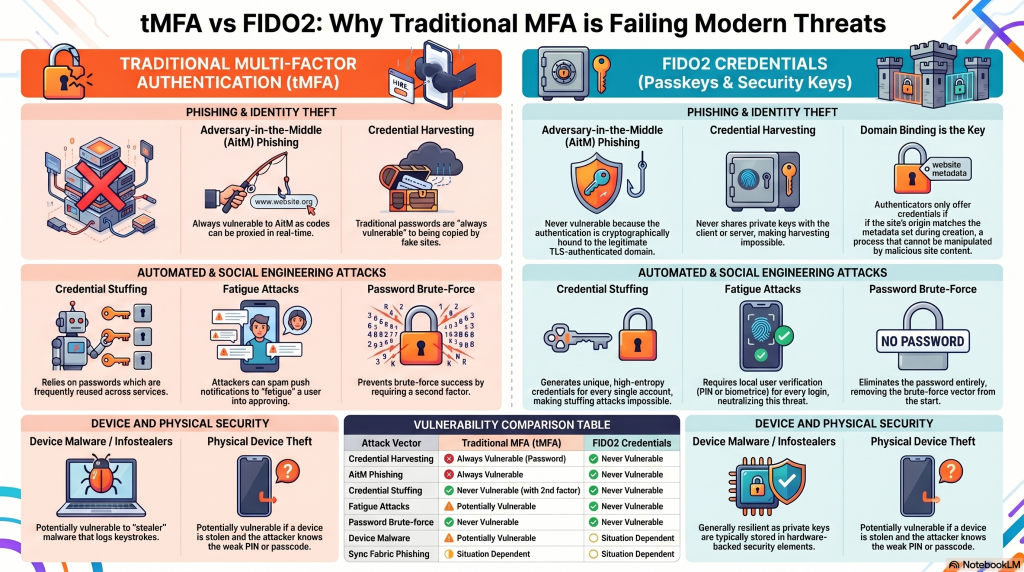
FIDO2 and passkeys are not just an incremental update; they are the most effective weapon the industry has ever deployed against the scourge of credential theft. By removing the human element from the cryptographic exchange, we can finally relegate the era of the stolen password to the history books.
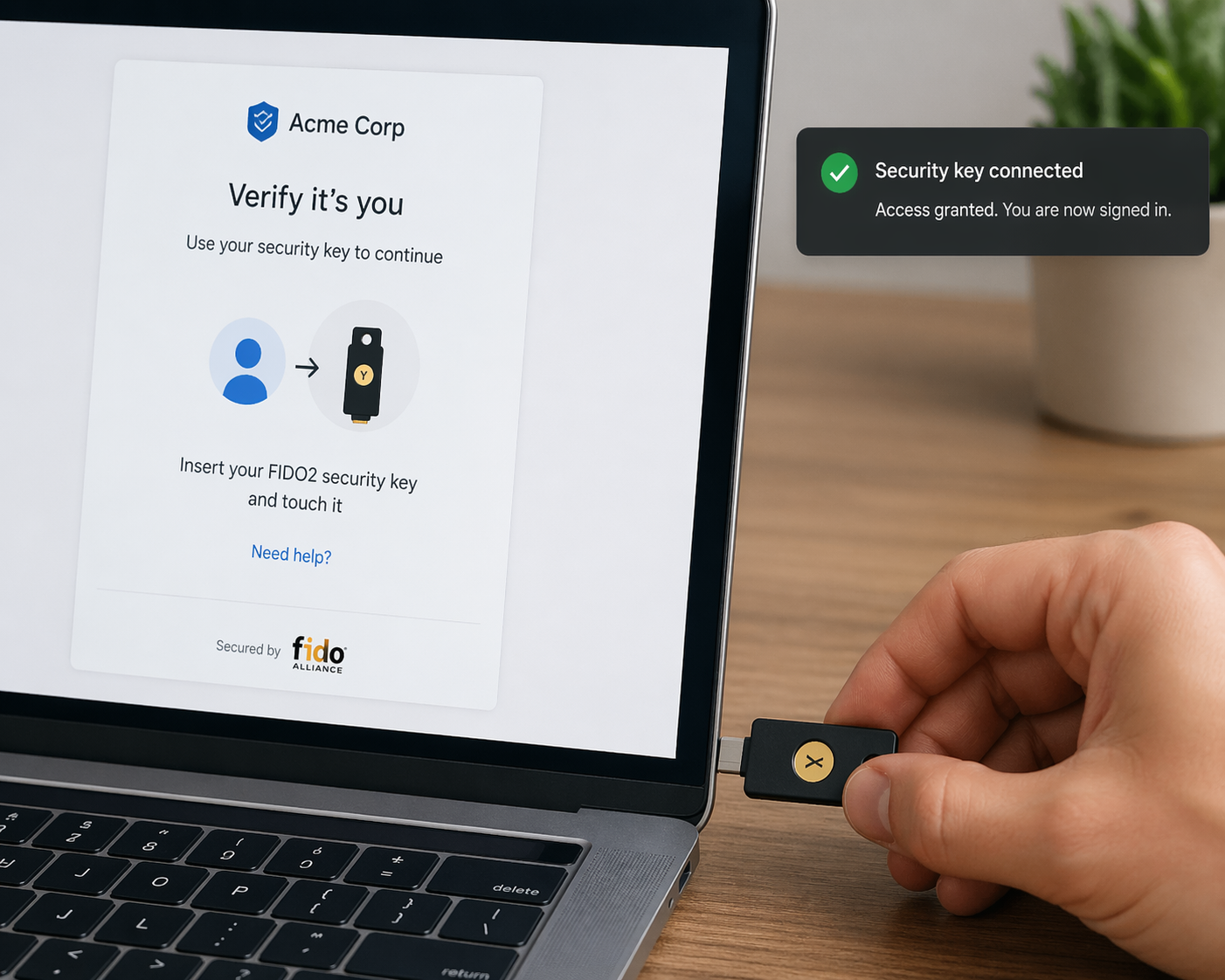
I have used a hardware passkey for a number of years – I use a Yubikey from Yubico. It is fully FIDO2 compliant, although the one I use does not have a biometric capability, so I’m considering purchasing a new one that does
Post 80 – 23/04/2026