
Compromising accounts without any user interaction
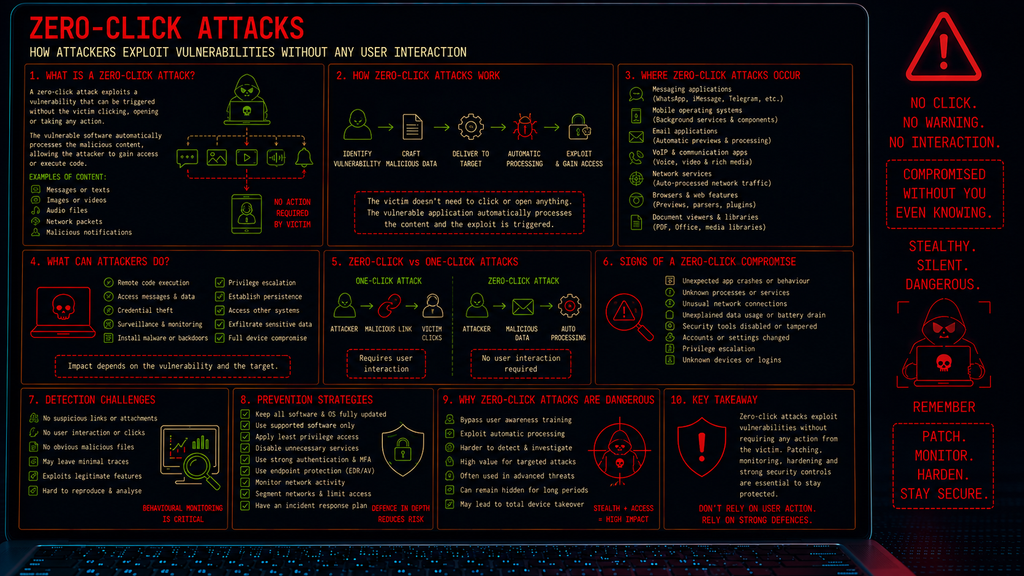
Introduction
Most cyber attacks require some form of interaction from the victim. They may need to open an attachment, click a link, install an application or enter their credentials.
Zero-click attacks are different.
A zero-click attack exploits a vulnerability that can be triggered without the victim having to click, open or otherwise interact with anything.
This makes zero-click attacks particularly dangerous because traditional security advice such as “don’t click suspicious links” may not protect against them.
What is a Zero-Click Attack?
A zero-click attack is a cyber attack in which an attacker exploits a vulnerability without requiring any deliberate action from the victim.
The attacker sends specially crafted data to the target device or application. The vulnerable software automatically processes that data, triggering the vulnerability.
The victim may simply receive:
- A message
- An image
- An audio file
- A video
- A specially crafted network packet
- A malicious notification
- Other automatically processed data
The important characteristic is that the victim does not need to interact with the malicious content.
In some cases, the victim may not even realise that anything has been received.
How Do Zero-Click Attacks Work?
The basic attack process can be represented as:
Identify Vulnerability → Craft Malicious Data → Deliver to Target → Automatic Processing → Exploit Vulnerability → Gain Access
The attacker first identifies a vulnerability in software that automatically processes incoming data. They then create specially crafted content designed to trigger that vulnerability and deliver it to an unwitting victim.
The vulnerable application processes the content automatically and, if the exploit succeeds, the attacker may be able to execute code, access information or establish further control over the device.
The critical difference is that the application performs the dangerous processing automatically.
Why don’t zero-click attacks require user interaction?
Modern applications are designed to process many types of information automatically.
For example, a messaging application may automatically:
- Download message content
- Generate image previews
- Process audio
- Decode video
- Parse metadata
- Generate notifications
- Process attachments
- Synchronise messages
This automation improves usability, but it can also create an attack surface. If a vulnerability exists in one of these processing functions, an attacker may be able to exploit it simply by sending specially crafted content.
The victim doesn’t necessarily need to open the message.
Where can zero-click attacks occur?
Zero-click vulnerabilities can potentially exist in many different types of software.
Messaging Applications
Messaging platforms are particularly attractive targets because they automatically process large amounts of untrusted content.
A malicious message may exploit a vulnerability in the application’s handling of an image, video, document or other media.
Mobile Operating Systems
Smartphones contain many services that operate automatically in the background.
A vulnerability in one of these components could potentially allow malicious data to trigger exploitation without visible user interaction.
Email Applications
Email clients may automatically process parts of incoming messages, including previews, attachments or embedded content.
VoIP and Communication Applications
Applications handling voice and video communications may automatically process complex media formats, creating additional attack surfaces.
Network Services
Zero-click exploitation does not necessarily require a graphical application.
A vulnerable network service may automatically process specially crafted network traffic received from an attacker.
What can a successful zero-click attack do?
The consequences depend on the vulnerability being exploited.
A successful attack could potentially provide:
- Remote code execution
- Access to application data
- Access to messages
- Credential theft
- Surveillance capabilities
- Installation of malware
- Privilege escalation
- Persistence
- Access to other systems
- Further network compromise
In particularly serious cases, an attacker could gain extensive control over a device while the victim remains completely unaware.
Why are zero-click attacks so dangerous?
Zero-click attacks are particularly concerning because they can bypass many common security assumptions.
There may be:
- No suspicious link
- No malicious attachment that needs opening
- No fake login page
- No obvious phishing message
- No user interaction
- No visible warning
The victim can therefore behave perfectly from a security-awareness perspective and still become compromised.
This is one reason why software vulnerabilities can be so dangerous.
Zero-Click Attacks and Mobile Devices
Mobile devices are particularly valuable targets because they contain large amounts of sensitive information.
A compromised smartphone may provide access to:
- Messages
- Contacts
- Photos
- Documents
- Location information
- Authentication tokens
- Corporate applications
- Cloud services
A sophisticated zero-click exploit could therefore provide an attacker with access to a significant amount of personal or organisational information.
For high-value targets, zero-click vulnerabilities can be extremely valuable because they may provide a covert method of compromising a device without alerting the user.
Detection Challenges
One of the biggest problems with zero-click attacks is detection. Because there may be no user interaction, traditional indicators such as suspicious clicks or downloaded files may not exist.
Security teams should therefore monitor for:
- Unexpected application crashes
- Unusual application behaviour
- Suspicious processes
- Unexpected network connections
- Unauthorised changes to system files
- Unusual authentication activity
- Unexpected privilege escalation
- Abnormal outbound traffic
- Security-control tampering
Endpoint Detection and Response (EDR) and mobile threat detection technologies can provide additional visibility into suspicious behaviour.
How can zero-click attacks be prevented?
Organisations should:
- Keep Software Updated – Install operating system and application security updates as soon as practical.
- Use Supported Software – Unsupported applications and operating systems may no longer receive security patches.
- Reduce Attack Surface – Disable unnecessary services and applications where possible.
- Apply Least Privilege – Applications and users should have only the permissions they actually require.
- Use Endpoint Security – EDR and other security controls can identify suspicious post-exploitation behaviour.
- Monitor Network Activity – Unexpected outbound connections can provide an important indication of compromise.
- Segment Sensitive Systems – Network segmentation can limit what an attacker can access after compromising a device.
- Have an Incident Response Process – A suspected zero-click compromise should be treated seriously because exploitation may have occurred without any obvious user action.
Conclusion
Zero-click attacks exploit vulnerabilities without requiring the victim to interact with the malicious content. They take advantage of the fact that modern devices and applications automatically process messages, media, network traffic and other data.
This makes them particularly difficult to defend against using security awareness alone.
- The victim doesn’t have to click the link.
- They don’t have to open the attachment.
- They don’t necessarily have to do anything at all.
- The software does it for them.
For this reason, patch management, endpoint security, application hardening, network monitoring and rapid vulnerability remediation are critical defences against zero-click attacks.