
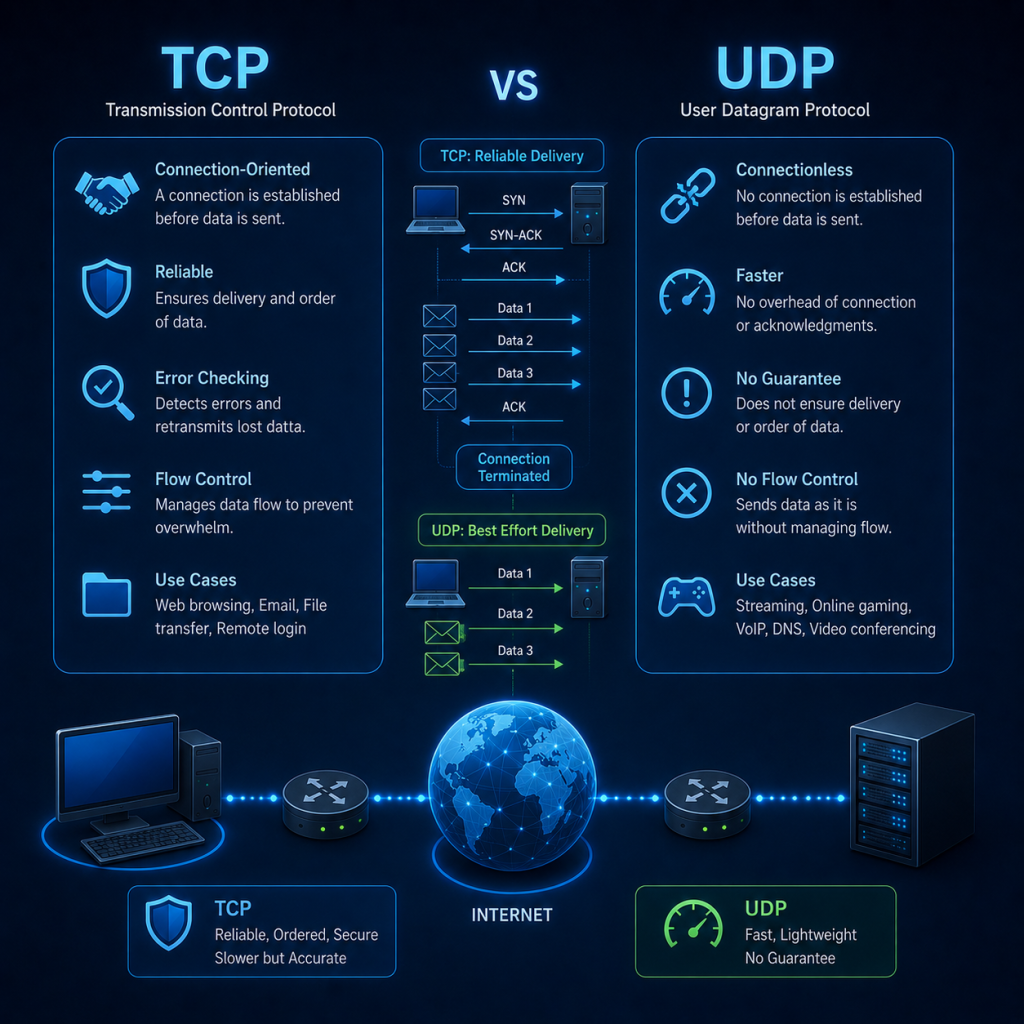
TCP (Transmission Control Protocol) and UDP (User Datagram Protocol) are two of the most important protocols used by applications to communicate across IP networks.
Both operate at the Transport Layer (Layer 4) of the OSI model and sit above the network Layer. Their job is to take data generated by applications and provide a mechanism for delivering that data between applications running on different devices.
Although TCP and UDP perform broadly the same job, they do it in very different ways: TCP is designed to provide reliable, ordered and connection-oriented communication, whereas UDP is designed to provide fast, lightweight and connectionless communication, without TCP’s mechanisms for guaranteeing delivery and ordering.
The choice between TCP and UDP therefore depends on what an application needs.
A file transfer, for example, cannot afford to silently lose part of a file. A small amount of additional overhead and retransmission is acceptable, so TCP is appropriate, but a live voice or video conversation has different requirements. If a packet containing a piece of audio is lost, retransmitting it several seconds later is usually pointless because the conversation has already moved on. In this situation, UDP may be a better choice.
What is TCP?
The Transmission Control Protocol provides a reliable, connection-oriented transport service between two applications.
When an application uses TCP, the two endpoints establish a connection via a mechanism known as the TCP 3-way handshake before application data is exchanged. TCP then keeps track of the data being transmitted and uses sequence numbers, acknowledgements, retransmissions and flow-control mechanisms to make sure that data can be delivered reliably.
TCP provides several important characteristics:
- Connection-oriented communication
- Reliable delivery
- Ordered delivery
- Error detection
- Retransmission of lost data
- Flow control
- Congestion control
- Duplicate detection
TCP does not simply send a stream of packets and hope that everything arrives. Instead, it maintains a considerable amount of state about the connection.
This allows TCP to answer questions such as:
Which data has been sent?
Which data has been received?
Which data has been acknowledged?
How much data can the receiver accept?
Has something been lost?
Is the network becoming congested?
This additional functionality is what makes TCP reliable, but it also introduces additional overhead.
What is UDP?
User Datagram Protocol takes a much simpler approach. There is no connection establishment, no 3-way handshake, no sequence numbering and no mechanism within UDP itself for retransmitting lost datagrams.
An application simply provides UDP with some data and a destination port, and UDP places that data into a datagram and passes it to IP for transmission.
UDP provides:
- Source and destination ports
- Datagram delivery
- A length field
- Error detection through a checksum
It does not provide:
- Guaranteed delivery
- Guaranteed ordering
- Retransmission
- Connection establishment
- Flow control
- Congestion control
This makes UDP considerably simpler than TCP.
The UDP header contains only four fields: source port, destination port, length and checksum.
TCP and UDP operate above IP
It is important to understand where TCP and UDP fit into the networking stack.
A typical communication might look something like this:
Application
    │
    │ HTTP / DNS / SSH / etc.
    ▼
Transport Layer
    │
    ├── TCP
    │
    └── UDP
    │
    ▼
Internet Layer
    │
    └── IP
    │
    ▼
Network Access
    │
    └── Ethernet / Wi-Fi
IP is responsible for getting packets from one IP address to another. TCP and UDP provide the transport mechanism that allows multiple applications to communicate using the same network connection.
This is where port numbers become important.
For example:
192.168.1.10:49152
        │
        │ TCP
        │
        ▼
192.168.1.20:443
The IP addresses identify the networks and hosts
The port numbers identify the applications or services on the hosts
This allows a single computer to simultaneously communicate with a web server, DNS server, SSH server and dozens of other services.
TCP Ports
TCP uses a 16-bit source port and a 16-bit destination port.
This gives a possible range of:
0 – 65535Ports from 0–1023 are known as well-known ports and are traditionally associated with common services.
Some examples include:
| Port | Protocol | Typical use |
|---|---|---|
| 20/21 | TCP | FTP |
| 22 | TCP | SSH |
| 23 | TCP | Telnet |
| 25 | TCP | SMTP |
| 80 | TCP | HTTP |
| 443 | TCP | HTTPS |
| 3389 | TCP | RDP |
A client will normally use a temporary ephemeral port as its source port.
For example:
Client

192.168.1.50:51542
        │
        │ TCP
        ▼
Web Server

192.168.1.100:443
The server listens on port 443 while the client uses a temporary port such as 51542.
The combination of IP addresses and ports allows the operating system to identify the particular communication session.
The TCP Header
TCP adds a header to application data before passing the resulting segment to IP.
A TCP header contains a number of important fields.
  0                   15 16                  31
  ┌─────────────────────┬──────────────────────────┐
  │     Source Port   │  Destination Port      │
  ├─────────────────────┴──────────────────────────┤
  │              Sequence Number               │
  ├────────────────────────────────────────────────┤
  │           Acknowledgment Number            │
  ├───────┬───────┬────────────────────────────────┤
  │Offset│ Flags │          Window             │
  ├───────┴───────┼────────────────────────────────┤
  │    Checksum  │       Urgent Pointer        │
  ├───────────────┴────────────────────────────────┤
  │                 Options                    │
  ├────────────────────────────────────────────────┤
  │                   Data                     │
  └────────────────────────────────────────────────┘
The current TCP specification defines the source and destination ports, sequence number, acknowledgement number, data offset, control flags, window, checksum, urgent pointer and optional TCP options.
Let’s examine the important fields.
Source Port
The source port identifies the application sending the data.
For example:
Source Port: 51542This would normally be an ephemeral client port.
Destination Port
The destination port identifies the service receiving the data.
For example:
Destination Port: 443Port 443 is commonly used for HTTPS.
Sequence Number
The sequence number is one of the most important fields in TCP.
TCP treats application data as a continuous stream of bytes. Each byte is assigned a position within that stream.
For example, imagine an application wants to send:
HELLO WORLDTCP assigns sequence numbers to the bytes. The receiver can therefore determine where each piece of data belongs.
The sequence number in a TCP segment identifies the sequence number of the first data byte carried by that segment. During connection establishment, SYN uses the sequence number to establish an Initial Sequence Number (ISN).
This is what allows TCP to handle:
- Segments arriving out of order
- Lost segments
- Duplicate segments
- Retransmissions
- Large streams of data
TCP Acknowledgement Numbers
TCP uses acknowledgement numbers to tell the sender what data has successfully been received.
The acknowledgement number normally represents:
The next sequence number the receiver expects to receive.
For example:
Sender → Receiver

SEQ = 1000
Data = 500 bytes
The receiver has successfully received bytes 1000 through 1499.
It can therefore respond:
ACK = 1500This means:
“I have received everything up to byte 1499. I am now expecting byte 1500.”
This is called a cumulative acknowledgement.
It is a fundamental part of TCP’s reliability mechanism.
TCP Three-Way Handshake
Before TCP can exchange application data, the two endpoints establish a connection. This is known as the TCP 3-way handshake.
It consists of:
Client                         Server
  │                              │
  │ ─────── SYN ───────────────►   │
  │                              │
  │ ◄──── SYN + ACK ────────────  │
  │                              │
  │ ─────── ACK ───────────────►   │
  │                              │
  │       CONNECTION OPEN        │
The three packets are:
- SYN
- SYN + ACK
- ACK
Step 1 – SYN
The client wants to establish a TCP connection.
It sends a TCP segment with the SYN flag set.
For example:
Client → Server

SYN
SEQ = 1000
The client is effectively saying:
“I want to establish a TCP connection, and my initial sequence number is 1000.”
Step 2 – SYN + ACK
The server receives the SYN and responds.
Server → Client

SYN + ACK
SEQ = 5000
ACK = 1001
The server is saying:
“I acknowledge your SYN and my initial sequence number is 5000.”
Notice that the acknowledgement number is:
1000 + 1 = 1001The SYN consumes one sequence number even though it does not contain application data.
Step 3 – ACK
The client responds:
Client → Server

ACK
SEQ = 1001
ACK = 5001
The connection is now established.
Both sides know the initial sequence numbers of the other endpoint and can begin exchanging application data.
Why Does TCP Need a Three-Way Handshake?
The handshake does more than simply say “hello”. It allows both endpoints to establish synchronised sequence-number state.
The client establishes its initial sequence number.
The server establishes its initial sequence number.
Both sides acknowledge that they have received the other’s value.
This gives TCP the information it needs to maintain the connection and track data reliably. It also explains why a TCP connection is described as stateful.
TCP maintains information about the connection throughout its lifetime.
TCP Sequence Numbers in Action
Imagine a client is sending a 5,000-byte file.
TCP might divide the data into several segments:
Segment 1
SEQ = 1001
Length = 1000

Segment 2
SEQ = 2001
Length = 1000

Segment 3
SEQ = 3001
Length = 1000

Segment 4
SEQ = 4001
Length = 1000

Segment 5
SEQ = 5001
Length = 1000
The receiver can acknowledge the data as it arrives.
For example:
ACK = 2001means:
“I have received everything up to sequence number 2000.”
If everything subsequently arrives:
ACK = 3001
ACK = 4001
ACK = 5001
ACK = 6001
TCP can therefore keep track of exactly which parts of the stream have arrived.
What Happens If a Segment Is Lost?
Suppose the sender transmits:
SEQ 1001
SEQ 2001
SEQ 3001
SEQ 4001
but the segment containing sequence number 2001 is lost.
The receiver receives:
1001
3001
4001
It knows that it is still waiting for:
2001It can therefore continue acknowledging the last contiguous data it has received.
The sender can detect that something has gone wrong and retransmit the missing data.
This is one of the fundamental mechanisms that gives TCP reliable delivery.
TCP Sliding Windows
Sending one segment and then waiting for an acknowledgement before sending the next would be extremely inefficient.
Imagine a connection between two computers separated by thousands of kilometres.
If the sender had to wait for an acknowledgement after every packet, much of the available network capacity would sit unused while packets travelled back and forth.
TCP solves this problem using windows.
The TCP receive window tells the sender how much data the receiver is currently willing to accept. RFC 9293 defines the window as the number of data octets, beginning at the acknowledged sequence number, that the receiver is willing to accept.
For example:
Window = 4000 bytesThe sender can transmit up to 4,000 bytes without waiting for every individual segment to be acknowledged.
Conceptually:
┌─────────────── TCP Receive Window ───────────────┐
│                                                │
│  SENT & ACKED │   SENT │       AVAILABLE       │
│               │        │                       │
└────────────────────────────────────────────────────┘
As acknowledgements arrive, the window moves forward.
This is why it is called a sliding window.
Why Sliding Windows Matter
The sliding window provides flow control.
Imagine a very fast server sending data to a slow computer. Without flow control, the server could send data much faster than the receiver could process it. The receiver could become overwhelmed.
The TCP window allows the receiver to tell the sender:
“This is how much additional data I can currently accept.”
If the receiver has very little buffer space available, it can advertise a smaller window. If it has plenty of available buffer space, it can advertise a larger window.
TCP therefore allows the receiver to control how much unacknowledged data can be outstanding.
Window Scaling
The original TCP window field is 16 bits.
That gives a maximum advertised value of:
65,535 bytesModern high-speed networks can require considerably larger windows. TCP therefore supports window scaling, which allows the effective window size to be much larger.
The window-scaling option is negotiated during connection establishment.
This becomes particularly important on high-bandwidth networks with significant latency, where a small window could prevent the connection from making full use of the available bandwidth.
Flow Control vs Congestion Control
These two concepts are often confused.
Flow control protects the receiver.
It answers:
“Can the receiving computer handle more data?”
Congestion control protects the network.
It answers:
“Can the network handle more data?”
TCP uses mechanisms such as the congestion window to regulate how aggressively data is transmitted.
A TCP sender therefore has to consider both:
Receiver capacity
        +
Network capacity
        =
How much data can be sent
This is one of the reasons TCP is considerably more sophisticated than UDP.
TCP Flags
TCP contains a number of control flags.
These flags tell the receiving TCP implementation how to interpret the segment and what action may be required.
The current TCP specification defines eight active control flags:
- CWR
- ECE
- URG
- ACK
- PSH
- RST
- SYN
- FIN
These are particularly important when analysing network traffic with tools such as Wireshark.
SYN – Synchronise
SYN is used when establishing a TCP connection.
It indicates that the sender is synchronising sequence numbers.
Example:
Client → Server

SYN
SEQ = 1000
SYN is normally seen during the TCP three-way handshake.
A SYN packet with no ACK is normally the initial connection request.
ACK – Acknowledgement
The ACK flag indicates that the acknowledgement number field is valid.
Once a TCP connection has been established, ACK is present on normal TCP segments carrying acknowledgements.
For example:
ACK = 5001means the receiver is expecting sequence number 5001 next.
The ACK flag is therefore central to TCP’s acknowledgement mechanism.
FIN – Finish
The FIN flag indicates that the sender has no more data to send.
It is used when closing a TCP connection.
For example:
Client → Server

FIN + ACK
The receiving endpoint can acknowledge the FIN and eventually close its own side of the connection.
Because TCP connections are bidirectional, each direction can be closed independently.
RST – Reset
The RST flag indicates that the connection should be reset.
A TCP reset can occur for several reasons.
For example, a host might receive a TCP connection attempt for a port where no application is listening.
The host can respond:
RSTeffectively saying:
“There is no connection here.”
RST can also appear when an existing connection becomes invalid or an endpoint needs to terminate it immediately.
RST is particularly interesting when analysing network traffic because unexpected resets can indicate connectivity problems, application failures, firewall behaviour or other network conditions.
PSH – Push
The PSH flag indicates the TCP push function.
Historically, this was associated with asking the receiving TCP implementation to make received data available to the application promptly rather than waiting for additional data to fill a buffer.
It is important not to interpret PSH as meaning:
“This packet is important.”
It is a TCP mechanism associated with delivery of received data to the application.
Modern applications generally do not need to manipulate PSH directly.
URG – Urgent
The URG flag indicates that the urgent pointer field is significant.
The urgent mechanism allows a sender to identify urgent data within the TCP stream.
The mechanism is now rarely used by modern applications, and RFC 9293 notes that new applications should not employ it because of implementation differences and middlebox issues.
Nevertheless, the field and flag remain part of TCP and can appear in packet captures.
ECE – ECN Echo
ECE stands for ECN-Echo.
It is associated with Explicit Congestion Notification (ECN).
ECN allows network devices to signal congestion without necessarily having to drop packets.
ECE is used by TCP to communicate ECN-related information between endpoints.
It is therefore more commonly encountered when examining modern TCP traffic than many people initially realise.
CWR – Congestion Window Reduced
CWR stands for Congestion Window Reduced.
It is also associated with Explicit Congestion Notification.
When a sender receives an indication of congestion through ECN, it can reduce its congestion window.
The CWR flag is then used to communicate that the sender has responded to the congestion indication.
TCP Flags at a Glance
| Flag | Name | Purpose |
| SYN | Synchronise | Establishes/synchronises sequence numbers |
| ACK | Acknowledgement | Indicates acknowledgement number is valid |
| FIN | Finish | Sender has no more data |
| RST | Reset | Immediately resets a connection |
| PSH | Push | Requests prompt delivery of data to the application |
| URG | Urgent | Indicates urgent pointer is significant |
| ECE | ECN Echo | Communicates ECN congestion information |
| CWR | Congestion Window Reduced | Indicates congestion response |
A useful way to remember the most important flags is:
SYN  → Start
ACK  → Acknowledge
FIN  → Finish
RST  → Reset
These four appear particularly frequently when analysing TCP connections.
Closing a TCP Connection
Establishing a TCP connection requires three stages.
Closing one normally involves a four-segment exchange because each direction of the connection is closed independently.
A simplified example looks like this:
Client                         Server
  │                              │
  │ ─────── FIN ───────────────►   │
  │                              │
  │ ◄────── ACK ────────────────   │
  │                              │
  │ ◄────── FIN ────────────────   │
  │                              │
  │ ─────── ACK ───────────────►   │
  │                              │
  │        CONNECTION CLOSED     │
The important point is that TCP is full duplex.
The client can finish sending data while the server may still have data to send.
This is why closing a TCP connection is not simply a single “goodbye” packet.
TCP TIME_WAIT
After a TCP connection has been closed, the endpoint that performs the active close may enter the TIME_WAIT state.
This state exists for an important reason.
Old TCP segments could still exist somewhere in the network.
If the same IP addresses and ports were immediately reused for a new connection, delayed packets from the previous connection could potentially be mistaken for packets belonging to the new connection.
TIME_WAIT therefore provides a period during which old segments can expire from the network.
This is one reason that systems handling large numbers of short-lived TCP connections can sometimes accumulate significant numbers of sockets in TIME_WAIT.
The UDP Header
UDP is dramatically simpler than TCP.
Its header contains only four fields:
  0                   15 16                  31
  ┌─────────────────────┬─────────────────────────┐
  │     Source Port     │  Destination Port   │
  ├─────────────────────┼─────────────────────────┤
  │       Length        │       Checksum      │
  └─────────────────────┴─────────────────────────┘
Each field is 16 bits.
That means the UDP header is only 8 bytes long.
The fields are:
Source Port
Identifies the sending application.
Destination Port
Identifies the receiving application.
Length
Specifies the length of the UDP datagram, including the UDP header and data.
Checksum
Provides error detection for the UDP header and data.
RFC 768 defines the UDP header and specifies that the length includes both header and data, with 8 bytes being the minimum possible UDP datagram length.
How UDP Works
Suppose a client wants to send a DNS request.
The application creates the DNS request and passes it to UDP.
UDP adds its header:
Source Port       49152
Destination Port  53
Length            ...
Checksum          ...
The resulting UDP datagram is then passed to IP.
IP adds its own header:
Source IP       192.168.1.50
Destination IP  192.168.1.1
Protocol        UDP
The packet is then passed down to Ethernet or Wi-Fi for transmission.
There is no handshake.
There is no:
SYN
SYN/ACK
ACK
The application simply sends the datagram.
What Happens If a UDP Packet Is Lost?
Nothing happens at the UDP layer.
Suppose an application sends:
UDP Datagram 1
UDP Datagram 2
UDP Datagram 3
UDP Datagram 4
and Datagram 3 is lost.
The receiver might receive:
1
2
4
UDP does not automatically detect that Datagram 3 is missing and request it again.
It is up to the application to decide what to do.
An application could:
- Ignore the missing data
- Request it again
- Add its own sequence numbers
- Implement its own acknowledgements
- Attempt error correction
- Continue without it
This is one of the fundamental differences between UDP and TCP.
TCP vs UDP
The simplest comparison is:
| Feature | TCP | UDP |
| Connection | Connection-oriented | Connectionless |
| Handshake | Yes | No |
| Reliability | Yes | No |
| Ordering | Yes | No |
| Retransmission | Yes | No |
| Sequence numbers | Yes | No |
| Acknowledgements | Yes | No |
| Sliding window | Yes | No |
| Flow control | Yes | No |
| Congestion control | Yes | No |
| Header size | Minimum 20 bytes | 8 bytes |
| Flags | Yes | No |
| Data model | Byte stream | Datagram |
| Overhead | Higher | Lower |
| Speed/latency | Generally higher overhead | Generally lower overhead |
Neither protocol is inherently “better”.
They are designed for different requirements.
TCP Applications
TCP is particularly useful where reliable delivery is important.
Examples include:
HTTPS – Web applications traditionally use TCP for HTTPS connections. The browser needs reliable delivery because losing part of an HTTP response could corrupt the resulting data.
SSH – SSH requires reliable, ordered communication because commands and responses must arrive correctly.
FTP – File transfers need reliable delivery. A corrupted or incomplete file is generally unacceptable.
Email – Protocols such as SMTP, IMAP and POP3 traditionally use TCP because reliable delivery is important.
UDP Applications
UDP is useful where low overhead, low latency or application-controlled reliability is desirable.
Examples include:
DNS – Traditional DNS queries commonly use UDP because DNS requests and responses are often small and do not require a connection to be established for every exchange. DNS can also use TCP when required.
DHCP – DHCP uses UDP because a client may initially have no usable IP configuration and needs to communicate using broadcast mechanisms.
VoIP – Voice communication is sensitive to delay. A missing voice packet is often less harmful than waiting for it to be retransmitted.
Streaming and Real-Time Applications – Real-time applications may use UDP because they can tolerate some packet loss in exchange for lower latency.
Online Gaming – Games often prioritise timely delivery. If a player’s position update is lost, it may be better to use the next position update rather than retransmit an old one.
Why Doesn’t Everything Use TCP?
At first glance, TCP seems like the obvious choice. Why would anyone deliberately choose a protocol that can lose packets?
Because reliability is not always the most important requirement.
Imagine a video call; Suppose an audio packet containing:
"Hello"is lost.
TCP would eventually retransmit it.
But imagine that retransmission arrives two seconds later – the conversation has already moved on, so playing the old packet now may actually make the experience worse.
For real-time applications:
Low latency
      ↓
Often more important than
      ↓
Perfect delivery
UDP allows the application developer to make that decision.
TCP Provides a Byte Stream
Another important difference is how TCP and UDP treat data. TCP provides applications with a continuous byte stream.
Suppose an application sends:
HELLOand then:
WORLDTCP does not necessarily preserve those as two separate messages.
The receiver might read:
HELLOWORLDor:
HEL
LOWOR
LD
depending on how the receiving application reads from the TCP socket.
TCP guarantees the ordering of the bytes, but it does not preserve application message boundaries.
UDP Preserves Datagram Boundaries
UDP works differently.
If an application sends:
HELLOas one UDP datagram and:
WORLDas another, the receiver receives two separate datagrams. The boundaries are preserved.
This distinction is extremely important when designing network applications.
TCP:
Application
   │
   ├── "HELLO"
   ├── "WORLD"
   │
   ▼
TCP byte stream
   │
   ▼
"HELLOWORLD"
UDP:
Application
   │
   ├── "HELLO" ──► Datagram 1
   │
   └── "WORLD" ──► Datagram 2
TCP and UDP Security
TCP and UDP are not security protocols. Neither provides encryption, and neither provides authentication of the application data.
For example:
TCP
 │
 ▼
TLS
 │
 ▼
Application
TLS can provide encryption and authentication for protocols such as HTTPS.
Similarly, UDP can be used underneath secure protocols.
For example, modern HTTP/3 uses QUIC, which runs over UDP and provides mechanisms that applications need for secure and reliable transport.
This is an important point:
UDP does not mean “insecure”, and TCP does not mean “secure”.
Security is provided by additional protocols and mechanisms above or alongside the transport protocol.
TCP and UDP in Wireshark
TCP and UDP are particularly useful protocols to study using Wireshark.
A TCP connection might look like:
192.168.1.50 → 192.168.1.100
TCP SYN
followed by:
192.168.1.100 → 192.168.1.50
TCP SYN, ACK
and then:
192.168.1.50 → 192.168.1.100
TCP ACK
After that, application data begins to flow.
Useful Wireshark filters include:
tcpto display TCP traffic.
udpto display UDP traffic.
You can also examine specific ports:
tcp.port == 443or:
udp.port == 53When examining TCP packets, pay particular attention to:
- Source port
- Destination port
- Sequence number
- Acknowledgement number
- Window size
- TCP flags
- TCP options
- Retransmissions
- Duplicate acknowledgements
These fields allow you to reconstruct what is happening within the connection.
TCP and UDP: The Big Picture
TCP and UDP solve the same broad problem:
How can applications communicate across an IP network?
But they approach the problem very differently – TCP builds a stateful connection between two endpoints and then carefully manages the resulting byte stream.
It uses:
Connection establishment
        ↓
Sequence numbers
        ↓
Acknowledgements
        ↓
Sliding windows
        ↓
Retransmissions
        ↓
Flow control
        ↓
Congestion control
        ↓
Connection termination
UDP takes a much simpler approach:
Application data
        ↓
UDP header
        ↓
IP
        ↓
Network
There is no connection to establish. There is no built-in retransmission. There is no sliding window. There is no guarantee that the destination will receive the datagram.
This simplicity is not a weakness. It is one of UDP’s greatest strengths.
The Bottom Line
TCP and UDP are both fundamental Transport Layer protocols, but they are designed around very different philosophies.
TCP prioritises reliability – It establishes a connection, numbers data, acknowledges received information, retransmits lost segments, controls the rate at which data is sent and ensures that the application receives an ordered byte stream.
UDP prioritises simplicity and speed – It adds only a small header and sends independent datagrams without establishing a connection or providing built-in mechanisms for reliability, ordering or flow control.
The choice between them therefore depends upon what the application needs.
If the application needs:
Reliable + Ordered + Guaranteed delivery
                    ↓
                   TCP
If the application needs:
Low overhead + Low latency + Application control
                    ↓
                   UDP
Understanding the difference is fundamental to understanding modern networking.
More importantly for cybersecurity professionals, understanding TCP and UDP at the packet level makes it possible to interpret network traffic, recognise abnormal connections, identify unusual ports, understand firewall logs, analyse packet captures and recognise the network behaviour produced by applications and attacks.
When you understand the TCP handshake, sequence numbers, acknowledgements, windows and flags, a packet capture stops looking like a collection of hexadecimal numbers and starts telling you exactly what two systems are doing to each other across the network.