
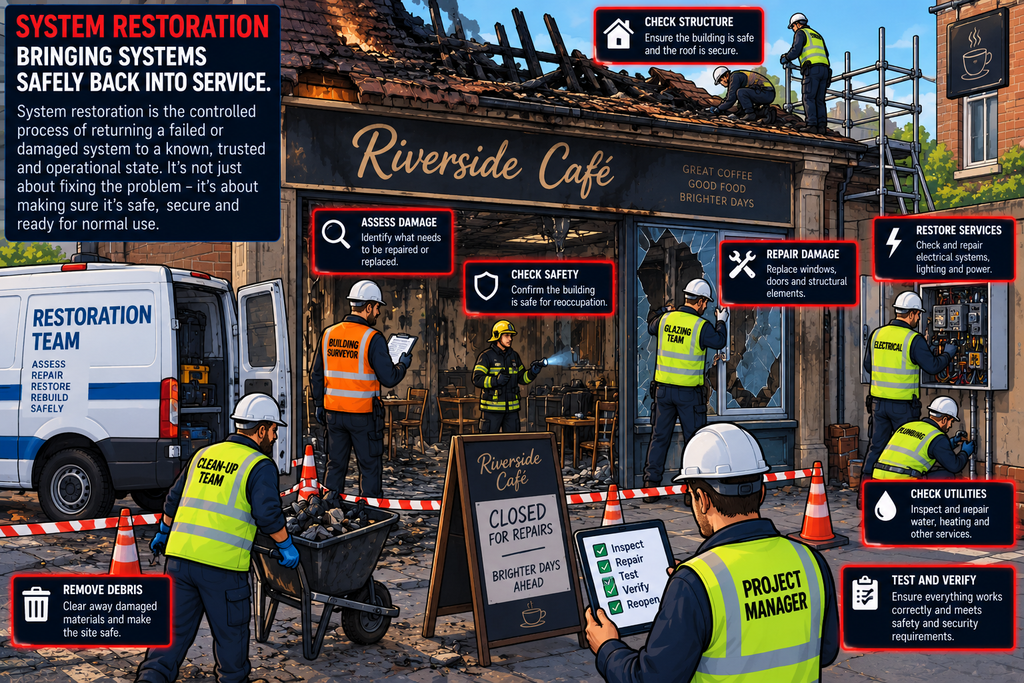
Imagine a shop that has been damaged by a fire.
The fire has been put out, but that doesn’t mean the shop can immediately reopen.
Someone needs to:
- Check the building is safe
- Repair the damage
- Replace anything that was destroyed
- Restore the electricity and other services
- Check that everything works
- Make sure it is safe for customers
- Only then reopen the shop
The same principle applies to IT systems after a serious incident.
A server might have been damaged by malware, ransomware, hardware failure, human error or a natural disaster. Simply turning it back on doesn’t mean it is ready to use.
System restoration is the controlled process of returning a damaged, compromised or unavailable IT system to a known, trusted and operational state.
Restoration is therefore about much more than restoring files from a backup.
What Is System Restoration?
System restoration is the process of bringing an IT system back into service after an incident or failure.
This might involve:
- Rebuilding a server
- Restoring data from backups
- Reinstalling an operating system
- Restoring applications
- Reconfiguring networking
- Re-establishing user access
- Reconnecting dependencies
- Testing functionality
- Verifying security
- Returning the system to production
The objective is to restore safe and reliable operation, not simply to make the machine boot.
Restoration vs Recovery
The terms recovery and restoration are often used interchangeably, but there is a useful distinction.
- Recovery is the broader process of getting an organisation or service back to normal after an incident.
- Restoration is the process of bringing a particular system, application or service back to an operational state.
System restoration is therefore one component of wider disaster recovery and business continuity.
Why Restoration Is Important
Modern organisations depend heavily on their IT. If a critical system becomes unavailable, the consequences can include:
- Loss of productivity
- Loss of revenue
- Loss of customer access
- Data loss
- Regulatory problems
- Reputational damage
- Safety issues
- Disruption to essential services
The longer a critical system remains unavailable, the greater the potential impact.
Effective restoration reduces the amount of time between failure and safe return to service.
For a serious incident, restoration needs to be carefully controlled. Restoring a system before understanding why it failed could simply recreate the problem.
The Restoration Lifecycle
A typical restoration process might look like this
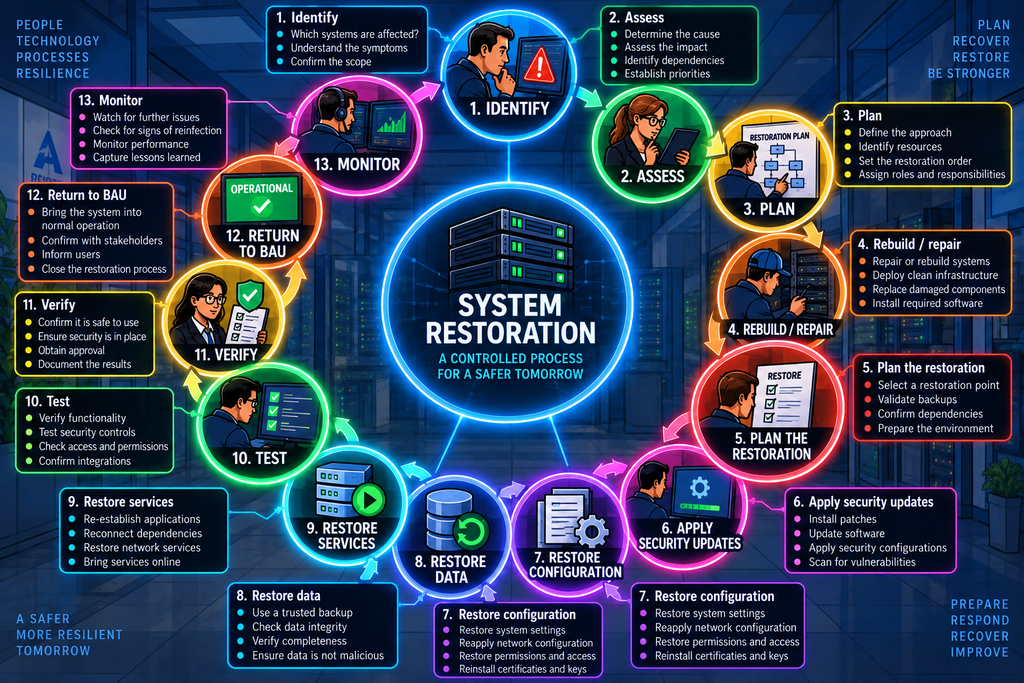
The exact process will vary depending on the type of system and incident.
Step 1: Identify What Has Failed
Before restoring anything, the organisation needs to establish what is actually affected.
This prevents the organisation from restoring the wrong system or overlooking dependencies.
Step 2: Assess the situation
The next thing to establish is why did the system fail?
Possible causes include:
- Hardware failure
- Software failure
- Malware
- Ransomware
- Accidental deletion
- Misconfiguration
- Power failure
- Fire or flood
- Network failure
- Cyber attack
This matters because restoring a system without addressing the cause could result in another failure.
Suppose a server was compromised by malware. The organisation shouldn’t simply restore the infected server from its most recent backup – They first need to establish that the restoration point is trustworthy.
Step 3: Plan What to Restore First
Not every system is equally important.
A business might prioritise:
- Identity services
- Core networking
- Critical databases
- Essential applications
- User systems
- Less critical services
The exact order depends on the organisation.
Systems rarely operate independently, but dependencies matter – some systems may not be able to function if others are still offline. Restoring the application before its database or authentication system may accomplish very little.
This is why restoration plans need to understand system dependencies.
Organisations should ideally know what each system depends on, and what depends on this system?
This is known as dependency mapping
If Identity is unavailable, several systems further down the chain may also be unavailable.
Step 4: Rebuild or Repair?
One of the major restoration decisions is whether to repair the existing system, or build a clean replacement.
The correct choice depends on the nature and extent of the problem.
Repairing a system might involve:
- Replacing hardware
- Repairing a filesystem
- Restoring configuration
- Reinstalling software
- Replacing damaged components
This can be appropriate when the underlying system remains trustworthy.
Rebuilding involves creating a clean system.
This can provide greater confidence after a serious compromise.
A gold image is a known-good standard system image, the use of which can significantly speed up restoration.
It can contain:
- Operating system
- Approved software
- Security configuration
- Required drivers
- Security tools
- Standard settings
However, a gold image that hasn’t been updated for three years isn’t necessarily a good restoration source. Gold images should therefore be maintained and updated.
Step 5: Find a Trusted Restoration Point
A restoration point might come from:
- Backup
- Snapshot
- Replication
- Secondary server
- Disaster recovery environment
- Gold image
- Clean installation media
The organisation needs to establish which restoration point should be used. The newest backup isn’t necessarily the correct backup.
Remember that a backup is only useful if it can actually be restored. Organisations should therefore test backups regularly
Backup testing is an important part of restoration planning.
We cannot forget that backups can be extremely valuable to attackers. An attacker who compromises backups may be able to:
- Delete them
- Encrypt them
- Modify them
- Steal them
- Prevent recovery
A good backup strategy therefore considers:
- Access control
- Encryption
- Isolation
- Immutability
- Retention
- Monitoring
An immutable backup is designed so that it cannot be altered or deleted during a defined protection period. This can be particularly valuable during ransomware attacks.
One way of protecting backups is to maintain ones that are disconnected from normal production systems. If an attacker compromises the production network, the offline backup may remain unaffected.
A commonly used backup strategy is the 3-2-1 rule:
- Keep 3 copies of important data
- On 2 different types of media
- With 1 copy off-site
Modern backup strategies may go beyond this model, but the underlying principle remains useful: don’t put all your recovery options in one place.
Step 6: Apply Security Updates
A restored system should be patched before being exposed to normal users or networks. This is particularly important when restoring an older backup or image.
Restoring a server from a six-month-old image may contain vulnerabilities that have since been fixed.
Restoration should bring the system back to a secure operational state, not simply recreate its historical state.
Step 7: Restore Configuration
Data isn’t the only thing that needs restoring.
The organisation may also need to restore:
- Network settings
- Firewall rules
- DNS configuration
- Application configuration
- User permissions
- Certificates
- Service accounts
- Scheduled tasks
- Security policies
Configuration can be just as important as the data itself.
Step 8: Restore Data
Once the system itself is ready, data can be restored.
The organisation should verify that the restored data is:
- Complete
- Consistent
- Appropriate
- Uncorrupted
- Free from known malicious content
Step 9: Restore Services
Complex environments may require a specific sequence for bringing things online
If the order is wrong, services may fail even though each individual component appears to be functioning.
Step 10: Test the System
A restored system should be tested before being returned to normal use.
Testing might include:
- Does it boot?
- Can users authenticate?
- Can applications start?
- Can data be accessed?
- Can systems communicate?
- Are security controls working?
- Are logs being generated?
- Are backups functioning?
The first question is “does it work as expected?” – This is known as functional testing
But functionality isn’t enough. You also need to ask “Is it secure?”
A system that works but has lost its security controls isn’t ready for production.
Don’t forget logging.
After restoration – the logging must be tested – over time, logging requirements alter – so the restoration might not be logging the right information
If logging has not been restored, the organisation may be operating without important visibility.
The same applies to monitoring. A restored system should be brought back under the organisation’s normal security monitoring.
Step 11: Verify the System
Once testing is complete, someone should formally verify that the system is ready.
This provides a clear decision point rather than allowing systems to drift back into production informally.
Step 12: Return to BAU
Once the system has passed the necessary checks, it can be returned to production (A.K.A Business As Usual – BAU)
The system is now available to users again.
Step 13: Monitor Closely
Restoration isn’t necessarily the end. The system should now be closely monitored for unusual behaviour.
This is particularly important after a cyber attack.
If the system was compromised by malware, responders should watch for signs that the attacker has returned. A second infection may indicate that something was missed during eradication.
Recovery Point Objective
One of the important concepts in disaster recovery is the Recovery Point Objective (RPO).
RPO asks “How much data can the organisation afford to lose?“
If the organisation has an RPO of two hours, it accepts the possibility of losing up to two hours of data.
Recovery Time Objective
The Recovery Time Objective (RTO) asks “How quickly does the system need to be restored?“
RTO and RPO help organisations design appropriate restoration capabilities.
RTO and RPO Together
Consider a business with:
- RTO: 4 hours
- RPO: 1 hour
This means it aims to Restore the system within four hours and lose no more than approximately one hour of data.
A critical payment system might require an RTO measured in minutes, while an internal archive might tolerate an RTO measured in days
The restoration strategy should therefore reflect business importance.
Disaster Recovery Sites
Some organisations maintain alternative locations where systems can be restored.
These may include:
- Cold site – A facility with basic infrastructure but little or no ready-to-run IT equipment.
- Warm site – A partially prepared environment.
- Hot site – A highly prepared alternative environment capable of taking over much more quickly.
The appropriate approach depends on business requirements and cost.
In Summary
The Golden Rule of Restoration
One of the most important principles of system restoration is:
Never restore a system into an environment where the original problem still exists.
Fix the cause before returning the system to service.
System restoration is the controlled process of returning a failed, damaged or compromised IT system to a known, trusted and operational state, and it involves much more than restoring data.
The important lesson is that restoration isn’t simply putting yesterday’s system back online.
A good restoration process returns the organisation to a known-good, secure and tested state.
Restore the system. Restore the data. Restore the security. Then—and only then—restore the service.