
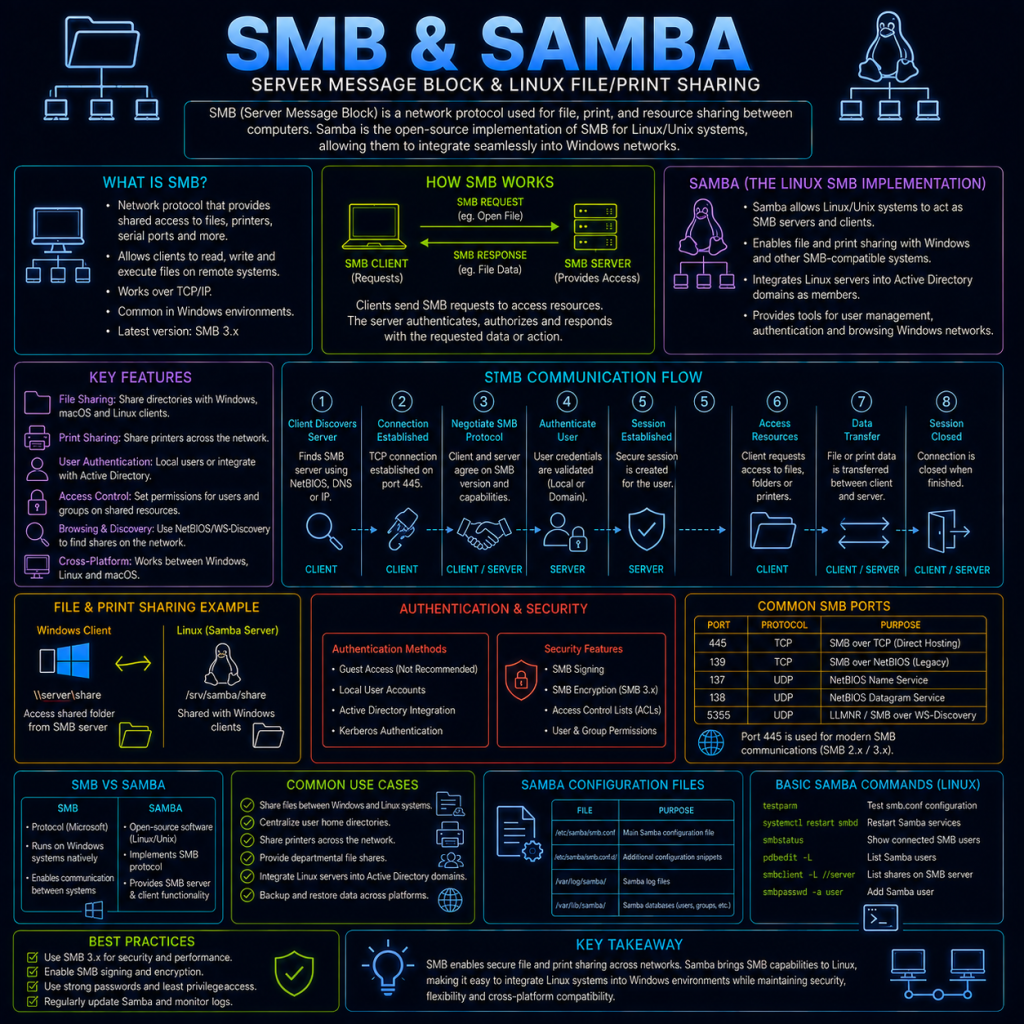
SMB (Server Message Block) is a protocol used primarily for file and printer sharing on Windows networks, allowing one device to access files, folders, and printers on another device across a network as though they were local. It’s the protocol working behind the scenes every time you browse a shared network drive or print to a networked printer from a Windows machine.
Samba is a free, open-source implementation of the SMB protocol for Linux and Unix-like systems, allowing them to share files with Windows machines (and each other) using the same protocol, and even allowing a Linux server to act as a stand-in for a Windows domain controller in some configurations.
SMB typically operates on TCP port 445 in modern versions (older versions also made use of ports 137–139, associated with NetBIOS, which SMB originally ran on top of before gaining the ability to run directly over TCP/IP).
How SMB works
At a basic level, SMB works on a client/server request-response model:
- The client connects to the SMB server (a File Server, in Windows terminology) and negotiates which version of the SMB protocol to use.
- The client authenticates, typically using Windows credentials (see “Authentication” below).
- The client requests access to a specific share — a named folder (or sometimes an entire drive, or a printer) that the server has made available.
- Once connected to a share, the client can browse, open, read, write, and delete files, much as it would on a local disk — SMB handles translating these operations into network requests behind the scenes.
SMB includes built-in support for things a purely local filesystem wouldn’t need to worry about, such as file locking (preventing two users from corrupting a file by editing it simultaneously) and opportunistic locking (a performance optimisation that allows a client to cache a file locally when it’s confident no one else is using it, reducing unnecessary network traffic).
SMB versions
SMB has gone through several major versions, and — much like the TLS versions covered on the TLS page — which version is in use matters significantly for both security and performance:
- SMBv1: The original version, dating back to the 1980s. Now considered obsolete and seriously insecure (see below), and disabled by default on modern Windows installations.
- SMBv2: Introduced with Windows Vista/Server 2008, bringing significant performance improvements and a much-simplified command set compared to SMBv1’s older design.
- SMBv3: Introduced with Windows 8/Server 2012, adding end-to-end encryption for SMB traffic, and further performance improvements, including support for multiple network connections working together for a single SMB session.
Modern Windows and Samba installations default to SMBv2 or SMBv3, and actively encourage disabling SMBv1 wherever it isn’t specifically required for compatibility with very old devices.
Authentication
Windows SMB authentication has evolved considerably over time, in a pattern similar to RDP’s own security evolution (see the RDP page):
- LM (LAN Manager) and NTLM: Older, Windows-specific challenge-response authentication protocols. LM in particular is now considered severely weak by modern standards and disabled by default; NTLM (in its later revisions, NTLMv2) is more robust but still generally considered inferior to the alternative below.
- Kerberos: On a modern Active Directory network, SMB authentication typically uses Kerberos (see the Kerberos page) rather than NTLM, benefiting from the mutual authentication and ticket-based design covered on that page.
Samba in practice
Samba allows a Linux (or macOS) machine to participate fully in this same ecosystem — sharing its own folders out over SMB for Windows machines to access, or connecting to existing Windows/SMB shares itself. A basic Samba share is configured in /etc/samba/smb.conf, with a section similar to:
[shared]
   path = /srv/samba/shared
   browsable = yes
   writable = yes
   guest ok = no
This defines a share named “shared”, pointing to a specific folder on the Linux filesystem, and specifies that it requires authentication (guest ok = no) rather than allowing anonymous access.
Samba is a common component in self-hosted setups specifically because it lets a home server or NAS present shared storage to Windows PCs on the same network using the same built-in “map network drive” functionality Windows users are already familiar with, without needing any special client software.
Checking SMB shares
On Windows, available shares on a remote device can be listed from the command line with:
net view \\servername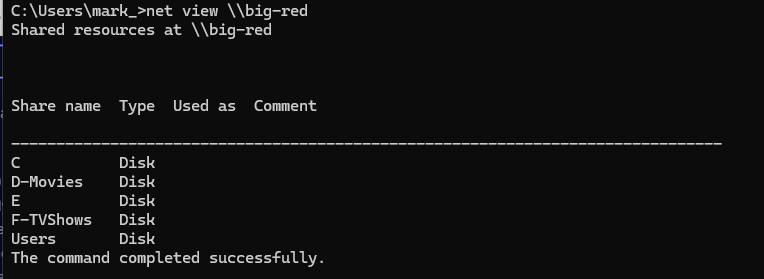
On Linux, the smbclient utility (part of the Samba suite) can be used to browse shares in a similar way:
smbclient -L //servername -U usernameSMB and security
SMB has an unusually significant place in cyber security history, largely due to one specific, deeply consequential vulnerability.
EternalBlue (CVE-2017-0144) was a critical flaw in SMBv1, discovered and stockpiled by the NSA before being leaked and subsequently patched by Microsoft. It allowed an attacker to achieve remote code execution against a vulnerable, unpatched system with no authentication required at all. Its significance comes from what happened next: EternalBlue became the propagation mechanism behind WannaCry and NotPetya in 2017 — two of the most damaging malware outbreaks in history, both of which spread automatically, worm-style, from one vulnerable SMBv1 system to another across entire networks (and in WannaCry’s case, across the wider Internet), without any user needing to click anything at all. This connects directly to the Ransomware and Botnets pages elsewhere on this site, and is a large part of why disabling SMBv1 became such widely repeated, urgent security guidance in the years since.
Pass-the-Hash attacks target SMB’s older NTLM authentication specifically. Because of how NTLM’s challenge-response process works, an attacker who has obtained a user’s password hash (rather than their actual plaintext password — for example, by extracting it from a compromised machine’s memory) can, in many configurations, use that hash directly to authenticate to other SMB servers, without ever needing to know or crack the underlying password itself. This is a major reason Kerberos-based authentication is generally preferred over NTLM wherever possible on a modern network.
Anonymous/guest access misconfigurations are a common, more mundane risk — an SMB share left accidentally open to anonymous or guest access can expose sensitive files to anyone on the network, or in a worse case, to the wider Internet if the share is inadvertently reachable from outside the local network entirely. Internet-wide scanning specifically for open, misconfigured SMB shares is common, precisely because it’s such a straightforward way to find exposed data.
Exposing SMB directly to the Internet is now considered a serious misconfiguration in almost all circumstances. Given the protocol’s history and the sensitivity of what it typically shares (files, sometimes entire drives), SMB should generally be treated the same way as the RDP guidance already covered on this site — kept strictly internal to a trusted network, and reached remotely (if needed at all) only via a VPN (see the VPN protocols page) rather than being port-forwarded directly to the public Internet.