
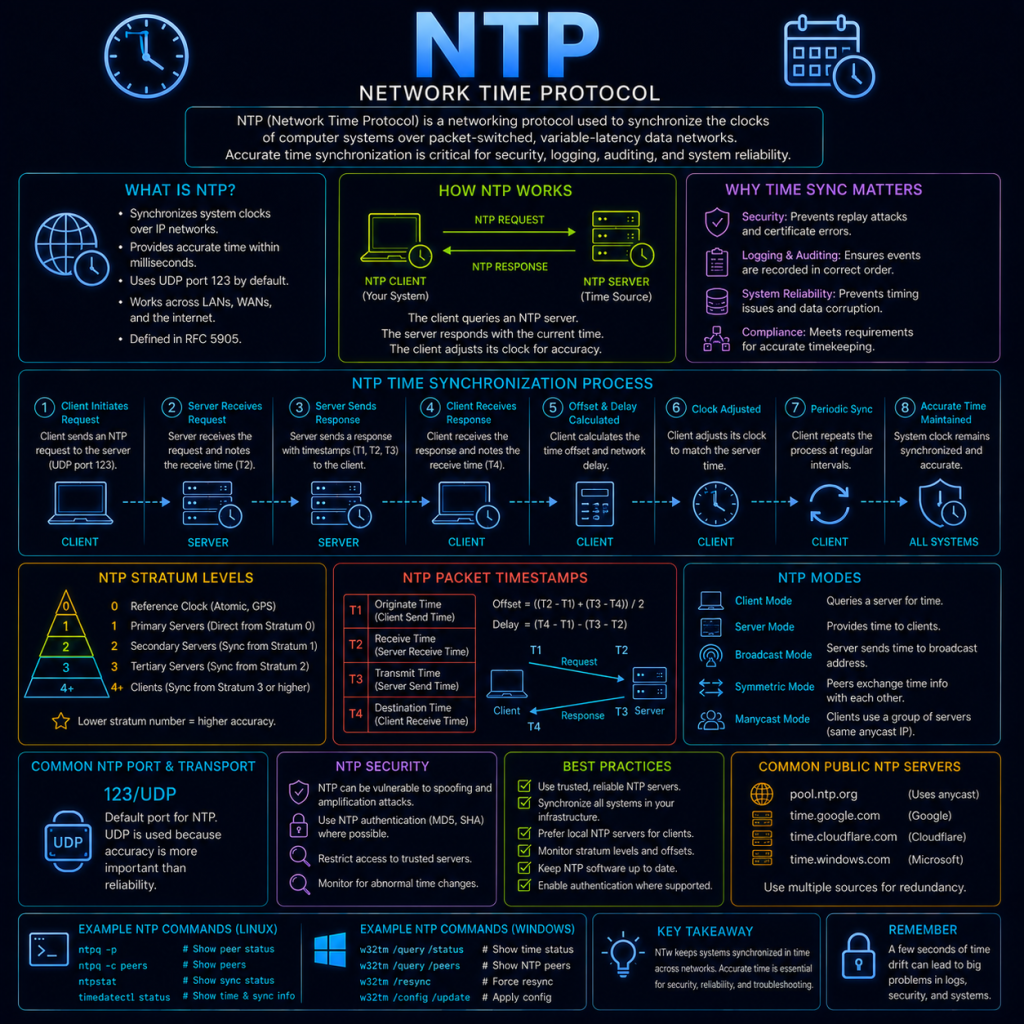
NTP (Network Time Protocol) is used to synchronise the clocks of computers over a network, keeping them all agreeing on the current time to within a small, predictable margin of error. It’s one of the oldest protocols still in active use today, and while it rarely gets much attention, accurate time turns out to be a quiet dependency underneath a surprising amount of network security.
NTP typically operates over UDP port 123.
Why accurate time matters
A device’s internal clock will naturally drift over time — even a reasonably good clock can drift by several seconds per day without correction, and cheaper hardware clocks can drift considerably more. Left uncorrected, this drift eventually causes real, practical problems:
- Authentication protocols can start failing. As covered on the Kerberos page, Kerberos tickets rely on timestamps to detect stolen or replayed tickets, and typically require clocks to be within around 5 minutes of each other by default. A device whose clock has drifted too far out of sync will start failing Kerberos authentication entirely, even with completely correct credentials.
- TLS certificate validation depends on the current date. As covered on the TLS page, every certificate has a validity period, and checking whether a certificate has expired (or isn’t valid yet) requires the checking device to know the current date accurately. A device with a badly wrong clock can either reject perfectly valid certificates, or fail to notice that a certificate has actually expired.
- Log correlation becomes unreliable. When investigating a security incident, defenders typically need to piece together events from multiple systems — a firewall log, a server’s authentication log, an application’s error log — by matching up timestamps across all of them. If those systems’ clocks aren’t properly synchronised, events that actually happened in one order can appear to have happened in a different, misleading order, making an investigation significantly harder, or actively pointing an investigator toward the wrong conclusion.
How NTP works
NTP synchronises time using a hierarchical system of strata:
- Stratum 0: Highly accurate reference clocks themselves — typically atomic clocks or GPS receivers. These aren’t directly connected to a network; they exist purely as a reference.
- Stratum 1: Servers directly connected to a Stratum 0 device, and therefore able to provide extremely accurate time to the rest of the network.
- Stratum 2: Servers that synchronise their time from Stratum 1 servers, and in turn offer time to others.
- Stratum 3 and beyond: This pattern continues downward, with each stratum synchronising from the one above it. Accuracy decreases slightly with each additional stratum, though the difference is generally negligible for most practical purposes.
A typical NTP exchange between a client and server works roughly like this:
- The client sends a request to the server, recording the exact time it sent the request.
- The server receives the request, records the time it received it, and sends back a response containing several timestamps: when the client’s request was sent, when the server received it, and when the server sent its reply.
- The client receives the reply and records the time it arrived.
With these four timestamps, the client can calculate both the round-trip delay (how long the whole exchange took) and the offset (how far its own clock differs from the server’s), and adjusts its own clock accordingly — gradually, rather than in one sudden jump, to avoid causing problems for any software that assumes time only ever moves forward smoothly.
Common NTP usage
Most operating systems have NTP synchronisation built in and enabled by default, requiring no manual setup for typical use. On Linux, the current time source and synchronisation status can be checked with:
timedatectl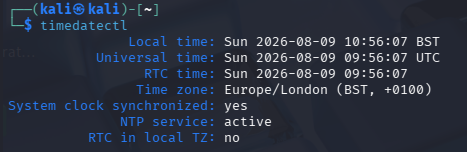
or, on systems still using the older, traditional NTP daemon:
ntpq -pThis displays the list of configured time servers, along with metrics such as offset and delay for each — useful for confirming synchronisation is actually working correctly, rather than assuming it silently is.
NTP and security
NTP is rarely thought of as a security protocol, but both its accuracy and the protocol itself have real security implications.
NTP amplification attacks are a well-known Denial of Service technique (see the Denial of Service (DoS) page). Older NTP servers supported a monitoring command that could return a large response from a small request, and — critically — NTP runs over UDP, meaning the source address on a request can be spoofed. An attacker could send a small, spoofed request appearing to come from a victim’s IP address to an open NTP server, causing that server to send a much larger response directly to the victim, rather than back to the attacker. Sending many such spoofed requests to many open NTP servers at once could generate an overwhelming flood of traffic aimed entirely at the victim, using the NTP servers purely as unwitting amplifiers. This specific vulnerability has been substantially mitigated in modern NTP software, but it remains a well-known, illustrative example of how a UDP-based protocol can be abused for amplification.
Deliberate time manipulation can undermine other security controls. Since so much depends on accurate time (as covered above), an attacker who can manipulate a target’s clock — for example, by compromising an internal NTP server, or by intercepting NTP traffic and supplying false time data — could potentially cause legitimate certificates to appear expired (or expired certificates to appear valid), or interfere with time-dependent authentication mechanisms. This is a less common attack in practice, but a good example of how a seemingly unimportant supporting protocol can become a meaningful target if enough else depends on it.
Using untrusted or unauthenticated time sources is a subtler risk. Standard NTP has historically had no built-in authentication, meaning a client generally has no cryptographic way to verify that a time response genuinely came from the server it asked, rather than from an attacker in a position to intercept and forge that response. NTS (Network Time Security) is a newer addition to the protocol that adds this missing authentication, allowing a client to cryptographically verify the source of its time data — though adoption is still gradually increasing rather than yet being the default everywhere.
Given how many other security mechanisms quietly depend on it, keeping accurate, properly synchronised time across a network should be treated as a foundational security control in its own right, not just a convenience for making sure clocks match.