
Faking authentication requests to trick users into granting access
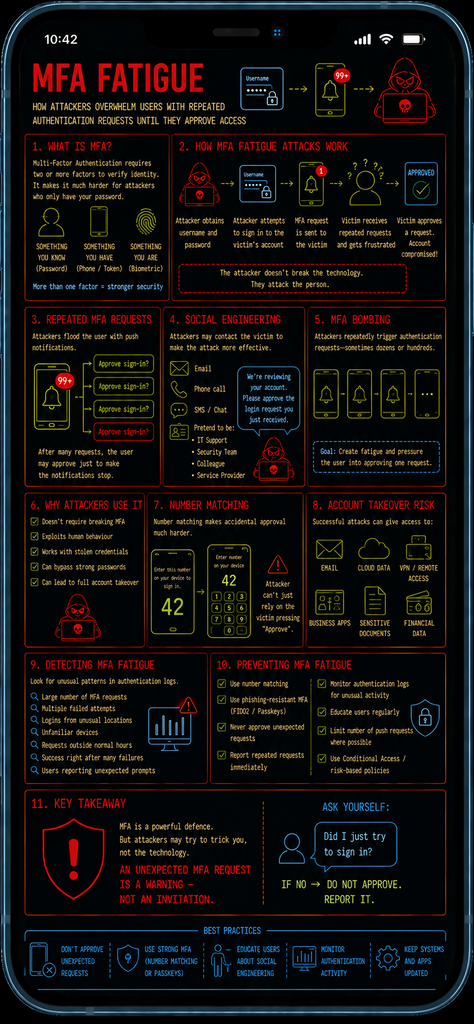
Introduction
Multi-Factor Authentication (MFA) is one of the most effective ways of protecting accounts against stolen passwords. Even if an attacker obtains a user’s password, they should still need a second authentication factor before gaining access.
However, MFA can also be exploited through social engineering.
MFA fatigue attacks – sometimes called MFA bombing or push bombing – attempt to overwhelm a victim with repeated authentication requests until they eventually approve one, either accidentally or simply to make the notifications stop.
The attacker isn’t necessarily breaking the MFA technology – Instead, they are attacking the person using it.
What is MFA?
Multi-Factor Authentication requires a user to provide more than one form of authentication when accessing an account.
These generally fall into three categories:
- Something you know – such as a password or PIN
- Something you have – such as a phone, security key or authentication token
- Something you are – such as a fingerprint or facial recognition
For example, a user might enter their username and password and then receive a notification on their smartphone asking them to approve the login.
The second factor provides an additional layer of protection if the password has been compromised.
How MFA fatigue attacks work
An MFA fatigue attack typically begins after an attacker has obtained a victim’s username and password. The attacker attempts to log into the victim’s account, causing the legitimate MFA system to generate an authentication request.
The attacker then repeatedly triggers additional requests.
The attacker is essentially trying to turn the security control into a source of notification fatigue.
Repeated MFA requests
The attacker may generate a large number of authentication requests causing the victim’s phone to repeatedly display a message such as “Approve sign-in?”
The victim may initially reject the requests, however, after receiving multiple notifications, the user may begin to assume that the system is malfunctioning.
Eventually, they may approve the request simply to stop the notifications.
This is the fundamental concept behind MFA fatigue.
Social engineering
MFA fatigue attacks often become more effective when combined with social engineering.
An attacker may contact the victim by:
- Telephone
- SMS
- Messaging applications
The attacker may pretend to be:
- IT support
- A security administrator
- A colleague
- A service provider
- Microsoft or another technology company
They may tell the victim that the authentication requests are legitimate and ask them to approve one.
For example:
“We’re testing your account security. You should receive an authentication request. Please approve it.”
The victim is therefore manipulated into defeating their own security control.
MFA bombing
The term MFA bombing refers specifically to repeatedly sending authentication requests to a target. The objective being to create enough disruption that the victim eventually accepts one.
The effectiveness depends heavily on the authentication system and the user’s behaviour.
Some systems limit the number of requests that can be generated, while others may provide additional warnings when unusual authentication activity is detected.
Why attackers use MFA fatigue
MFA fatigue can be attractive to attackers because it does not necessarily require them to defeat the underlying cryptographic protection provided by MFA – Instead, they exploit the human decision-making process.
The attacker may already have the Username + Password, what they don’t have (yet) is the MFA approval
Once the authentication request is approved, the attacker may be able to access the account as an authenticated user.
This makes MFA fatigue a particularly important example of human-factor attacks.
Combining MFA fatigue with stolen credentials
MFA fatigue attacks generally become much more useful when the attacker already possesses valid credentials.
Credentials can be obtained through techniques such as:
- Phishing
- Credential-stealing malware
- Password reuse
- Previous data breaches
- Infostealers
- Social engineering
The MFA system then becomes the final barrier preventing the attacker from accessing the account.
Rather than attempting to technically bypass that barrier, the attacker attempts to convince the legitimate user to open it.
Number matching
Modern authentication systems can reduce MFA fatigue attacks by using number matching.
Instead of simply displaying “Approve sign-in?”, the authentication service may display a number such as “42“
The user must enter or select the matching number on their authentication device. This makes accidental approval significantly more difficult because the attacker cannot simply rely on the victim pressing Approve.
However, number matching is not a complete defence against social engineering. An attacker could still attempt to persuade the victim to provide or enter the displayed number.
MFA fatigue and account takeover
A successful MFA fatigue attack can result in account takeover. Depending on the privileges associated with the compromised account, the attacker could potentially access:
- Cloud storage
- Corporate applications
- VPN services
- Internal systems
- Financial information
- Sensitive documents
If the compromised account has administrative privileges, the consequences can be significantly greater.
The attacker may also use the compromised account to launch further attacks against other employees.
Detecting MFA fatigue attacks
Security teams should monitor authentication systems for unusual patterns of acivity.
Potential indicators include:
- Large numbers of MFA requests
- Repeated failed authentication attempts
- Authentication attempts from unusual locations
- Login attempts from unfamiliar devices
- MFA requests occurring outside normal working hours
- Successful authentication immediately following multiple failed attempts
- Sudden changes in account activity after authentication
- Users reporting unexpected MFA notifications
A particularly important indicator is Multiple rejected MFA requests followed by a successful approval.
This pattern should warrant investigation.
Preventing MFA fatigue attacks
- Use Number Matching – Where supported, use number matching rather than simple approve/deny notifications.
- Use Phishing-Resistant MFA – Technologies such as FIDO2 security keys and passkeys provide stronger protection against phishing and many forms of authentication abuse.
- Never Approve Unexpected Requests – Users should reject MFA requests they did not initiate. An unexpected authentication request should be treated as a potential security incident.
- Report Repeated Requests – Employees should know how to report repeated MFA notifications to the security or IT team.
- Monitor Authentication Activity – Security teams should monitor authentication logs for unusual patterns and investigate suspicious MFA activity.
- Educate Users – Users should understand that an MFA notification is not automatically proof that the request is legitimate.
Conclusion
MFA significantly improves account security, but MFA does not eliminate the human element. MFA fatigue attacks exploit that human element by repeatedly generating authentication requests and attempting to convince the victim to approve one.
The attacker doesn’t necessarily need to defeat the authentication technology – They simply need to persuade the legitimate user to press the button.
An unexpected MFA request is a warning – not an invitation to automatically approve it.