
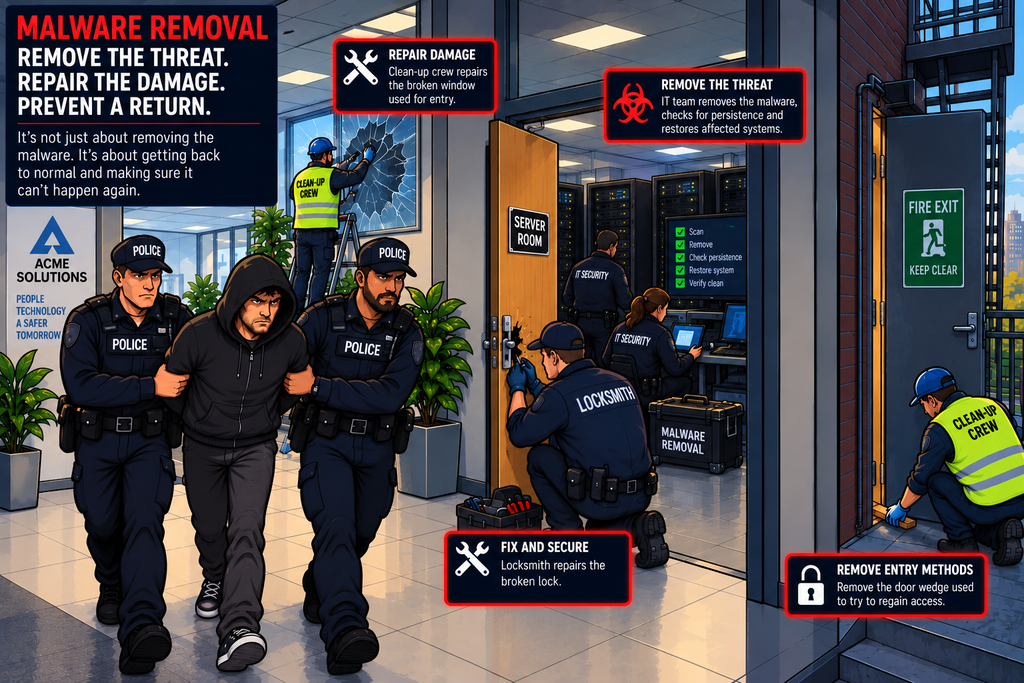
Imagine discovering that a burglar has broken into your office.
You don’t just remove the burglar and assume everything is fine.
You also need to ask:
- How did they get in?
- What did they do?
- Did they leave anything behind?
- Did they make copies of any keys?
- Did they damage anything?
- Can they get back in?
The same principle applies to malware.
Finding and deleting a malicious file is only part of the job. A thorough malware-removal process needs to identify the infection, contain it, remove the malware and any persistence mechanisms, repair the affected system and verify that the attacker no longer has access.
Malware removal isn’t simply deleting a malicious file. It’s making sure the system is clean, secure and no longer under the attacker’s control.
Malware removal is primarily a corrective security control. It is what an organisation does after malicious software has been detected to return the affected system to a safe state.
What Is Malware?
Malware is the short term for malicious software – software deliberately designed to perform harmful or unauthorised actions.
Examples include:
- Viruses
- Worms
- Trojans
- Ransomware
- Spyware
- Keyloggers
- Rootkits
- Remote access trojans (RATs)
- Botnet malware
- Infostealers
- Cryptominers
Malware can:
- Steal information
- Encrypt files
- Monitor users
- Create backdoors
- Download additional malware
- Disable security controls
- Modify systems
- Spread to other computers
Malware Removal vs Malware Detection
These are two different activities.
Detection asks – “Is malware present?”
Removal asks – “How do we get rid of it and return the system to a secure state?”
Detection without effective removal leaves the organisation exposed.
Malware Removal Is Part of Incident Response
Malware removal fits naturally into the Incident Response lifecycle.
The removal process normally occurs after the organisation understands enough about the incident to safely remove the threat.
How Does Malware Get Onto a System?
Before removing malware, it is useful to understand how it arrived.
Common infection methods include:
- Phishing emails
- Malicious attachments
- Malicious websites
- Exploited vulnerabilities
- Compromised software
- Malicious USB devices
- Stolen credentials
- Drive-by downloads
- Supply-chain attacks
- Malvertising
Removing the malware without addressing the original entry point may simply allow the attacker to try again.
The First Step: Don’t Make Things Worse
When malware is discovered, the immediate temptation might be to delete it, but that isn’t always the best first action.
The security team may first need to:
- Isolate the device
- Preserve evidence
- Identify the malware
- Determine what it has done
- Identify other affected systems
- Determine whether the attacker still has access
Simply deleting a suspicious file may destroy useful evidence or leave other components of the infection behind.
Isolate the Infected System
One of the most important immediate actions is often containment.
The objective is to prevent the malware from:
- Spreading
- Communicating with its command-and-control server
- Stealing additional data
- Attacking other systems
- Performing lateral movement
Endpoint security products such as EDR can often isolate an infected machine from the network while still allowing the security team to manage it.
This can be extremely useful during an incident.
Identify the Malware
The next step is to understand what you’re dealing with – different malware requires different responses.
Traditional antivirus products have historically relied heavily on signatures – A characteristic pattern associated with known malware.
If a known malicious file matches a signature, the security software can identify it.
Signatures work particularly well against known malware, but attackers often modify malware to make it look different. This is one reason modern endpoint security uses additional techniques.
Modern security products can also look at what software does.
Even if the exact malware has never been seen before, its behaviour may reveal that something is wrong.
EDR and Malware Removal
Endpoint Detection and Response (EDR) is particularly useful for malware investigations. EDR can provide information about:
- Processes
- Files
- Network connections
- Registry changes
- Command execution
- User activity
- Persistence mechanisms
Some EDR platforms can also automatically isolate hosts or terminate malicious processes.
Traditional antivirus still remains an important malware-removal technology however.
It may be able to:
- Detect malware
- Quarantine files
- Delete malicious files
- Block execution
- Monitor behaviour
- Perform scheduled scans
However, antivirus should not be treated as the complete malware-removal strategy though.
Quarantining the malware means isolating a suspicious file so that it cannot execute normally.
This provides a safer alternative to allow the file to remain active.
As already mentioned, deleting malware immediately isn’t always ideal. Quarantine can preserve the suspicious file while preventing it from executing.
This can allow security teams to:
- Identify the malware
- Confirm the detection
- Analyse the file
- Collect evidence
- Determine whether other systems are affected
Removing the Malware
Once the organisation understands the threat, the malware itself can be removed.
This might involve:
- Deleting malicious files
- Removing malicious processes
- Removing malicious services
- Removing scheduled tasks
- Removing persistence mechanisms
- Removing malicious applications
- Cleaning configuration changes
But there is an important this to remember – Malware can leave things behind.
Persistence
Attackers often want malware to survive:
- Reboots
- Logouts
- Security scans
- Password changes
This is known as persistence.
Removing the original executable without removing the persistence mechanism may not solve the problem.
Common Persistence Mechanisms
Depending on the operating system, attackers may abuse various components on the system to achieve persistence including:
- Startup items
- Scheduled tasks
- Services
- Registry entries
- Startup folders
- Modified scripts
- Application configuration
- User accounts
- SSH keys
- Cloud credentials
The exact techniques vary by operating system and malware family.
Backdoors
Some malware creates a backdoor which provides an attacker with a way to regain access to a system in the event of it being discovered and removed.
Removing the malware may not be enough if another backdoor has been installed.
One forms of backdoor attackers may attempt is the creation of additional accounts.
This is why incident response needs to consider what the attacker did, not just which malware was detected.
Stolen Credentials
Malware can also steal credentials of existing users and services. So even if the malware is successfully removed, the attacker may still have valid credentials to regain entry – this time as a trusted entity.
Credentials may therefore need to be:
- Reset
- Revoked
- Rotated
- Reissued
depending on the situation.
Modern malware may steal more than passwords though – It can potentially obtain authentication tokens or session information.
This means that simply changing the password may not always be sufficient.
Existing sessions or tokens may need to be revoked.
Command and Control
Many types of malware communicate with an attacker’s command-and-control (C2) infrastructure.
During malware removal, security teams may need to identify and block those communications.
Malware may use DNS to locate its command-and-control infrastructure. A common tactic is to use Domain Generating Algorithms (DGAs) – These algorithms generate hundreds of random domains and register them on the Internet. The attackers command & control services then move between these domains to allow the malware a constant ability to connect – even if one domain is blocked, another will be available shortly.
Security teams may therefore investigate:
- DNS queries
- Suspicious domains
- Newly registered domains
- Known malicious domains
- Unusual DNS patterns
DNS logs can therefore be useful during malware investigations.
Stopping the Spread of Malware
Some malware is capable of spreading automatically – Worms are a classic example of this.
In this situation, removing malware from one machine isn’t enough – The organisation needs to determine how far the infection has spread.
This is why Defence in Depth is important.
Determine the Scope
This is a critical part of malware removal. Security teams need to identify how many systems are affected
The answer determines the scale of the response.
The investigation needs to consider the wider environment.
Large organisations may have hundreds or thousands of endpoints. Manually cleaning every computer isn’t practical.
Centralised endpoint management can help.
Automation can make large-scale response considerably faster.
Modern security tools may be able to automatically:
- Kill a malicious process
- Quarantine a file
- Remove malware
- Isolate a host
- Block network communication
- Disable an account
Automation can reduce the time between detection and containment, but automated malware removal can sometimes produce false positives.
This is why organisations need appropriate testing, confidence thresholds and procedures for automated remediation.
Malware Removal vs Reimaging
Sometimes the safest option isn’t to try to clean the existing operating system, but to completely reimage or rebuild the machine.
This can provide greater confidence that hidden malware has been removed.
This is why the use of Gold images is often considered important – the Gold image provides a known good, trusted baseline to rebuild from
Rebuilding can be appropriate when:
- Malware has deeply compromised the system
- A rootkit is suspected
- The extent of compromise is uncertain
- System files have been extensively modified
- The organisation cannot establish that the system is clean
- The cost of rebuilding is lower than the risk of incomplete removal
The decision depends on the circumstances.
Rootkits
A rootkit is a particularly challenging issue.
Rootkits are designed to hide their presence and can operate at a very low level within a system.
Because rootkits can undermine the trustworthiness of the operating system itself, rebuilding may sometimes be preferable to attempting to clean the system.
Once malware has been removed or the system rebuilt, the organisation needs to make sure it is safe to return to normal operation.
Patch the Vulnerability
If malware exploited a software vulnerability, removing the malware without fixing the vulnerability leaves the door open for a repeat attack..
The vulnerability needs to be fixed.
This is why Patch Management and Malware Removal work together.
Harden the System
The organisation may also use the incident as an opportunity to harden the affected system.
For example:
- Remove unnecessary software
- Disable unnecessary services
- Restrict administrator privileges
- Improve firewall rules
- Disable unnecessary scripting
- Improve application controls
- Strengthen authentication
The goal is to make reinfection more difficult.
Restore Data Carefully
If the system needs to be rebuilt, data will also most likely need to be restored.
But restored data should be treated carefully. Restoring infected files could simply reintroduce the problem.
Backups and Malware
Backups are particularly important for ransomware attacks.
If ransomware encrypts production files, then the only way to recover the data without the decryption key is to restore it from a safe backup
But we must remember that the backups themselves must be protected. Attackers increasingly target backup infrastructure because they know how valuable it is during recovery.
Verify the System Is Clean
This is one of the most important steps. Don’t simply remove the malware and assume success.
The organisation should verify:
- Malware is gone
- Persistence is gone
- Suspicious processes are gone
- Malicious accounts are removed
- Credentials have been addressed
- Vulnerabilities are fixed
- Security software is functioning
- Network connections are normal
- Logging is working
Monitoring After Recovery
A system shouldn’t necessarily be considered safe immediately after the clean-up phase.
It should be monitored for signs of reinfection.
This can be particularly important after a serious compromise. If malware keeps returning, something has probably been missed.
Repeated reinfection is a strong indication that the organisation needs to investigate further.
In Summary
Malware removal is the process of identifying, containing and removing malicious software from affected systems, while also addressing the mechanisms that allowed the attacker to gain and maintain access.
The process typically involves:
- Detect – Identify that malware may be present.
- Triage – Determine what has happened and how serious it is.
- Contain – Isolate affected systems and prevent the malware from spreading or communicating.
- Investigate – Understand what the malware did and determine the scope of the compromise.
- Remove – Delete or quarantine malicious software and processes.
- Eradicate – Remove persistence, backdoors, compromised accounts and other elements of the attack.
- Patch and Harden – Fix the vulnerabilities and weaknesses that allowed the malware to succeed.
- Verify – Confirm that the system is clean and secure.
- Recover – Return the system to normal operation.
- Monitor – Watch for reinfection or further attacker activity.
- Learn – Use the incident to improve security controls.
Malware removal works closely with many of the other security controls covered in this series:
- Patch Management closes vulnerabilities exploited by malware.
- Hardening reduces opportunities for malware to execute.
- Application Whitelisting can prevent unauthorised software from running.
- EDR detects and investigates endpoint activity.
- IDS/IPS can identify or block malicious network activity.
- Logging and Auditing provides evidence of what happened.
- SIEM correlates events across the environment.
- EUBA can identify unusual behaviour.
- SOAR can automate parts of the response.
- Network Segmentation can limit malware propagation.
- Least Privilege limits what malware can do.
- Backups support recovery, particularly after ransomware.
The key lesson is that malware removal isn’t simply an antivirus scan followed by clicking “Delete”.
A serious malware infection should be treated as a potential security incident.
You need to understand:
- What got in?
- How did it get in?
- What did it do?
- What did it change?
- What else did it compromise?
- Can the attacker still get back in?
Only when those questions have been answered can you have confidence that the threat has really been removed.
Don’t just delete the malware. Find the infection, contain it, eradicate it, fix the weakness that allowed it in—and make sure it can’t come back.