
Targeting users via games, utilities, updates, ads, and more
Introduction
Smartphones have become one of the most important devices people use every day. They contain our personal messages, photographs, emails, banking applications, authentication codes, location data and access to cloud services.
This makes them a very attractive target for attackers.
One way attackers attempt to compromise a smartphone is through malicious mobile applications. These applications are designed to appear legitimate while secretly performing actions that compromise the device, steal information or provide an attacker with access to the victim’s accounts.
Also In 2025, a powerful exploit kit – dubbed Coruna – was discovered targeting iOS users. Researchers estimate that over 50K users have been affected by this kit alone.
What are malicious phone apps?
A malicious phone app is an application that contains functionality intended to harm the user, compromise their device or obtain information without legitimate authorisation. The application may deliberately be created as malware, or a legitimate-looking application may contain hidden malicious functionality.
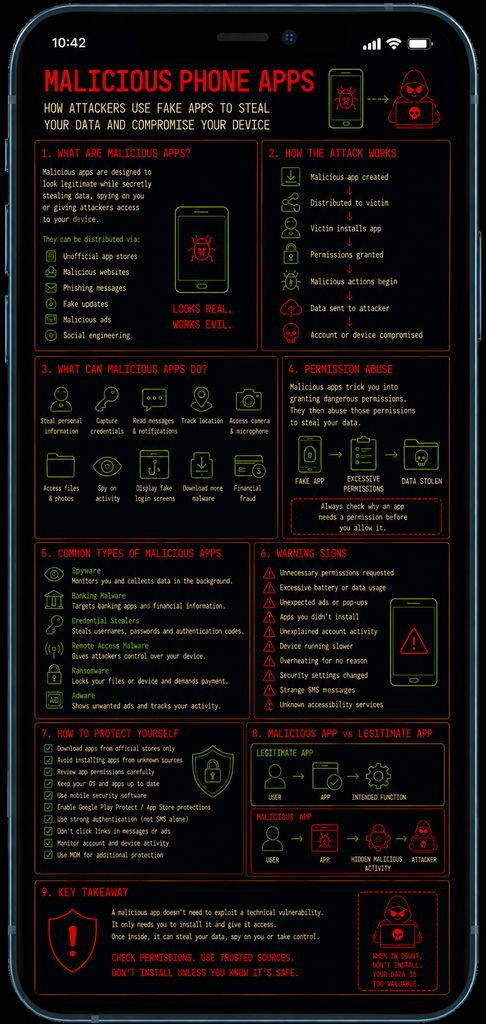
Malicious apps can be distributed through:
- Unofficial app stores
- Malicious websites
- Fake software updates
- Phishing messages
- Malicious advertisements
- Compromised applications
- Third-party APK files
- Social engineering campaigns
Attackers often disguise malicious applications as useful or desirable software such as games, cleaners, VPNs, cryptocurrency applications, productivity tools or security applications.
Between 2022–2023, Google blocked between 1.2 million and 1.4 million risky apps per year. In 2024, they prevented 2.36 million policy-violating apps from publication and banned 158,000 bad developer accounts, and in 2025 they blocked 1.75 million bad apps and banned over 80,000 malicious developer accounts.
In 2025, Google removed over 220 malicious apps that, collectively had been downloaded over 38 million times. The apps displayed over 2.3 billion adverts a day on affected devices earning the app developers millions of dollars
How does the attack work?
The attack generally begins by convincing the victim to install the application. The attacker may create an application that looks legitimate and uses convincing branding, descriptions and screenshots.
Once installed, the application may request permissions such as access to:
- Contacts
- Messages
- Camera
- Microphone
- Location
- Files and photographs
- Notifications
- Accessibility services
The victim may approve these permissions without realising what they allow the application to do – The malicious application can then abuse the permissions granted to it.
The application may operate quietly in the background, making the attack difficult for the victim to recognise.
What can malicious apps do?
The capabilities depends on the operating system, application permissions and malware involved.
A malicious application may attempt to:
- Steal personal information
- Capture credentials
- Read messages or notifications
- Access photographs and files
- Track the user’s location
- Record audio
- Access the camera
- Monitor activity
- Steal authentication codes
- Display fraudulent login screens
- Redirect users to malicious websites
- Download additional malware
- Conduct financial fraud
- Spy on the victim
- Communicate with an attacker-controlled server
Some malware can also attempt to abuse accessibility features to interact with other applications and perform actions on behalf of the victim.
Permission abuse
One of the most important concepts in malicious mobile applications is permission abuse.
Mobile operating systems use permissions to restrict what applications can access, however, a malicious application may attempt to persuade the user to grant excessive permissions.
A well known example was a Flashlight App for Android phones. This app requested multiple permissions including access to contacts, photos and video, SMS, email, microphone and location.
If the victim approved the permissions, the malware gained access to information unrelated to the flashlight’s legitimate purpose.
This is why application permissions should be considered carefully rather than automatically approved.
Common types of malicious apps
Malicious applications can take several forms.
- Spyware – Designed to monitor the victim and collect information such as messages, locations, photographs or other activity.
- Banking Malware – Designed to target banking applications, financial information and authentication mechanisms.
- Credential Stealers – Attempt to capture usernames, passwords or authentication information.
- Remote Access Malware – Provides an attacker with some level of remote control over the compromised device.
- Ransomware – Attempts to prevent the victim from accessing their files or device until a ransom is demanded.
- Adware – Displays unwanted advertising and may track user activity or redirect the victim to malicious websites.
Why are malicious apps effective?
Mobile applications can be particularly effective attack vectors because users often trust the application ecosystem.
An application may have:
- A convincing name
- Professional-looking graphics
- Fake reviews
- A large number of downloads
- A description copied from a legitimate application
- A seemingly trustworthy developer
Attackers may also use social engineering to create urgency to trick users into responding without thinking of the risks
For example, a victim may receive a message claiming:
“Your account requires an immediate security update.”
The message directs them to download an application that is actually malicious.
Signs of a malicious app
Possible warning signs include:
- An application requesting unnecessary permissions
- Unexpected battery consumption
- Excessive mobile data usage
- Unusual device activity
- Unexpected advertisements
- Applications appearing that the user did not install
- Unexplained account activity
- Unexpected SMS messages
- Device overheating without an obvious reason
- Significant performance degradation
- Security warnings being disabled
- Unusual accessibility settings
None of these signs alone proves that an application is malicious, but several occurring together should warrant investigation.
How Can Organisations Protect Against Malicious Apps?
Organisations should implement controls that reduce both the likelihood of malicious applications being installed and their potential impact.
Recommended controls include:
- Use official application stores wherever possible
- Restrict installation of applications from unknown sources
- Deploy mobile device management (MDM)
- Enforce application allowlists where appropriate
- Review application permissions
- Keep mobile operating systems updated
- Keep applications patched
- Deploy mobile security controls
- Educate users about malicious applications
- Monitor unusual device and account activity
- Use strong authentication that does not rely solely on SMS
- Separate corporate and personal data where possible
Users should also avoid installing applications simply because a message, advertisement or website tells them to.
Conclusion
A malicious mobile application does not necessarily need to exploit a technical vulnerability. Sometimes the attacker simply needs to convince the victim to install the wrong application and grant it access.
Once installed, the application may be capable of collecting sensitive information, monitoring the victim, stealing credentials or facilitating further attacks.
- Don’t judge an application by how legitimate it looks.
- Check where it came from.
- Check what permissions it requests.
- And only install software from trusted sources.