
Executing malicious code inside legitimate processes
Introduction
A Dynamic Link Library (DLL) is a shared library containing code and resources that can be used by multiple applications. Instead of every program containing its own copy of common functionality, applications can load DLLs when required.
Windows applications frequently rely on DLLs to function – This makes DLLs an important part of the Windows operating system and software ecosystem.
It also makes them an attractive target for attackers.
Two techniques that take advantage of DLLs are:
- DLL Hijacking
- DLL Injection
Although both involve DLLs, they are fundamentally different techniques.
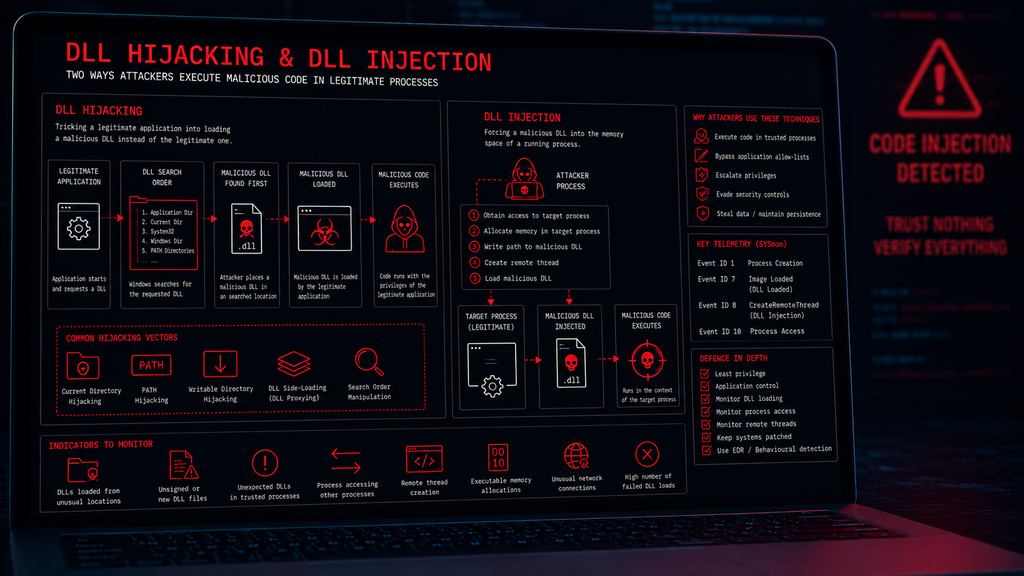
DLL Hijacking generally involves causing a legitimate application to load a malicious DLL instead of the legitimate library it was expecting, whereas DLL Injection involves forcing a DLL into the memory space of an already-running process so that the code within the DLL executes in that process.
Both techniques can allow malicious code to execute while potentially appearing to originate from a legitimate application.
What is a DLL?
As mentioned – DLL stands for Dynamic Link Library.
A DLL is a Windows file which contains executable code and other resources that applications can load when they are required.
For example, Windows contains numerous system DLLs that provide functionality used by applications such as:
- Networking
- File operations (open, close, save, cut, copy, paste)
- Cryptography
- User interfaces
- Graphics
- Authentication
- Hardware interaction
- Operating system functionality
Rather than implementing all of this functionality itself, an application can load the appropriate DLL. This means that code developers do not have to write the same functions in every application (thus making code production more efficient), but also developers don’t have to worry too much about the security of the function – that’s Microsoft’s job – All the developer needs to do is call the required DLL.
This creates a relationship between the Application the DLL and the Functionality
If an attacker can manipulate that relationship, the consequences can be significant.
DLL Hijacking
DLL Hijacking occurs when an attacker causes a legitimate application to load a malicious DLL instead of the legitimate DLL intended by the application.
The important concept to understand is DLL search and loading behaviour.
When an application requests a DLL without specifying its exact location, Windows may search a series of locations to find the required library.
The usual order for searching for a DLL is:
- The Application Folder: The directory where the main program (
.exe) is running from. - System32 Folder: The 32-bit system folder (
C:\Windows\System32). - 16-bit System Folder: The legacy system folder (
C:\Windows\System). - Windows Folder: The main Windows directory (
C:\Windows). - Current Working Directory: The folder where the user currently sits in the command line or shell.
- PATH Environment Folders: The directories listed in the system and user
PATHvariables
If an attacker can place a malicious DLL in a location that is searched before the legitimate DLL, the application may load the attacker’s file.
The application itself may be completely legitimate, but the malicious code is executed because the application has been tricked into loading the wrong library.
How DLL Hijacking works
A simplified example looks like this:
- Legitimate application starts – A legitimate Windows application launches (E.G.
calc.exe) - Application requests a DLL – The application attempts to load a library called
example.dll - Windows searches for the DLL – Windows searches locations according to the relevant DLL loading and search rules.
- Malicious DLL is found first – The attacker has placed a malicious DLL in a location searched before the legitimate library.
- Application loads the malicious DLL – The legitimate application loads the attacker’s DLL.
- Malicious code executes – Code contained within the malicious DLL executes in the context of the legitimate application.
This creates an important distinction – The legitimate application has not necessarily been modified. Instead, the attacker has manipulated the application’s dependency on a DLL.
Why DLL Hijacking works
DLL Hijacking takes advantage of the way applications locate libraries. If an attacker can influence the search path or place a malicious library somewhere that is searched first, the application may load the wrong file.
The security weakness therefore exists at the intersection of the expected application behaviour + DLL search order + File placement
Common DLL Hijacking scenarios
DLL Hijacking can occur in several ways:
- Current-directory hijacking – An application may search its working directory for required DLLs. If an attacker can place a malicious DLL there, the application may load it.
- Search-order hijacking – The attacker takes advantage of the order in which Windows searches for a requested library. A malicious DLL placed in an earlier search location may be loaded instead of the legitimate version.
- PATH hijacking – Applications may search directories referenced by the Windows
PATHenvironment variable. If an attacker can influence a directory within the search path, they may potentially introduce a malicious DLL. - Writable-directory hijacking – Applications sometimes operate from directories where users have write permissions. If a privileged application subsequently loads DLLs from that location, the writable directory can become a potential attack surface. This can be particularly dangerous when a lower-privileged user can influence files subsequently loaded by a higher-privileged process.
- DLL Side-Loading – A closely related technique to DLL hijacking is known as DLL Side-Loading. DLL Side-Loading occurs when a legitimate executable loads a malicious DLL because the executable searches for the DLL in a location controlled by the attacker. This technique is particularly attractive because the executable itself may be completely legitimate. This can make the activity more difficult to identify than simply executing an obviously malicious executable.
- DLL Proxying – Another technique associated with DLL Hijacking is DLL Proxying. A malicious DLL may be designed to perform malicious activity while also forwarding legitimate functionality to the genuine DLL. This can allow the legitimate application to continue operating normally. This can make detection more difficult because the application may continue to function normally.
DLL Injection
DLL Injection is different from DLL Hijacking and involves causing a DLL to be loaded into the address space of another running process.
The target process may be a legitimate Windows application or another process already running on the system.
Here, the attacker attempts to make the target process load their DLL. Once loaded, code within the DLL executes within the context of that process.
The fundamental difference is therefore:
- DLL Hijacking – Tricks an application into loading the wrong DLL.
- DLL Injection – Forces a running process to load an attacker-controlled DLL.
How DLL Injection works
A simplified DLL Injection sequence looks like this:
- Target process identified – The attacker identifies a running process.
- Process access obtained – The attacker obtains sufficient access to interact with the target process.
- DLL location provided – The target process is given information allowing it to locate the DLL.
- Remote execution mechanism used – The attacker causes execution to occur within the target process.
- DLL loaded – The malicious DLL is loaded into the target process.
- Code executes – The DLL’s code executes within the target process.
This can allow the attacker to operate through a process that may otherwise appear legitimate.
Why attackers use DLL Injection
DLL Injection can provide several advantages. An attacker may use it to:
- Execute code inside another process
- Manipulate process behaviour
- Evade simplistic process-based detection
- Interact with another application’s memory
- Obtain access to information available to the target process
- Maintain malicious functionality within a legitimate process
- Circumvent certain application-level restrictions
The effectiveness of the technique depends heavily on the privileges and protections associated with the target process.
DLL Injection and Process Context
One important characteristic of DLL Injection is process context. When a DLL is loaded into another process, its code executes as part of that process.
This can create a misleading appearance during an investigation. A security analyst looking only at the process name may see “example.exe” and assume that the activity is legitimate.
Additional telemetry is therefore required to determine whether the process has been manipulated.
DLL Injection and Privileges
Windows implements security boundaries between processes. A process cannot simply manipulate every other process on the system.
The ability to interact with another process depends on factors such as:
- User privileges
- Process security
- Integrity levels
- Protected process mechanisms
- Security software
- Operating system protections
An attacker therefore needs sufficient access to the target process.
This is one reason why DLL Injection is frequently associated with privilege escalation or post-compromise activity.
DLL Injection Techniques
There are several methods that have historically been used to achieve DLL Injection. Regardless of technique, the underlying objective is the same – Cause attacker-controlled code to execute inside another process.
Commonly discussed techniques include:
- Remote thread-based injection
- Process hollowing
- Thread hijacking
- APC-based injection
- Manual mapping
- Reflective DLL loading
These techniques differ in how the malicious code is introduced and executed.
CreateRemoteThread-Based Injection
One well-known DLL Injection technique involves creating a thread within another process. The Windows API function CreateRemoteThread has historically been associated with this technique.
Security products should monitor for suspicious cross-process activity involving remote threads.
A particularly important Windows telemetry source is Sysmon Event ID 8 – CreateRemoteThread. This event can provide valuable information about processes creating threads inside other processes.
Process Hollowing
Process Hollowing is related to process injection but works differently from traditional DLL Injection.
A legitimate process is created and its executable image is replaced or manipulated before malicious code is executed within the process. The process may therefore appear legitimate from the outside while executing attacker-controlled code.
Process Hollowing is an example of a broader category known as process injection.
Thread Hijacking
Instead of creating a new thread, an attacker may attempt to manipulate an existing thread within a target process. The attacker can attempt to redirect the thread’s execution toward malicious code.
This can make the resulting behaviour different from traditional CreateRemoteThread-based injection.
Manual Mapping
Manual Mapping is a more advanced technique in which an attacker attempts to load a DLL into a process without relying on the normal Windows DLL-loading mechanisms. Rather than simply asking Windows to load a DLL in the normal way, the attacker handles aspects of the loading process themselves.
This can potentially reduce the amount of conventional DLL-loading telemetry generated.
Manual Mapping is therefore relevant when analysing more sophisticated malware.
Reflective DLL Loading
Reflective DLL Loading is another technique designed to load a DLL directly from memory. Rather than relying entirely on the normal Windows loader, the DLL contains functionality that allows it to initialise itself.
This can allow attackers to execute code without necessarily writing the DLL to disk in the traditional manner.
The technique is therefore particularly relevant to fileless and memory-based attack techniques.
DLL Hijacking vs DLL Injection
Although the terms are sometimes confused, they describe different attack mechanisms.
| Feature | DLL Hijacking | DLL Injection |
|---|---|---|
| Primary objective | Trick an application into loading a malicious DLL | Load a DLL into another process |
| Target | Application starting/loading a library | Running process |
| Main weakness | DLL loading/search behaviour | Process access and execution |
| Requires target process already running? | Not necessarily | Usually |
| Malicious DLL location important? | Often | Not necessarily |
| Cross-process activity | Not necessarily | Usually |
| Common detection focus | Unexpected DLL loads | Process manipulation |
| Example telemetry | Sysmon Event ID 7 | Sysmon Event ID 8 |
The distinction is important when investigating Windows attacks.
DLL Hijacking and Privilege Escalation
DLL Hijacking can become particularly dangerous when a privileged application loads a malicious DLL from a location that a lower-privileged user can modify. This can potentially turn a relatively simple DLL loading weakness into a privilege escalation vulnerability.
DLL Injection and Defence Evasion
Attackers may also use process injection techniques as part of defence evasion. Security products commonly monitor processes and their behaviour. If malware executes as an obviously malicious executable, detection may be relatively straightforward.
A such, an attacker may instead attempt to execute code inside a legitimate process.
Process injection does not make the activity invisible however. Modern EDR and endpoint security products can inspect memory, process relationships, thread creation, loaded modules, and other behavioural indicators.
Injection techniques can however, increase the complexity of detection and investigation.
Detecting DLL Hijacking
Security teams can look for unusual DLL-loading behaviour. Potential indicators include:
- DLLs loaded from unusual directories
- DLLs loaded from user-writable locations
- DLLs loaded from temporary directories
- Unexpected DLLs loaded by trusted applications
- Unsigned DLLs
- Newly created DLL files
- DLLs with suspicious file paths
- Applications loading DLLs from network locations
- Unexpected changes to application directories
A particularly useful telemetry source is Sysmon Event ID 7 – Image Loaded.
This can provide information about DLLs and other images loaded by processes when the relevant Sysmon configuration is enabled.
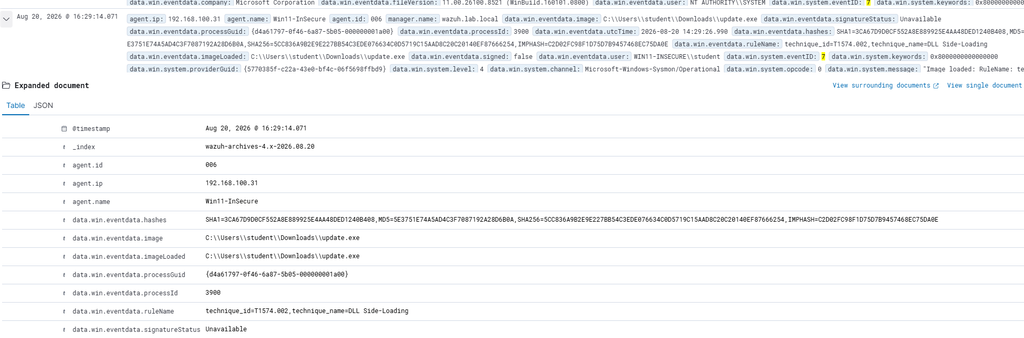
Detecting DLL Injection
DLL Injection can produce different indicators. Security teams may look for:
- Unexpected cross-process access
- Remote thread creation
- Suspicious memory allocation
- Executable memory regions
- Unusual DLL loads
- Processes loading DLLs they would not normally require
- Memory regions that do not correspond to files on disk
- Suspicious parent/child process relationships
Sysmon Event ID 8 – CreateRemoteThread can be particularly useful when investigating remote-thread-based injection.
However, not every injection technique generates the same telemetry. This is why endpoint detection needs to consider multiple behavioural indicators.
Preventing DLL Hijacking
Organisations can reduce DLL Hijacking risk through several controls:
- Secure DLL search behaviour – Applications should use secure methods for loading libraries and avoid unnecessarily searching locations that can be modified by untrusted users.
- Restrict directory permissions – Users should not have write access to directories from which privileged applications load executable code.
- Use absolute paths where appropriate – Applications that know exactly where a required DLL is located can reduce ambiguity around DLL loading.
- Application control – Application control technologies can restrict which executables and libraries are allowed to run.
- Code signing – Digitally signed software can help organisations verify the origin and integrity of DLLs.
- Monitor unusual DLL loading – Security monitoring can identify unexpected libraries being loaded by trusted applications.
Preventing DLL Injection
Defending against DLL Injection is more complex because the attack targets process behaviour rather than simply file placement. Important controls include:
- Endpoint Detection and Response
- Application control
- Least privilege
- Attack Surface Reduction
- Credential protection
- Process protection mechanisms
- Memory monitoring
- Security software
- Behavioural detection
Organisations should also keep operating systems and applications updated so that known vulnerabilities cannot be used to obtain the privileges required for injection.
Windows Security Features
Modern versions of Windows include several protections that can make process injection more difficult.
These include:
- User Account Control (UAC)
- Protected Processes
- Code Integrity
- Control Flow Guard
- Attack Surface Reduction
- Virtualization-based security
- Credential Guard
- Endpoint security controls
The effectiveness of these mechanisms depends on system configuration and the specific attack technique being used. Attackers therefore frequently attempt to identify which security controls are present before selecting an injection method.
DLL Attack Investigation Checklist
When investigating potential DLL Hijacking or DLL Injection, analysts should consider:
- Which process loaded the DLL?
- Where was the DLL located?
- Was the DLL digitally signed?
- Who created or modified the DLL?
- When was the DLL created?
- Was the DLL located in a writable directory?
- Was the process running with elevated privileges?
- Which process initiated the activity?
- Was there suspicious process access?
- Was a remote thread created?
- Was executable memory allocated?
- Did the process subsequently communicate externally?
- Were credentials accessed?
- Did the behaviour occur immediately after another suspicious event?
These questions help establish whether the DLL activity was legitimate or malicious.
DLL Hijacking & DLL Injection Prevention Checklist
Organisations should consider:
- Restrict write access to application directories.
- Prevent privileged applications from loading DLLs from user-writable locations.
- Use secure DLL loading practices.
- Keep Windows and applications patched.
- Use application control where appropriate.
- Monitor DLL loading activity.
- Monitor suspicious process access.
- Monitor remote thread creation.
- Enable appropriate Sysmon telemetry.
- Deploy endpoint detection and response.
- Use least privilege.
- Monitor unsigned or unexpected DLLs.
- Investigate DLLs loaded from temporary directories.
- Correlate process, DLL, and network telemetry.
- Protect privileged processes.
Conclusion
DLLs are a fundamental component of Windows software – They allow applications to share code and functionality and are used extensively throughout the operating system and third-party applications.
However, the way Windows applications load and interact with DLLs can also create opportunities for attackers.
DLL Hijacking involves manipulating DLL loading behaviour so that a legitimate application loads a malicious library.
DLL Injection takes a different approach by introducing a malicious DLL or code into an already-running process.
Both techniques can be used for execution, privilege escalation, persistence, and defence evasion.
Tools such as Sysmon and EDR can provide valuable telemetry for detecting these behaviours, particularly when events such as Image Loaded, Process Access, and CreateRemoteThread are correlated.
Attackers can abuse trusted applications, legitimate DLL mechanisms, and Windows process functionality to execute malicious code while attempting to blend into normal system activity.
Understanding how DLL Hijacking and DLL Injection work is therefore essential for both Windows security engineers and SOC analysts.