
Attacking virtual systems to access the underlying host or other applications
Introduction
Containers have become an important part of modern computing, with technologies such as Docker and Kubernetes allowing applications to run in isolated environments by sharing host processes and services.
Containerisation of applications provides many advantages over dedicated servers:
- Rapid deployment
- Application isolation
- Portability
- Efficient resource utilisation
- Scalability
- Simplified application management
However, a container is not the same thing as a virtual machine, and as such brings a different set of risks, and attack vectors.
A virtual machine normally includes a complete guest operating system running on virtualised hardware, whereas a container instead shares the host operating system’s kernel – This distinction is extremely important from a security perspective.
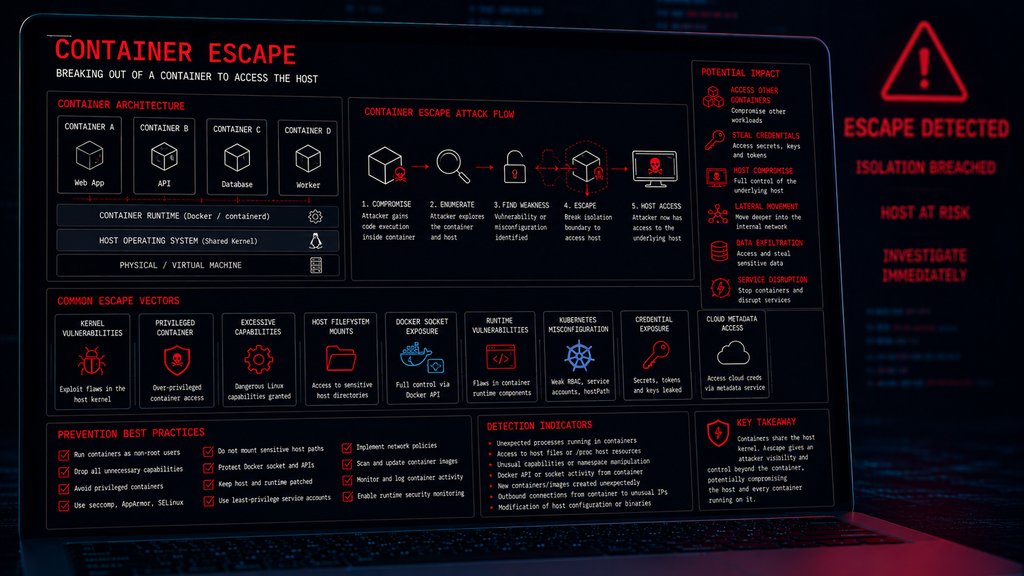
If an attacker compromises an application running inside a container, they may initially be restricted to that container. However, if they can exploit a vulnerability or abuse a dangerous configuration, they may be able to escape the container’s isolation and interact with the underlying host.
This technique is known as a Container Escape, or sometimes a Container Breakout, and the potential consequence is significant:
Compromise of one container → compromise of the underlying host → potential access to other containers and services.
What is a container?
A container is an isolated environment used to run an application and its dependencies. Each container appears to have its own environment, however, the containers are still ultimately relying on the host kernel.
This is one of the fundamental differences between containers and traditional virtual machines.
A have written a series of posts all about self-hosting apps with containers – you can read them here
Container Isolation
Container technologies use several Linux kernel mechanisms to create isolation – These can include:
- Linux namespaces
- Control groups (cgroups)
- Capabilities
- Seccomp
- AppArmor
- SELinux
- Filesystem isolation
- Network namespaces
- User namespaces
Together, these mechanisms restrict what processes inside a container can see and do.
For example, a process inside a container may see only the Container filesystem rather than the complete host filesystem. It may also see the Container processes rather than every process running on the host.
The security boundary is therefore created by the combination of these kernel features.
What is Container Escape?
Container Escape occurs when an attacker operating inside a container breaks through the intended isolation boundary and gains access to resources belonging to the host or other containers.
The attacker may begin with a Compromised Application running in a container. The objective is to abuse the container settings and gain access to the underlying host.
Once the host is compromised, the attacker may potentially gain access to:
- Other containers
- Host files
- Container images
- Credentials
- Configuration files
- Secrets
- Network resources
- Cloud credentials
- Kubernetes resources
Container escape can therefore turn a compromise affecting a single application into a much larger infrastructure compromise.
Container Escape vs Container Compromise
It is important to understand the difference between container compromise and container escape
Container compromise is where the attacker gains control of an application or process inside the container.
For example, targeting a Web Application with Remote Code Execution to obtain a Shell inside Container
The attacker has compromised the container, but the host may remain protected.
Container escape is where the attacker goes beyond the container boundary.
For example the attacker may target an application running in the Container and then obtain an ability to escape to container to the host operating system
The attacker has now broken through the intended isolation boundary.
This distinction is critical when assessing the severity of a container compromise.
Why are container escapes dangerous?
Containers are frequently used to host important applications, and a single host may run dozens or even hundreds of containers.
If an attacker escapes from one container and compromises the host, the attacker may potentially gain influence over the other containers and their data.
This is why container isolation is an important security boundary.
How Container Escape Happens
There is no single container escape technique, several different attack paths can lead to a breakout.
The major categories include:
- Kernel vulnerabilities
- Container runtime vulnerabilities
- Privileged containers
- Excessive Linux capabilities
- Host filesystem mounts
- Docker socket exposure
- Kubernetes misconfiguration
- Weak access controls
- Insecure container configurations
- Credential exposure
Container Escape Through Kernel Vulnerabilities
As mentioned earlier, containers share the host’s kernel. This creates an important security dependency.
If a vulnerability exists within the host kernel, a malicious process inside a container may potentially exploit that vulnerability.
This is one of the most serious forms of container escape because the attacker is attacking the underlying operating system rather than merely exploiting the containerised application.
Container Runtime Vulnerabilities
Containers rely on software known as a container runtime. Examples of runtime environments include:
- Docker
- containerd
- CRI-O
The runtime manages activities such as:
- Creating containers
- Starting containers
- Stopping containers
- Managing container filesystems
- Managing namespaces
- Managing container processes
A vulnerability in the runtime can potentially undermine container isolation. This is why container runtimes need to be kept updated and securely configured.
Privileged Containers
One of the most dangerous container configurations is a privileged container. This is a container that receives significantly more access to host resources than a normal container.
This higher-level of privilege dramatically reduces the effectiveness of container isolation. A compromised privileged container may have access to resources that would normally be unavailable to other containers.
Developers should not give a container privileges it does not need.
Linux Capabilities
Modern Linux can divide privileged operations into smaller units called capabilities. Examples include capabilities associated with:
- Network administration
- Changing system configuration
- Mounting filesystems
- Managing processes
- Changing system time
- Accessing raw network interfaces
Container runtimes normally restrict the capabilities available to containers. However, granting excessive capabilities can weaken container isolation.
Container Running as Root
Running an application as root inside a container does not automatically mean that the attacker has root access to the host – Container root and host root are not necessarily equivalent.
However, running containers as root can increase the potential impact of other vulnerabilities or misconfigurations.
Therefore, applications should generally run with the lowest privileges necessary.
Host Filesystem Mounts
Containers can be given access to directories on the host.
For example, a drive partition may be mounted inside a container to save files, or log information for access without having to manage the container directly.
However, mounting sensitive host directories into containers can create serious security risks.
If the attacker can modify sensitive host files through a mount, the consequences can be severe.
Docker Socket Exposure
One particularly important example is the Docker socket. The Docker daemon commonly exposes an API through /var/run/docker.sock
If this powerful interface is made available inside a container, the container may effectively have significant control over the Docker environment. The Docker socket should be treated as a highly privileged interface.
Simply mounting it into a container can undermine much of the intended isolation.
Container Escape Through Docker Management Interfaces
Container management interfaces provide powerful functionality – They can potentially allow authorised users or processes to:
- Create containers
- Start containers
- Stop containers
- Mount filesystems
- Configure networking
- Manage images
- Control container processes
If an attacker gains unauthorised access to such an interface, they may be able to use legitimate container functionality against the host.
An attacker does not always need to exploit a vulnerability if a dangerous administrative interface has already been exposed.
Kubernetes and Container Escape
Kubernetes adds another layer of complexity to the world of containerisation. An attacker who compromises a container may attempt to move beyond the container to target elements such as:
- Kubernetes nodes
- Other pods
- Kubernetes APIs
- Service accounts
- Secrets
- Cloud metadata services
- Cluster management systems
Container escape can therefore become the first step in a broader cloud or Kubernetes attack.
Kubernetes Privileged Pods
A Pod is the smallest deployable and manageable computing unit in Kubernetes. Instead of running containers directly, Kubernetes wraps one or more containers into a higher-level abstraction called a Pod, which acts as a “logical host” for an application. Kubernetes allows administrators to configure pods with elevated privileges.
A privileged pod may have significantly greater access to the underlying node. This can be useful for legitimate infrastructure workloads, however, if an attacker can deploy or control a privileged workload, the security implications can be severe.
This is why Kubernetes admission controls and workload security policies are important.
HostPath Mounts in Kubernetes
Kubernetes can mount directories from the node into a pod using mechanisms such as hostPath.
Whilst can be a legitimate action for certain workloads, exposing sensitive node directories to containers can weaken the isolation boundary.
The security concern is similar to host filesystem mounts in Docker
Sensitive host paths should therefore only be exposed when there is a clear operational requirement.
Container Escape Through the Kubernetes API
A compromised container may have access to a Kubernetes service account – If that service account has excessive permissions, the attacker may be able to interact with the Kubernetes API which creates yet another possible attack path
Compromised Container -> Service Account Token -> Kubernetes API -> Excessive Permissions -> Additional Resources
This is not necessarily a traditional container escape, but it can allow an attacker to move beyond the original workload and compromise other resources.
This demonstrates that container security and identity security are closely connected.
Container Escape and Secrets
Containers frequently require credentials and secrets in order to operate and interact with other services and APIs.
Examples include:
- API keys
- Database credentials
- Cloud credentials
- Kubernetes secrets
- Service account tokens
- Application passwords
If these credentials are accessible from a compromised container, an attacker may use them to move beyond the container without actually exploiting the container runtime.
The resulting attack can be just as serious as a technical container escape.
Container Escape and Cloud Metadata
Cloud-hosted containers may also interact with cloud metadata services. These metadata services can provide information about the cloud environment and, depending on configuration, potentially expose temporary credentials.
If an attacker can access sensitive metadata from a compromised workload, they may attempt to use the resulting credentials against cloud resources.
Cloud environments should therefore restrict unnecessary metadata access and use modern workload identity mechanisms where appropriate.
Container Escape and Lateral Movement
Once an attacker reaches the host, the attack may no longer be limited to containers as the host may have network access to:
- Internal servers
- Databases
- Management systems
- Storage
- Monitoring infrastructure
- Kubernetes control-plane components
- Cloud services
This is why container escape is often considered a high-impact post-compromise technique.
Container Enumeration
After compromising a container, an attacker may attempt to determine other facts including:
- What operating system is present?
- What processes are running?
- What interfaces exist?
- What network routes exist?
- What capabilities are available?
- Is the container privileged?
- Are host directories mounted?
- Is a container management socket available?
- Are Kubernetes service account credentials present?
- What environment variables exist?
- Which services are accessible?
- What identity is the process running under?
From a defensive perspective, this is important because container enumeration may provide early warning that an attacker is attempting to identify an escape path.
Detecting Container Escape Attempts
Security teams should monitor both the container and the host. Potential indicators of abuse include:
- Unexpected privileged operations
- Access to host filesystems
- Unexpected namespace manipulation
- Suspicious capability usage
- Access to container runtime sockets
- Unexpected container creation
- Unusual Docker API activity
- Unexpected Kubernetes API calls
- Containers attempting to access host devices
- Suspicious processes executing inside containers
- Unexpected network connections from containers
The strongest detection comes from correlating multiple events. Useful telemetry can come from:
- Container runtime logs
- Docker logs
- Kubernetes audit logs
- Linux audit logs
- EDR
- Host-based monitoring
- Network monitoring
- SIEM platforms
- Cloud security platforms
Preventing Container Escape
Container security should begin before a container is deployed.
Organisations should consider:
- Run applications as non-root – Applications should run with the minimum privileges required.
- Drop unnecessary capabilities – Containers should only receive capabilities they actually need.
- Avoid privileged containers – Privileged mode should be avoided unless there is a compelling operational requirement.
- Restrict host mounts – Sensitive host directories should not be unnecessarily exposed to containers.
- Protect container management sockets – Interfaces such as the Docker socket should be treated as highly privileged.
- Patch the host – The host kernel is part of the container security boundary.
- Patch the container runtime – Docker, containerd, CRI-O, and associated components should be kept updated.
- Seccomp – Seccomp can restrict the system calls that processes inside containers are allowed to make.
AppArmor and SELinux
Linux security frameworks such as AppArmor and SELinux can provide additional mandatory access controls. They can restrict what processes are allowed to access even if those processes have elevated privileges within their normal execution context.
This creates additional layers around the container, Linux Security Controls, and the host
The objective is to ensure that a compromised container has as few avenues as possible for interacting with the host.
User Namespaces
User namespaces can separate the container’s user and group identities from those on the host. This can reduce the consequences of processes running as root inside the container.
This is an important defence because it reduces the direct relationship between container privileges and host privileges.
Kubernetes Security Controls
Kubernetes environments should also implement appropriate workload controls. Important measures include:
- Pod Security Standards
- Least-privilege service accounts
- Network policies
- Restricted capabilities
- Non-root containers
- Seccomp profiles
- AppArmor or SELinux
- Admission controls
- Image security scanning
- Kubernetes audit logging
- RBAC
The goal is to prevent a compromised container from becoming a stepping stone into the wider cluster.
Image Security
Containers are typically created from images – A container image is a read-only, lightweight, standalone software package that holds everything needed to run an application, including the code, runtime, libraries, environment variables, and configuration file.
Many images are created by developers and uploaded to public repositories for others to use. As such, container security begins with the image.
Attackers may attempt to compromise an image before it is deployed.
Organisations should therefore:
- Only use trusted image sources.
- Scan images for vulnerabilities.
- Remove unnecessary packages.
- Avoid embedding secrets.
- Pin important dependencies.
- Verify image provenance.
- Sign and verify images where appropriate.
- Regularly rebuild outdated images.
A secure runtime cannot compensate for a fundamentally compromised application image.
Container Escape Prevention Checklist
Organisations should consider the following security when dealing with containers:
- Run containers as non-root users.
- Avoid privileged containers.
- Drop unnecessary Linux capabilities.
- Use user namespaces where appropriate.
- Apply Seccomp profiles.
- Use AppArmor or SELinux.
- Restrict host filesystem mounts.
- Protect Docker and container runtime sockets.
- Patch the host kernel.
- Patch the container runtime.
- Apply Kubernetes Pod Security Standards.
- Use least-privilege RBAC.
- Restrict Kubernetes service accounts.
- Implement network policies.
- Monitor Kubernetes audit logs.
- Monitor container runtime activity.
- Scan container images.
- Remove secrets from images.
- Restrict access to cloud metadata services.
- Deploy endpoint detection on container hosts.
- Correlate container and host telemetry.
- Regularly review container configurations.
Conclusion
Containers provide powerful isolation, portability, and scalability for many applications and services. However, they should not be treated as miniature virtual machines.
Containers share the host operating system’s kernel, which means the security of the container ultimately depends on the security of several underlying components.
Container Escape occurs when an attacker breaks through the intended container isolation boundary and gains access to the underlying host or other resources.
The consequences of container escape can be severe.
A container is an isolation boundary — but it is not an absolute security boundary. Effective container security therefore requires protection at every layer:
Image → Container → Runtime → Kernel → Host → Orchestrator → Cloud
For security professionals, understanding container escape is increasingly important because modern applications are no longer deployed exclusively as traditional processes on standalone servers.
They increasingly run inside Docker containers, Kubernetes clusters, and cloud-native environments.
The container may be where an attack begins, but the host is where the consequences can become much larger.