
Accidentally exposing data to the entire Internet
Introduction
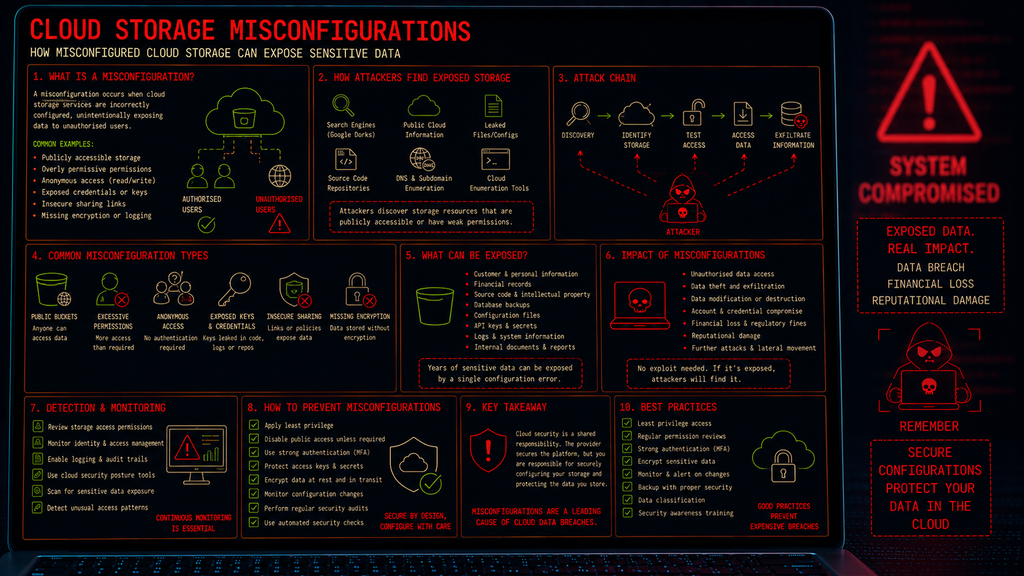
Cloud storage misconfigurations occur when cloud-based storage services are configured in a way that unintentionally exposes data, systems or resources to unauthorised users.
Cloud storage is widely used by organisations to store documents, backups, databases, application data, logs and sensitive business information. Services such as object storage make it easy to share and access data, but incorrect permissions or security settings can accidentally make that data accessible to the public or to users who should not have access.
Unlike many attacks, a cloud storage breach does not necessarily require an attacker to exploit a software vulnerability – Sometimes, the attacker simply finds something that has been left accessible.
What are cloud storage misconfigurations?
Cloud storage platforms provide extensive controls for determining who can access data and what they can do with it. A misconfiguration occurs when these controls are incorrectly applied.
Examples include:
- Publicly accessible storage buckets (A.K.A. Leaky buckets)
- Overly permissive access-control policies
- Anonymous read access
- Anonymous write access
- Excessive permissions granted to users or applications
- Exposed access keys or credentials
- Insecure sharing links
- Storage containing sensitive information without appropriate protection
- Backups exposed to the internet
- Poorly configured encryption
- Missing logging and monitoring
The important point is that the cloud service itself may be functioning exactly as designed.
The security problem is the configuration chosen by the organisation.
How does a cloud storage attack work?
A typical attack can follow a relatively simple sequence:
Discovery → Identify Storage → Test Access → Access Data → Extract Information
An attacker may discover an exposed storage resource through:
- Search engines
- Public cloud information
- Leaked configuration files
- Source-code repositories
- DNS records
- Cloud enumeration
- Previously exposed credentials
- Information gathered during reconnaissance
Once a potentially exposed storage resource has been identified, the attacker determines whether it allows unauthorised access.
If sensitive information is accessible, the attacker may then download or manipulate the data.
Publicly Accessible Storage
One of the most common cloud storage problems is accidentally making a storage resource publicly accessible.
For example, an organisation may intend to provide access only to employees but configure the storage permissions so that anyone on the internet can read the contents.
This can expose:
- Customer information
- Internal documents
- Financial records
- Source code
- Application data
- Database backups
- Configuration files
- Logs
- Credentials and secrets
The organisation may not even realise that the data is publicly accessible.
Excessive permissions
Cloud platforms use permissions to determine what users, applications and services can do.
One of the most common mistakes in cloud administration is granting more permissions than are actually required.
For example, an application that only needs to read files might be given permission to:
- Read
- Write
- Delete
- Modify permissions
- Create new objects
If that application’s credentials are compromised, the attacker automatically inherits those excessive privileges. This creates a significant blast radius of potential damage
The principle of least privilege is therefore just as important in cloud environments as it is on traditional networks.
Anonymous access
Some cloud storage services can be configured to allow access without authentication. This can be useful for legitimate public content, such as:
- Website images
- Public downloads
- Software updates
- Public datasets
However, accidentally applying anonymous access to sensitive storage areas can expose information to anyone who discovers the resource.
The danger is particularly significant when organisations assume that a storage location is private simply because its URL or resource name is not publicly advertised.
Security through obscurity is not access control.
Cloud storage write access
Read access is not the only concern however. If an attacker can write to a cloud storage resource, the consequences can potentially be much more serious.
An attacker may be able to:
- Modify legitimate files
- Replace application resources
- Upload malicious content
- Delete data
- Disrupt applications
- Manipulate backups
- Alter files used by other systems
For some applications, a writable storage location can therefore become part of a larger attack chain.
Exposed credentials and access keys
Cloud storage can also be compromised when authentication credentials are exposed.
Credentials can accidentally appear in:
- Source code
- Git repositories
- Configuration files
- Scripts
- Application logs
- Documentation
- Developer workstations
- Public repositories
An attacker who obtains valid cloud credentials may not need to exploit the storage service at all. They can simply authenticate as the legitimate user or application.
This is particularly dangerous when the exposed credentials have excessive permissions.
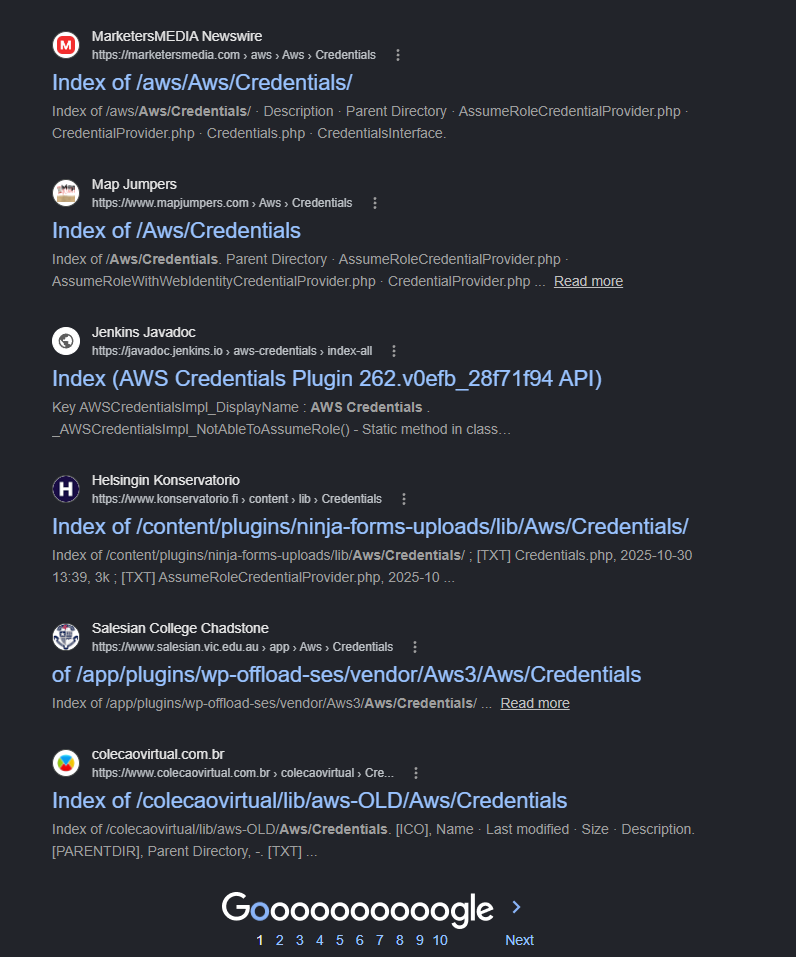
A simple Google dork such as intitle:index of "aws/credentials" returns a frightening amount of links to exposed keys
Sensitive data in cloud storage
Another problem occurs when organisations store sensitive information without applying appropriate security controls.
Examples include:
- Personally identifiable information
- Financial information
- Health-related records
- Authentication information
- API keys
- Password databases
- Intellectual property
- Customer records
- Security logs
Even when access controls are correctly configured, sensitive information should still be protected using appropriate encryption, retention and monitoring controls.
Why are cloud storage misconfigurations dangerous?
Cloud storage misconfigurations can be particularly dangerous because cloud services are designed to be accessible and scalable.
A single configuration error can potentially expose a large quantity of information.
The consequences can include:
- Data breaches
- Loss of confidential information
- Data modification
- Data destruction
- Financial loss
- Regulatory penalties
- Reputational damage
- Credential compromise
- Further cloud account compromise
The scale of the problem can also be significant because cloud storage may contain years of accumulated organisational data.
Detecting Cloud Storage Misconfigurations
Organisations should regularly assess their cloud storage configuration.
Important areas to monitor include:
- Access Permissions – Identify storage resources that allow public or unauthorised access.
- Identity and Access Management – Review which users, applications and services have access to storage and whether those permissions are actually required.
- Cloud Configuration Monitoring – Cloud security tools can identify potentially dangerous configuration changes and alert security teams.
- Logging – Storage access logs can help identify unusual downloads, unexpected users and suspicious access patterns.
- Data Discovery – Organisations should understand what information is actually stored in their cloud environment. You cannot properly protect sensitive data if you do not know where it exists.
How can organisations defend against cloud storage misconfigurations?
- Apply Least Privilege – Give users and applications only the permissions they require.
- Disable Unnecessary Public Access – Storage should not be publicly accessible unless there is a clearly defined business requirement.
- Use Strong Authentication – Protect administrative accounts with strong authentication and appropriate identity controls.
- Protect Credentials – Never store cloud access keys or secrets in source code, public repositories or insecure configuration files.
- Encrypt Sensitive Data – Use appropriate encryption for sensitive information both at rest and in transit.
- Monitor Configuration Changes – Changes to storage permissions should be logged and reviewed.
- Perform Regular Audits – Cloud environments should be periodically assessed for things like public storage, excessive permissions, unused accounts, exposed credentials, insecure sharing, and sensitive information
- Use Automated Security Controls – Cloud security posture management tools can continuously check cloud environments for common configuration weaknesses.
Conclusion
Cloud security is not simply about choosing a secure cloud provider. It is also about how the organisation configures and manages the services it uses.
A storage bucket containing sensitive information does not need an exotic exploit to become compromised.
If the permissions say “Anyone can access this.”, then an attacker may simply do exactly that.
The same principle applies to excessive permissions, exposed credentials, insecure sharing and poorly protected backups.
Remember:
Cloud security is a shared responsibility — the provider secures the underlying platform, but organisations are responsible for securely configuring the services and data they place in the cloud.
A secure cloud environment therefore requires least privilege, strong authentication, careful configuration, encryption, continuous monitoring and regular security reviews.