
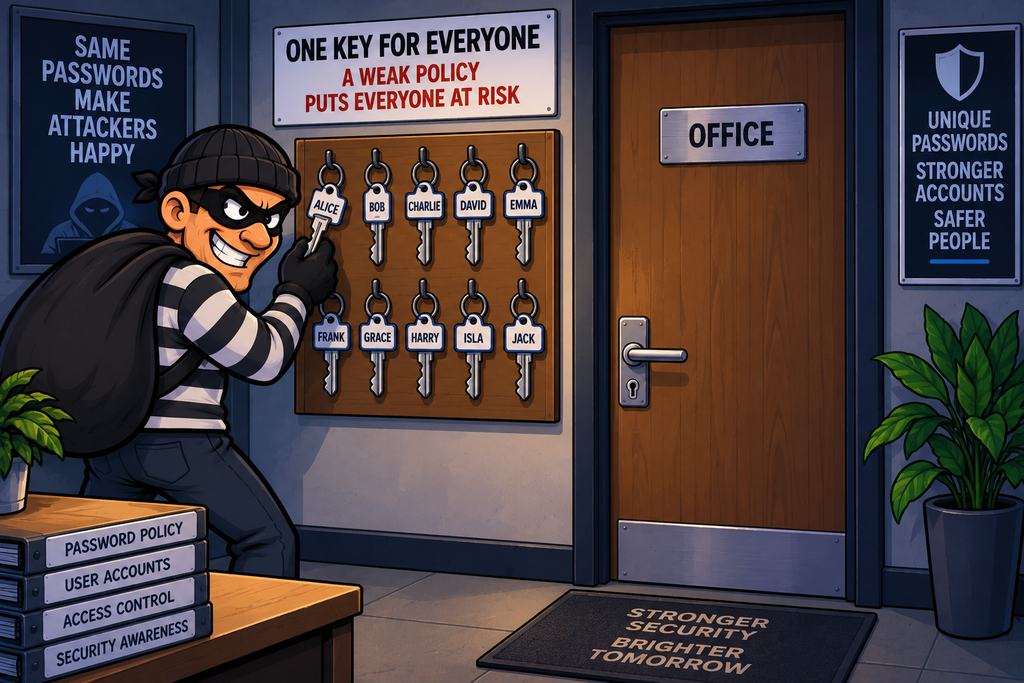
Imagine an office where everyone has a key to the front door.
If the organisation allows people to choose keys that are:
- Tiny and easy to copy
- The same as everyone else’s
- Based on their name
- Left unchanged for years
- Shared with colleagues
then having a locked door doesn’t provide much protection.
Passwords work in much the same way.
A password policy defines the rules an organisation uses to control how passwords are created, protected and used.
A password policy is designed to make passwords harder to guess, harder to steal, harder to break, and harder to abuse.
Password policies are therefore an important preventive security control, particularly when they are combined with MFA, account lockout or rate limiting, secure password storage and good user education.
What Is a Password Policy?
A policy is a collection of rules designed to govern how an organisation operates. As such, a password policy is a collection of rules governing passwords – How they are created, distributed, managed, used, revoked, and changed. The policy should also detail what to do if a password is lost, stolen, or forgotten.
The policy should govern the entire password lifecycle.
A policy might specify:
- Minimum password length
- Maximum password length
- Whether common passwords are prohibited
- Whether previously used passwords can be reused
- Whether passwords can expire
- How passwords are stored
- How failed logins are handled
- Whether MFA is required
- Whether passwords can be reset
- How compromised passwords are dealt with
The exact rules should reflect the organisation’s risk and the authentication technology being used.
Why Do Password Policies Matter?
Passwords are still one of the most common ways people authenticate to systems and services.
Unfortunately, people tend to choose passwords that are:
- Easy to remember
- Easy to type
- Related to themselves
- Reused across multiple systems
Attackers know this. So an attacker who knows the name and other personal information of a potential victim may have a much easier time guessing what they have set as their password.
A strong policy aims to make predictable choices less useful to attackers.
The Password Attack Problem
Attackers have several ways of attacking passwords.
These include:
- Password guessing
- Brute-force attacks
- Dictionary attacks
- Password spraying
- Credential stuffing
- Phishing
- Malware
- Keylogging
- Password database theft
A good password policy addresses some of these attacks directly and makes others less effective.
Password Length Matters
One of the most important characteristics of a password is its length.
Consider:
abc123

vs.

correct-horse-battery-staple
The second password contains considerably more characters and may therefore provide much more resistance to guessing or brute-forcing – assuming it is not a commonly used or compromised phrase.
Modern password guidance generally places considerable emphasis on length rather than simply requiring lots of different character types.
Complexity Requirements
Traditional password policies often required users to include combinations of characters such as:
✓ Uppercase
✓ Lowercase
✓ Numbers
✓ Special character
For example:
P@ssw0rd!At first glance, this looks fairly complex.
The thing to remember about complexity rules though is that we are dealing with people, and in most cases, people don’t like complexity – as such, attackers know that people commonly make predictable substitutions such as:
- a → @
- o → 0
- s → $, or 5
- 1 → !
So simply requiring a mixture of character types does not automatically produce a strong password.
Length vs Complexity
Consider these two passwords:
Tr0ub4dor!

vs.

correct-horse-battery-staple
The first password contains a mixture of character types, but the second one is longer.
In many circumstances, the longer password (or passphrase) can provide greater resistance to guessing.
The key point is – Don’t confuse complexity with unpredictability. A short password containing numbers and symbols can still be predictable.
Passphrases
Psychology also plays a part when it comes to passwords.
The term “password” implies a word. A better approach is to use the term passphrase as this implies more than one word.
For example:
purple-train-correct-horse-lampA long passphrase can be easier for a person to remember than a short collection of random symbols.
However, users should avoid phrases based on common quotations, song lyrics or other well-known phrases because attackers can include these in their password dictionaries.
Don’t Force Arbitrary Short Maximums
Some systems historically imposed maximum password lengths such as 8 characters
This is poor practice for modern authentication systems. The compute time to process every possible character for an 8 character password depends on the system being used to attack the password, but is extremely short compared to that to crack a 12 or 14 character password.
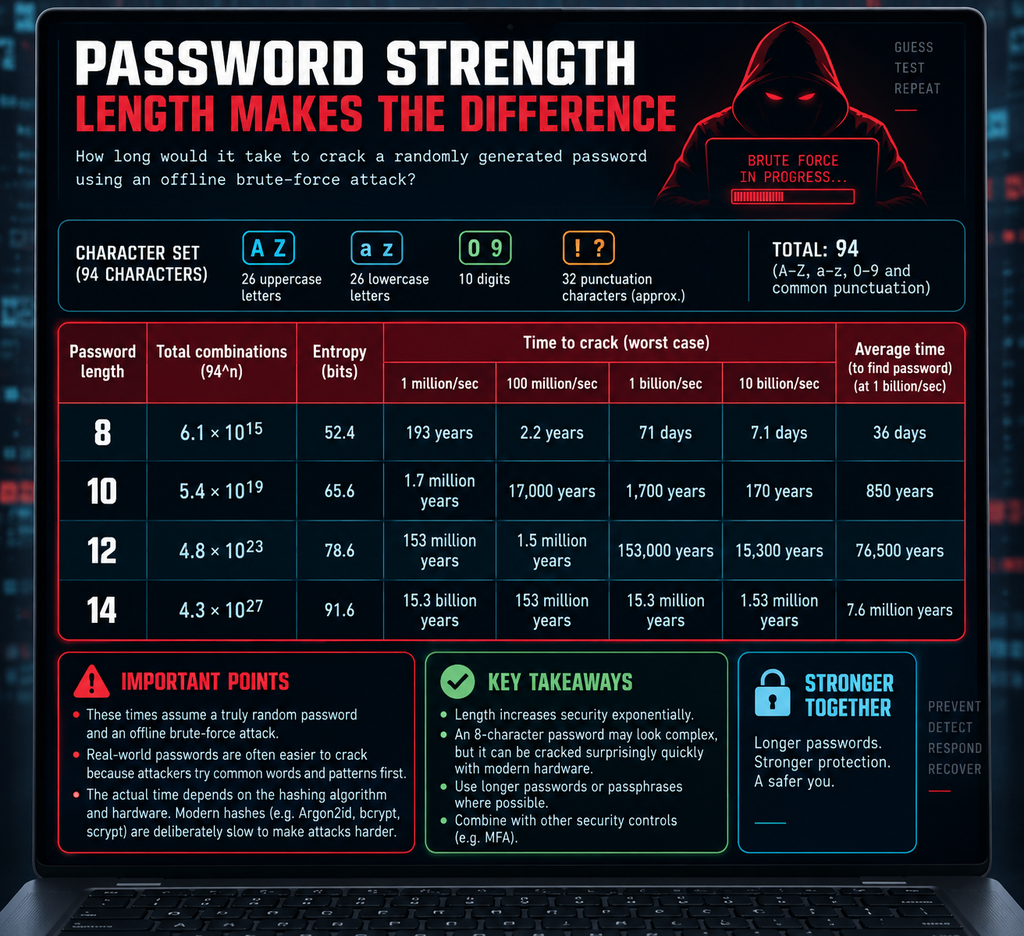
A system should generally allow sufficiently long passwords or passphrases. Artificially short maximum lengths reduce the possible password space.
Common Passwords Should Be Blocked
We should remember that a password can be long but still be terrible.
For example:
1234567890123456
passwordpassword
qwertyuiopasdfgh
letmeinletmein12
Although the length of a password(phrase) is important, length alone doesn’t make a password secure.
A mature password policy can compare new passwords against a list of:
- Common passwords
- Previously breached passwords
- Common password patterns
- Organisation-specific predictable passwords
and reject them.
Don’t Use Personal Information
Passwords based on personal information are particularly dangerous.
Attackers may obtain personal information from various sources:
- Social media
- Company websites
- Public records
- Data breaches
- Previous attacks
A good password policy should discourage predictable personal information.
Password Reuse
Possibly the biggest of all password problems is that of password reuse.
If one service is compromised, an attacker will try the stolen credentials elsewhere – again, we must remember that people are often predictable – people often reuse passwords as it means fewer to remember.
This type of attack is known as credential stuffing.
This is why users should have unique passwords for different services.
If password reuse cannot be avoided, at least make sure to have different passwords for work and personal accounts, and between high-priority accounts such as email, or banks to that of other accounts.
Password Managers
A password manager can make unique passwords practical.
Instead of remembering 200 different passwords, all you need to remember is one strong master credential for the password manager and then the password manager stores the individual passwords.
This makes password reuse much less necessary.
Organisations can provide or recommend approved password managers for users.
Randomly Generated Passwords
Because the user does not have to remember every password if they are using a password manager, the password manager can generate highly random passwords for different services and accounts.
A randomly generated password doesn’t need to be memorable because the password manager remembers it – not the user.
Password Expiration
Traditional password policies often required users to change passwords regularly.
For example every 30 or 90 days
Whilst this might sound like a secure practice, it can create an unintended problem in that it forces users to constantly have to think of new passwords, and as such users may respond by making predictable changes:
- P@ssword
- P@ssword1
- P@ssword2
- P@ssword3
- etc.
An attacker who knows the previous password may be able to predict the next one.
Modern security guidance generally favours not forcing arbitrary periodic password changes for ordinary users unless there is a specific reason to do so.
Instead, passwords should be changed when:
- They are compromised.
- There is evidence of an attack.
- The user requests a change.
- The organisation has a specific risk-based requirement.
This is an important change from older password-policy thinking.
A strong password does not automatically become weak simply because 90 days have passed.
A known-compromised password, however, should be changed immediately.
Password History
Organisations may also prevent users from immediately reusing old passwords.
This prevents users from simply cycling through the same small collection of passwords.
However, password-history requirements should be balanced against usability.
Failed Login Attempts
Password policies often interact with controls that limit repeated login attempts.
This makes automated guessing more difficult. However, simply locking an account after a small number of failures can create a denial-of-service opportunity.
An attacker could deliberately cause someone else’s account to lock by spamming the account with a relatively small number of incorrect attempts.
A more flexible approach is often to introduce delays or rate limits.
This slows down automated attacks without necessarily locking the user out completely.
Password Spraying
Password spraying is a different attack to the more traditional brute force.
Instead of trying hundreds of passwords against one account, the attacker tries a small number of common passwords against many accounts.
This can avoid some traditional account-lockout mechanisms.
Controls such as:
- MFA
- Password blocklists
- Risk-based authentication
- Rate limiting
- Monitoring
can help defend against password spraying.
Multi-Factor Authentication
One of the biggest improvements to password security is Multi-Factor Authentication (MFA).
Instead of relying on the simple password, MFA uses a second, or third element that is typically out-of-bounds to the other data
This second factor might be:
- A Security key
- An Authenticator application
- Some Biometric data
- A Hardware token
- Other approved authentication mechanism
This means that knowing the password alone may not be enough.
More detail about MFA can be found here
Passwords and Phishing
A strong password doesn’t necessarily stop other types of attacks such as phishing.
Suppose an attacker creates a fake login page and tricks a user into visiting it.
The users password may be extremely strong, but the attacker has tricked the user into simply giving it to them.
This is another reason MFA is important.
Phishing-Resistant Authentication
Some forms of MFA are more resistant to phishing than others.
Hardware security keys using standards such as FIDO2/WebAuthn can provide strong protection because authentication is cryptographically tied to the legitimate website.
A fake website cannot simply collect the same reusable credential in the way it can collect a password.
Password Storage
A password policy isn’t only about what a user chooses for their password, or passphrase. Organisations also need to protect passwords when they are stored.
A properly designed application should not store credential data in clear text
If the store of the user credentials is stolen or access by an unauthorised entity, the attacker would immediately have everyone’s passwords.
Instead, passwords should normally be processed using a password hashing function.
When a user generates a password, the system should take the data, process it through a hashing algorithm (ideally with a salt to add complexity) and then store the resulting hash digest.
When the user logs in with their password, the same hashing algorithm (and salt) is used to generate the digest which is then compared against the stored digest. If the match – access is granted, if they dont, access is rejected.
The original password should never need to be stored.
Remember though that hashing is not encryption – This distinction is important.
Encryption is designed so that data can be decrypted using a key.
Hashing is designed as a one-way process
Passwords generally should be hashed rather than encrypted for storage.
Salted Password Hashes
As mentioned above, password hashes should normally use a unique salt.
The salt is designed to add a level of randomness to the password during the hashing process – If two users have the same password, unique salts mean their stored password hashes should still differ.
This makes certain attacks against stolen password databases more difficult.
Password Hashing Algorithms
General-purpose hashing algorithms such as SHA-256 are not normally sufficient on their own for storing passwords.
Password storage should use a purpose-designed password hashing function such as:
- Argon2
- scrypt
- bcrypt
- PBKDF2
These are deliberately designed to make large-scale password guessing more expensive.
The key issue is that SHA-256 is designed to be fast, whereas password-hashing algorithms are deliberately designed to be slow and expensive.
If a website stores a password hash using SHA-256 for example, then an attacker who obtains the password database can perform enormous numbers of guesses very quickly.
For example, they can:
- Guess a password.
- Calculate its SHA-256 hash.
- Compare the result with the stolen hash.
- Repeat — potentially billions of times.
SHA-256 is excellent for things such as file integrity, digital signatures and cryptographic checksums, where speed is generally desirable, but for password storage, that speed works in the attacker’s favour.
Password-specific algorithms take the opposite approach. They deliberately make each password guess computationally expensive.
| Algorithm | How it makes cracking harder |
|---|---|
| SHA-256 | Very fast; relatively cheap to calculate |
| bcrypt | Deliberately CPU-intensive and configurable |
| scrypt | CPU-intensive and memory-intensive |
| Argon2id | CPU-intensive, memory-intensive and configurable |
The memory requirement is particularly useful with scrypt and Argon2id. An attacker trying to test millions of passwords simultaneously can’t simply throw thousands of GPU cores at the problem as efficiently, because each parallel calculation also requires significant memory.
If each guess costs more time and computing resources, large-scale cracking becomes more difficult.
Protect Password Reset Processes
A password policy can be undermined by a weak password-reset mechanism.
For example security questions based on personal information are often deemed weak because the answers may be discoverable via phishing, social media, etc.
Modern systems should use stronger mechanisms such as secure, time-limited reset links or other appropriate identity verification.
Password Reset Tokens
A password reset process might work by generating a one-time token presented to the user via a time-limited URL.
The token can only be used once to stop replay attacks, and the link the token is bound to has a limited time for the user to use to reset their data. This greatly reduces the window of opportunity for attacker to attempt to steal the token and use it themselves.
However, the reset tokens themselves must be protected.
The tokens generated should themselves not be predictable – or be reversible to reveal any data
For example, a token should not be generated using something like Base64
e.g. a token such as https://mysite.com/reset?t=dXNlcmlkPTEyMzQ1Ng== may look like random data
But decodes as https://mysite.com/reset?t=userid=123456
Don’t Reveal Whether an Account Exists
Password reset and login systems can sometimes leak information.
For example, if a user attempts to log in with incorrect data, an error message that says “That email address doesn’t exist.” can be useful to an attacker.
An attacker can use this to discover which email addresses correspond to valid accounts.
A safer approach may provide a generic response such as “If an account exists for this
address, instructions have been sent.“
This reduces account enumeration.
Password Policies for Privileged Accounts
Administrator accounts deserve additional protection as unauthorised access to these can be catastrophic for the organisation.
Compromise of a normal account may affect one user, but compromise of a domain administrator account could affect the entire organisation.
As such the password policy for such accounts should be subject to more stringent controls.
Service Accounts
Service accounts can also create additional challenges for password administration. A service may need a credential but there may be no human logging into it.
These accounts should have:
- Minimum necessary privileges
- Strong credentials
- Appropriate credential rotation
- Restricted access
- Monitoring
Where possible, organisations should use modern alternatives such as managed identities or other non-password authentication mechanisms.
Shared Accounts
Shared accounts create accountability problems.
For example if you have an admin account that three people share (Alice, Bob, Dave), then fi something goes wrong proving who actually performed the action can be a quite difficult thing to do
Individual accounts provide much better accountability.
Where privileged access is required, named accounts combined with appropriate privileged-access controls are generally preferable.
Password Policy and Monitoring
All password-related events should be monitored.
Examples include:
- Multiple failed logins
- Password spraying
- Password resets
- MFA failures
- Disabled accounts
- New privileged accounts
- Authentication from unusual locations
This turns the authentication events into a useful detective control.
Password Policies and Breached Credentials
Organisations should consider whether passwords have appeared in known breaches. Sites such as haveibeenpwnd offer APIs that companies can use to see if any users are using credentials that are known to be included in password breaches.
This can prevent users from choosing passwords that attackers already possess.
Password Policy and Passkeys
Passwords are increasingly being supplemented or replaced by passkeys and other passwordless authentication methods.
Instead of using just a password to authenticate, a passkey uses public-key cryptography tied to a hardware device (such as a Yubikey) to allow access.
This can eliminate many traditional password attacks, particularly password reuse and credential phishing.
Password policies therefore need to evolve alongside authentication technology.
A mature security strategy shouldn’t simply keep making password rules more complicated.
Instead, companies should ask – “Can we reduce our dependence on passwords altogether?“
Possible alternatives or additional controls include:
- Passkeys
- Hardware security keys
- Smart cards
- Certificates
- Biometrics
- Managed identities
- Device-based authentication
The strongest password policy may ultimately be the one that doesn’t require users to use passwords for every service.
Common Password Policy Mistakes
- Requiring complexity but allowing short passwords – Pa$$word looks complex but is well known.
- Forcing unnecessary password changes – Users often respond with predictable variations.
- Allowing common passwords – Length doesn’t help if the password is extremely common.
- Allowing password reuse – One breach can become multiple compromises.
- Ignoring MFA – A stolen password can still provide access.
- Storing passwords in plaintext – A database breach becomes catastrophic.
- Using weak password hashing – Fast general-purpose hashes are not designed for password storage.
- Relying on security questions – Answers can often be discovered.
- Ignoring privileged accounts – Administrator credentials deserve stronger controls.
- Forgetting service accounts – Non-human accounts can become attractive targets.
In Summary
A password policy defines how an organisation creates, protects and manages passwords.
A modern password policy should consider:
- Length – Allow long passwords and passphrases.
- Uniqueness – Don’t reuse passwords between services.
- Common Passwords – Block common and known-compromised passwords.
- Password Storage – Use appropriate salted password-hashing algorithms rather than plaintext or reversible storage.
- Authentication Protection – Use rate limiting and appropriate protections against guessing and spraying.
- MFA – Require additional authentication factors, particularly for sensitive and privileged access.
- Password Changes – Don’t force arbitrary periodic changes without a security reason; require changes when passwords are compromised or there is another meaningful reason.
- Privileged Accounts – Apply stronger controls to administrators and other high-value accounts.
- Password Managers – Make unique, randomly generated passwords practical for users.
- Monitoring – Detect unusual authentication activity and potential attacks.
- Passwordless Authentication – Where appropriate, reduce reliance on passwords through technologies such as passkeys and hardware security keys.
Password policies are closely connected to:
- Authentication
- Multi-Factor Authentication
- Access Control
- Least Privilege
- Zero Trust
- Encryption
- PKI
- Secure Configuration
- Defence in Depth
- Monitoring and Detection
The most important change in thinking is this:
Don’t measure password security by how complicated the password looks. Measure it by how difficult it is for an attacker to obtain or successfully guess it—and what happens if they do.
A good password policy doesn’t simply make users create difficult passwords – It makes stolen passwords less useful to attackers.