

Imagine buying a safe with a faulty lock.
The manufacturer discovers the problem and produces a replacement lock.
You know about the problem, you have access to the fix – but the safe is still vulnerable until you actually replace the lock.
That is essentially the problem that patch management addresses.
Software inevitably contains vulnerabilities. When those vulnerabilities are discovered, the developer may release an update or patch that fixes them.
Patch management is the process of identifying, testing, deploying and verifying those updates across an organisation’s systems.
Knowing that a vulnerability exists isn’t enough. The vulnerability remains a risk until the affected system is fixed, replaced or otherwise protected.
Patch management is therefore a fundamental preventive security control.
What Is a Patch?
A patch is an update designed to modify software, firmware or an operating system.
The term patching comes from the days when programs were produced as a series of punched-cards – if a programmer made a mistake and punched a hole in the wrong place, a patch was used to cover the hole and thus, fix the error.

A patch might:
- Fix a security vulnerability.
- Correct a software bug.
- Improve reliability.
- Fix compatibility problems.
- Improve performance.
- Add functionality.
From a cybersecurity perspective, the most important patches are security patches.
Why Does Patch Management Matter?
Software vulnerabilities are constantly being discovered by the manufacturer, users, security researchers, and hackers alike.
A vulnerability might allow an attacker to:
- Execute arbitrary code.
- Bypass authentication.
- Escalate privileges.
- Read sensitive information.
- Crash a system.
- Install malware.
- Move laterally through a network.
If the vendor releases a patch but the organisation doesn’t install it, the vulnerability still remains.
This creates an important window of opportunity for attackers.
As soon as a manufacturer announces the release of a patch, a race starts between organisations deploying the patch to their estate, and hackers trying to find unpatched systems to abuse.
This is sometimes referred to as the patch gap.
The larger the patch gap, the longer attackers have to exploit the vulnerability.
Zero-Day Vulnerabilities
Sometimes attackers discover and exploit a vulnerability before a patch exists.
This is known as a zero-day vulnerability. The concept here is that when a manufacturer is made aware of a vulnerability, the clock starts to tick until the patch is released. If the manufacturer is not aware of the vulnerability, but attackers are – then the clock hasn’t started – it is still on day zero.
Patch management cannot fix a vulnerability for which no patch exists.
This is why organisations also need other controls such as:
- Firewalls.
- Network segmentation.
- Application control.
- EDR.
- Least privilege.
- Monitoring.
- Intrusion prevention.
- Compensating controls.
Once a patch becomes available, however, the organisation needs to deploy it as quickly and safely as practical.
What Needs Patching?
In short – Almost everything containing software may need updating.
Examples include:
- Operating Systems – E.G. Windows, Linux, macOS, Unix, Android, iOS
- Applications – E.G. Web browsers, Productivity suites, PDF readers, Databases, Development tools, VPN clients.
- Network Devices – E.G. Firewalls, Routers, Switches, Wireless access points
- Infrastructure – E.G. Servers, Hypervisors, Storage systems, Backup systems
- Cloud and Containers – E.G. Container images, Kubernetes components, Cloud agents, Virtual machines.
- Firmware – E.G. BIOS/UEFI, SSDs, Network cards, Printers, IoT devices
Patch Management Is More Than “Install Updates”
This is one of the most important distinctions – Patch management is a process, not simply a button to press.
A mature patch management process looks something like:
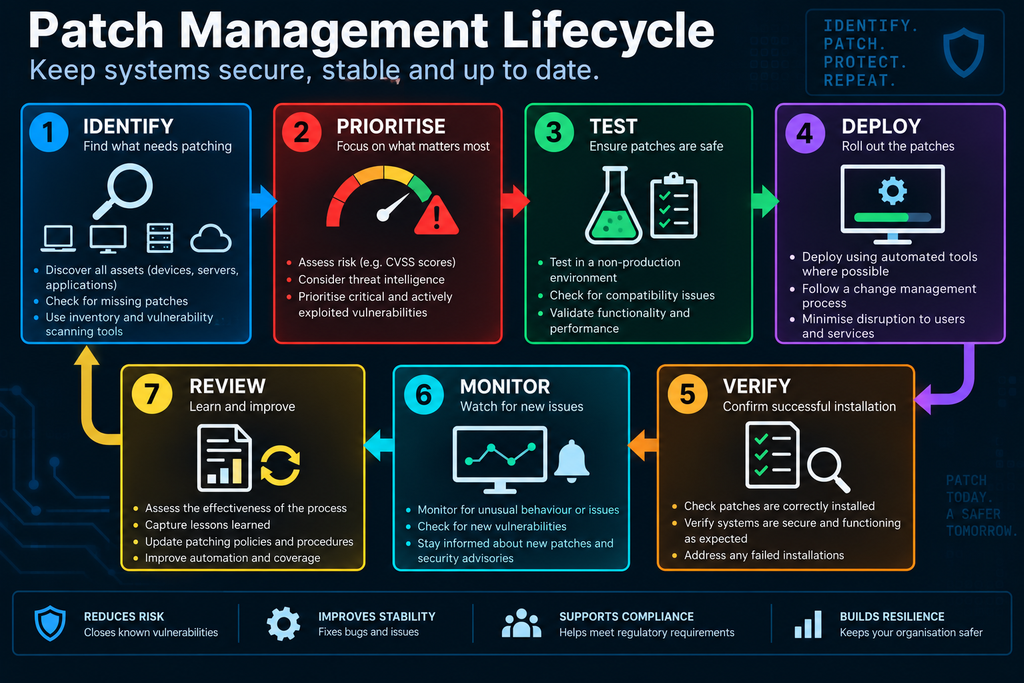
Every stage matters.
Step 1: Identify Your Assets – You can’t patch systems you don’t know exist.
An organisation needs an accurate inventory of:
- Computers.
- Servers.
- Applications.
- Network devices.
- Cloud resources.
- IoT devices.
- Firmware.
- Virtual machines.
- Containers.
Without this information, some systems will inevitably be missed and unknown assets are a problem.
Imagine the security team believes it has patched everything, but lurking deep in the bowls of the server room is a server that was implemented for a project a couple of years ago, but now nobody uses. This server will not have the right patching levels because it’s been forgotten about – but that’s exactly the server an attacker would love to find!
Asset management is therefore a critical part of patch management.
Step 2: Identify Available Patches – which updates need to be applied?
This can be done manually for small environments or automatically using management and vulnerability tools.
Vulnerability scanners can help identify systems running vulnerable software. This helps organisations identify where patching is most urgent.
Step 3: Prioritise – Not every patch is equally urgent.
An organisation may have hundreds of updates available – Trying to install everything immediately isn’t always practical.
Instead, patches should be prioritised according to risk.
Factors can include:
- Severity.
- Exploitability.
- Whether exploitation is occurring in the wild.
- Whether public exploit code exists.
- Importance of the affected system.
- Exposure to the Internet.
- Sensitivity of the data.
- Availability of compensating controls.
One commonly used way of prioritising patches is to use the CVSS – Common Vulnerability Scoring System.
This system provides a numerical indication of vulnerability severity – A high CVSS score can indicate a serious vulnerability.
However the CVSS score should not be the only factor used to decide patch priority – Context matters.
A medium-severity vulnerability on an Internet-facing critical server could be more urgent than a high-severity vulnerability on an isolated test machine.
Similarly, a vulnerability being actively exploited by threat actors can dramatically change its priority.
Threat intelligence can therefore help determine which patches should be deployed first.
Step 4: Test the Patch – Installing a patch can sometimes break something.
This is where patch management becomes more complicated. Patches should generally be tested before widespread deployment, particularly in critical environments.
Once tested, a phased roll-out of the patch should be conducted with roll-back plans in place in case something does break
Sometimes there isn’t time for a lengthy testing and roll-out process.
In these circumstances, organisations may accept a higher operational risk in order to reduce a much larger security risk.
This is a risk-management decision.
Step 5: Deploy the Patch
Patch deployment can be:
- Manual.
- Automated.
- Scheduled.
- Remote.
- Centralised.
Small environments might use manual updates.
Large organisations generally need automation.
Organisations can use different technologies to manage updates.
Examples include:
- Windows Update for Business.
- Microsoft Intune.
- Microsoft Configuration Manager.
- WSUS.
- Linux package-management systems.
- Ansible.
- Configuration-management platforms.
- Cloud management tools.
- Mobile Device Management systems.
The specific technology matters less than having an effective process.
Automatic Updates
Automatic updates are extremely useful for many systems as they reduce the time between the patch being released and it being deployed to the system
However, automatic patching isn’t appropriate for every system.
Critical systems may require:
- Testing.
- Change approval.
- Maintenance windows.
- Rollback procedures.
Step 6: Verify – Installing a patch isn’t the end of the process.
The organisation should verify that the patch was successfully applied. This can reveal systems that:
- Failed to update.
- Were offline.
- Had insufficient disk space.
- Had incompatible software.
- Were excluded from deployment.
A mature patch-management process tracks issues them until they are resolved or an approved alternative control is in place.
Sometimes a system genuinely cannot be patched immediately. This creates a patch exception.
For example:
- The vendor no longer supports it.
- The application will break.
- The device is extremely difficult to access.
- The patch has known compatibility problems.
- The system is part of a safety-critical environment.
- The manufacturer has not approved the patch.
But an exception shouldn’t simply mean “We can’t patch it, so we’ll forget about it.”
Suppose an old server cannot be patched – Additional controls might include:
- Network segmentation.
- Firewall restrictions.
- Application allowlisting.
- Removing Internet access.
- Restricting administrative access.
- Increased monitoring.
These controls don’t magically fix the vulnerability, they reduce the opportunity for attackers to exploit it.
Legacy Systems
Legacy systems are a particularly difficult problem when patching is concerned.
Some systems may be:
- No longer supported.
- Running obsolete operating systems.
- Running proprietary software.
- Connected to specialist hardware.
- Impossible to patch without breaking functionality.
Examples include some:
- Industrial control systems.
- Medical devices.
- Manufacturing systems.
- Embedded systems.
For these systems, organisations may need a combination of:
- Isolation.
- Segmentation.
- Monitoring.
- Access control.
- Compensating controls.
- Replacement planning.
End-of-Life Software
One of the biggest patch-management headaches is end-of-life software.
When a vendor stops supporting a product, the long-term solution is normally to migrate or replace the system.
Continuing to run unsupported software indefinitely creates a growing security problem.
Patch Management and Vulnerability Management
These concepts are closely related but aren’t identical.
Vulnerability management asks – “What weaknesses exist, how serious are they, and what should we do about them?”
Patch management asks – “How do we deploy the available fixes?”
Patch management is therefore an important sub-part of vulnerability management.
Patch Management and Hardening
Patch management and hardening are also closely related.
Hardening = Secure the configuration
Patch management = Keep the software up to date
A properly hardened system still needs to be patched – and attackers know that organisations don’t always patch quickly.
They can scan large numbers of systems looking for vulnerable software.
Once a vulnerability becomes publicly known, scanning and exploitation can sometimes happen very quickly.
When a vulnerability is publicly disclosed, attackers may analyse the patch itself to understand what was fixed – This is one reason delaying patches can be dangerous.
The availability of a patch can effectively provide attackers with information about the underlying vulnerability.
Patch Tuesday
Microsoft traditionally releases many security updates on the second Tuesday of each month, commonly known as Patch Tuesday. However, critical updates can be released outside this normal schedule.
This gives organisations a predictable point in the month around which they can plan testing and deployment. But this also gives attackers a well-defined window of opportunity for launching their latest attacks (especially zero-days)
Patch Management Metrics
As with everything in business – you cannot improve on something if you don’t measure it.
Patch management is no different
Useful metrics include:
- Patch compliance – How many systems are patched vs those which are not?
- Mean Time to Patch – How long does it take to patch a vulnerable system?
- Critical vulnerability age – How long have critical vulnerabilities remained unresolved?
- Failed patch rate – How many updates failed to deploy?
- Exception count – How many systems cannot currently be patched?
These metrics help security teams identify weaknesses in the patching process.
Patch SLAs
Organisations can establish service-level agreements for patching – especially for mission-critical systems.
The exact times should reflect the organisation’s risk appetite.
The important thing is having defined expectations rather than simply saying – “We’ll patch it when we get around to it.”
Patch Management for Remote Workers
Remote working makes patch management more complicated. For example, a laptop may rarely connect to the corporate network – so how do you deploy tested patches?
Cloud-based patch management allows organisations to patch devices even when users are working remotely and are not connected to the corporate network.
Typically the process is as follows:
- Agent installed – A management agent on the laptop communicates with the cloud patch-management service.
- Identify – The service checks the device for missing or outdated patches.
- Prioritise – Patches are assessed based on severity, vulnerability and organisational policy.
- Deploy – Approved patches are downloaded directly from the internet and installed on the device.
- Verify – The cloud service reports whether installation was successful.
- Monitor – Administrators can see the patch status of remote devices through a central dashboard.
The key advantage here is that the device doesn’t need to connect to the corporate VPN or internal network. As long as it has internet access, it can receive and report patches.
Patch Management as a Security Control
Patch management is primarily a preventive security control – It removes known vulnerabilities before attackers can exploit them.
But patch management also supports detective controls in that an unexpected system that remains unpatched can generate an alert for members of the IT teams to investigate.
In Summary
Patch management is the process of identifying, prioritising, testing, deploying and verifying software and firmware updates.
It includes:
- Operating systems.
- Applications.
- Servers.
- Network devices.
- Firewalls.
- Cloud systems.
- Containers.
- IoT devices.
- Firmware.
- Security tools.
A mature patch-management process includes:
- Identify – Know what systems and software you have.
- Assess – Determine which vulnerabilities affect them.
- Prioritise – Consider severity, exploitability, exposure and business impact.
- Test – Determine whether the patch causes compatibility or operational problems.
- Deploy – Install the patch using an appropriate process.
- Verify – Confirm that the patch actually succeeded.
- Monitor – Continue checking for vulnerable and non-compliant systems.
- Manage Exceptions – Where patching isn’t possible, document the risk and apply compensating controls.
Patch management is closely related to:
- Hardening
- Vulnerability Management
- Asset Management
- Defence in Depth
- Least Privilege
- Network Segmentation
- Application Whitelisting
- Secure by Design
The biggest mistake is assuming that “patch available” means “vulnerability fixed.”
It doesn’t.
Until that process is complete, the vulnerability may still be exploitable.
The attacker only needs one unpatched system. Your job is to make sure they can’t find one.