
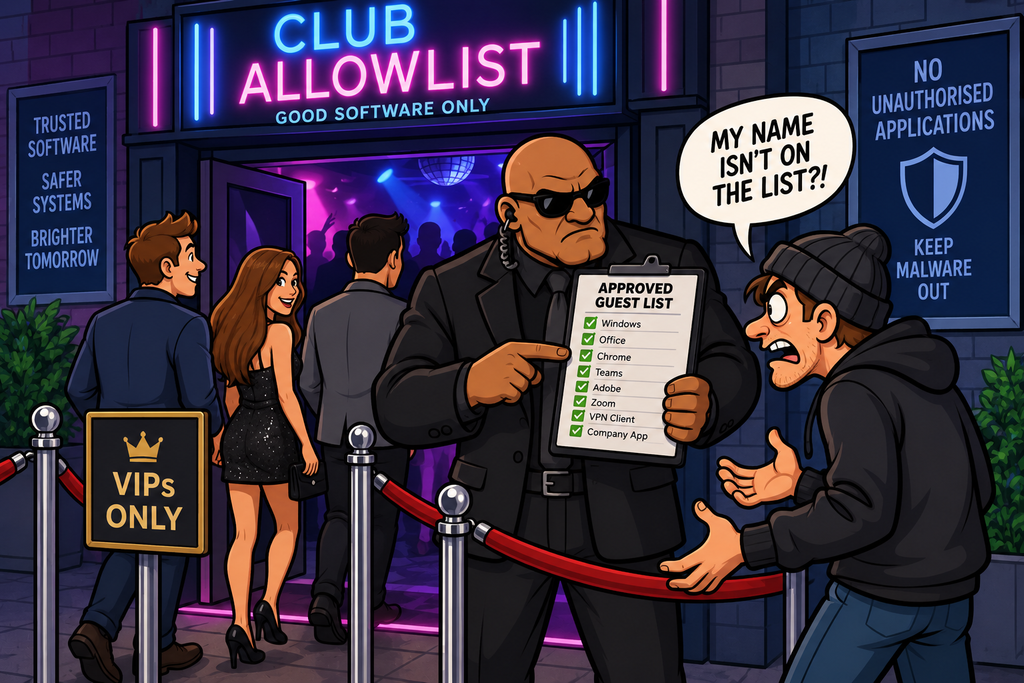
Imagine a nightclub with a strict guest list – The door staff don’t try to memorise every troublemaker who might turn up.
Instead, they work from a simpler rule:
If your name is on the list, you can come in. If it isn’t, you don’t get through the door.
That is essentially the idea behind application whitelisting.
Rather than trying to identify every malicious application that should be blocked, the system defines which applications are approved and allows only those applications to run.
Everything else is denied by default.
This is a much easier system to manage, and doesn’t carry the same risk of missing something that shouldn’t be allowed.
Application whitelisting is therefore a classic preventive security control.
Its goal is simple:
Only trusted software should be allowed to execute.
What Is Application Allowlisting?
Application whitelisting is a security approach that allows an organisation to define which software is permitted to run on a system.
The system might allow:
- Approved operating-system components
- Approved business applications
- Approved scripts
- Approved installers
- Approved administrative tools
And block:
- Unknown software
- Unapproved applications
- Malware
- Unauthorised scripts
- Random executables downloaded from the Internet
A simple policy might look like:
Approved:

Microsoft Word        ✓
Microsoft Excel       ✓
Google Chrome         ✓
Company ERP Client    ✓
PowerShell scripts    Limited
Unknown.exe           ✗
RandomTool.exe        ✗
Malware.exe           ✗
Denylisting vs Allowlisting
Traditional security products often use a denyisting model.
Denylisting says – Everything is allowed unless we know it is bad.
For example:
Known malware      → BLOCK
Known ransomware   → BLOCK
Known trojan       → BLOCK
Unknown program    → ALLOW
Application allowlisting reverses that model.
Approved software  → ALLOW
Everything else    → BLOCK
This is effectively a default-deny approach to software execution.
Why Is This Important?
Attackers frequently need to execute code in order to further their goals.
That might be:
- Malware
- Ransomware
- A remote-access tool
- A credential stealer
- A malicious script
- A custom payload
- An unauthorised utility
If the operating system refuses to run software that isn’t approved, the attack becomes much harder.
The malicious file may exist on disk – But that doesn’t necessarily mean it can be executed.
Application Alloylisting as Default Deny
The key principle is:
Deny by default. Allow only what is required.
This is closely related to the same principle as that used in firewalls.
A badly controlled endpoint might effectively allow any application to run.
Whereas an allowlisted endpoint asks the question – is this code approved or not?
This dramatically reduces the number of programs an attacker can simply introduce and execute.
How Does Application Alloylisting Decide What Is Trusted?
There are several ways a system can determine whether an application should be allowed.
File Path Rules
The simplest approach is to allow applications based on where they are stored.
For example – C:\Program Files\ApprovedApp\* = ALLOW
While – C:\Users\Alice\Downloads\* = BLOCK
This can be easy to manage, however, it can be weak if users are able to write files into an approved directory.
So path-based rules need careful permission management.
File Hashes
Another approach is to identify an application by its cryptographic hash.
Before deployment of code, a hash is recorded. Before the code is executed, the hash is checked – If the file changes, the hash changes and the system can then take the required approach – ALLOW, DENY, QUERY.
This gives very precise control, but it creates an operational problem.
Every legitimate software update changes the file. So whenever a legitimate update is pushed out, administrators need to update the allowlist.
Hash rules are therefore accurate but can be difficult to maintain at scale.
Digital Signatures
A more flexible approach is to trust software based on its digital signature.
Trusted manufacturers will sign their code with a digital signature. An organisation might trust software signed by:
Microsoft
Adobe
Google
Approved internal development team
This can reduce the maintenance burden because multiple versions of an application can be accepted based on the publisher signature rather than individual file hashes.
Publisher-based application control relies on code signing certificates.
The software publisher signs the application using their private key. The system can verify the signature using the corresponding public-key infrastructure.
This connects application allowlisting directly to the concepts of:
- PKI
- Digital certificates
- Certificate Authorities
- Digital signatures
However, we must remember that whilst this system is relatively robust – signed software isn’t automatically safe – A trusted publisher can still produce vulnerable software, and code-signing certificates can sometimes be stolen or abused.
Additionally, if the manufacturer is compromised, an attacker can add malicious code to an application that is subsequently signed with a legitimate signature.
A good example of this exact scenario is the 2020 SolarWinds ORION attack.
Here attackers injected a hidden backdoor (known as SUNBURST) into legitimate Orion software updates.
The result was over 18,000 customers downloaded and installed the backdoor into their networks. Some of the affected organisations included Microsoft, FireEye, the US Department of Justice, and the US Homeland Security.
You can read more about ORION here
Publisher Rules
Publisher-based rules can be even more specific.
For example:
ALLOW
Publisher: Microsoft
Product: Microsoft Office
Version: 16 or later
This gives administrators control over:
- Publisher
- Product
- Application name
- Version
- Signing certificate
This is often more practical than approving every file individually.
Application Identity
Modern application-control systems can combine multiple attributes when making decisions about allowing an application to run or not.
For example:
- Publisher
- Hash
- Path
- Version
- Certificate
- User
- Device
- Application type
Examining the context of the application request provides much more flexible control over what it can / cannot do.
Scripts Need Controlling Too
Application allowlisting shouldn’t only consider .exe files. Many different types of files can be executed.
Attackers often use scripts.
Examples include:
- PowerShell
- JavaScript
- VBScript
- Batch files
- Python
- Shell scripts
- Office macros
If the application-control policy only blocks unknown executables but allows unrestricted script execution, an attacker may simply use an approved interpreter to run their script.
PowerShell
PowerShell is a good example of this.
PowerShell itself is a legitimate Windows utility and is often essential for system administration.
As such, an organisation cannot necessarily just block it – But its unrestricted use may create risk.
A more controlled approach might be to only allow PowerShell to be run by privileged accounts, or to carefully control what script are allowed to run.
PowerShell has an execution policy which can be applied in various ways
The execution policy is applied to a scope – there are 5 scopes:
- MachinePolicy – Set by Group Policy and applies to everyone using that device
- UserPolicy – Set by Group Policy and applies to specified users across the organisation
- Process – Applies to the current PowerShell process
- CurrentUser – Applies to the current signed-in user
- LocalMachine – Applies to all users of this device
A policy can have 5 levels:
- Restricted – Scripts generally cannot run
- AllSigned – Scripts must be signed in order to run
- RemoteSigned – Local scripts can run, downloaded scripts must be signed
- Unrestricted – Scripts can run, downloaded scripts will display a warning, but can still run
- Bypass – No execution-policy is applied, and no warnings are shown
The PowerShell command Get-ExecutionPolicy -list will display the current policy settings of a device
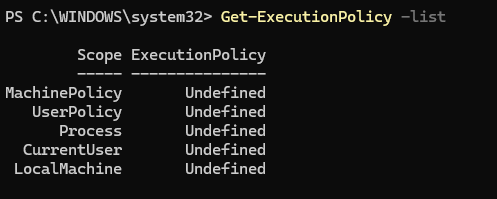
The policy value of Undefined means that the default setting of Restricted will be applied
This illustrates an important point:
Application whitelisting is about controlling execution, not merely blocking software names.
Macros
Microsoft Office macros can also execute code. Macros are written in Visual Basic, which is a powerful language developed by Microsoft that not only allows code to execute within the application (e.g. MS Excel), but also externally between other applications, and Windows itself.
As such, Macros need to be carefully managed. Application-control strategies may therefore be combined with policies that:
- Disable macros
- Allow only signed macros
- Block Internet-originated macros
- Restrict scripting engines
Again, the idea is to control the ways code can run.
DLLs and Shared Libraries
Applications may also load shared libraries such as DLLs.
A DLL (Dynamic Linked Library) is code that can be shared between applications – So for example a developer does not need to write the code for Cut, Copy & Paste into their application – all then need to do is call the DLLs that perform those functions. This makes software development much easier and safer in most cases.
However, an attacker might try to make a trusted program load an untrusted DLL.
More mature application-control systems therefore need to control:
- Executables
- Libraries
- Scripts
- Installers
- Packaged applications
rather than only .exe files.
Installers
Installer applications deserve special attention.
Files such as:
- MSI packages
- Setup programs
- Software deployment packages
can install or execute additional code.
If an attacker can compromise an installer, that can use it to install their malicious code. Similarly, although they are called installers – these software tools can be used to update, or remove software. Attackers can use the Remove code feature to perform additional actions, including editing the Windows registry to add backdoors.
Ordinary users should not necessarily be able to run installer software to install arbitrary software.
Host-Based Control
Application allowlisting normally operates on individual endpoints or servers.
This makes it a host-based preventive control, and it can be particularly effective on servers.
Why?
Because servers often have predictable workloads.
A web server may only need to run:
- Operating-system components
- Web-server software
- Monitoring software
- Backup agents
- Security tools
Anything else may be suspicious.
The smaller and more predictable the legitimate application set, the easier allowlisting becomes.
User workstations are often harder to manage because users may legitimately require many different applications.
A restrictive policy that works perfectly on a web server could make a developer workstation almost unusable.
Application allowlisting therefore needs to reflect the role of the device.
Audit Mode
One practical approach is to start in audit mode.
Here, instead of immediately blocking unknown software, nothing is blocked initially.
Administrators collect information about what legitimate users actually run which allows them to build the policy tailored to the use-case before enforcement begins.
What Happens When Something Is Blocked?
Good application control shouldn’t simply display a simple ERROR when an application is blocked.
Users need useful information.
For example:
APPLICATION BLOCKED

The application:
RandomTool.exe

is not approved by your organisation.

If you require this software for a business purpose, please contact IT.
This helps distinguish between:
- Malicious software
- Unauthorised software
- Legitimate business software that hasn’t yet been approved
Organisations therefore need a defined process for requesting new software, or unblocking blocked software.
Application allowlisting is not just a technical technology – It needs an operational process behind it.
Software Inventory
One of the useful side effects of application control is that the organisation gains a better understanding of its software estate.
It can answer questions such as:
- What applications are installed?
- Which versions are in use?
- Who uses them?
- Which applications are approved?
- Which applications are obsolete?
- Which systems are running unsupported software?
This can improve:
- Patch management
- Vulnerability management
- Licensing
- Asset management
- Incident response
Can Application allowlisting Stop Malware?
ALlowlisting can stop a great deal of malware, particularly when the attacker attempts to introduce a new executable.
But application whitelisting doesn’t make malware impossible.
Attackers may attempt to work around it.
Living off the Land
One of the most important bypass techniques is that of Living off the Land.
Instead of introducing a new malicious executable, the attacker abuses tools that are already installed and trusted on the device, or within the network.
Examples might include legitimate:
- PowerShell
- Command shells
- Script interpreters
- Administrative utilities
- System-management tools
The application itself is legitimate, but the way it is being used is malicious.
This is a major limitation of simple application allowlisting.
More information about the types of executables, binaries, and DLLs which can be used in this way can be found here (LOLBAS) and here (GTFOBins)
Application Hijacking
Attackers may also attempt to abuse trusted applications to execute malicious content.
Examples can include:
- DLL hijacking
- Side-loading
- Plug-in abuse
- Macro execution
- Script execution
- Malicious templates
The outer application may be approved, but the code it loads isn’t necessarily trustworthy.
Stolen Code-Signing Certificates
As mentioned earlier – another potential bypass involves code signing. If an attacker obtains a trusted publisher’s signing key, they may be able to sign malicious software that is still trusted by the victim.
This is why private code-signing keys require strong protection, and also demonstrates the importance of certificate revocation.
Misconfiguration
Application control can also fail through poor policy configuration.
For example: ALLOW: C:\Users\*\*
If users can place arbitrary applications in the path that is allowed, the rule effectively allows almost anything.
Other common mistakes include:
- Overly broad path rules
- Trusting too many publishers
- Allowing all scripts
- Allowing unrestricted interpreters
- Failing to control DLLs
- Allowing users to modify approved directories
- Excluding too many systems from enforcement
As with firewalls:
The technology is only as effective as the policy controlling it.
Application Allowlisting and EDR
Application control works particularly well alongside Endpoint Detection and Response (EDR).
Application control asks the question – “Is this program allowed to run?“
EDR asks questions such as – “What is the program actually doing?“
This helps address the problem of legitimate applications being used maliciously.
Application Allowlisting and Antivirus
Application allowlisting and antivirus approach the problem differently.
Antivirus Typically tries to answer – “Is this file malicious?“
Whereas application allowlisting Asks – “Is this file approved?“
That difference matters.
Consider an unknown file – Traditional malware detection may not yet recognise a brand-new malicious program and allow it to execute
Allowlisting doesn’t need to know whether the application is malicious or not – If it isn’t approved, it doesn’t run.
This makes application control particularly useful against unknown malware (Zero-days).
Application Allowlisting and Ransomware
Ransomware frequently requires executable code.
Application allowlisting can potentially block the initial ransomware payload.
However, ransomware may also exploit legitimate tools or scripts (remember Living off the land?)
So application allowlisting should not be treated as a complete ransomware defence.
It should form part of a broader strategy involving:
- Backups
- EDR
- Patch management
- Least privilege
- MFA
- Network segmentation
- Email security
- Monitoring
Application Control in High-Security Environments
Application allowlisting is particularly useful where systems have a narrow, predictable purpose.
Examples include:
- Point-of-sale terminals
- ATMs
- Kiosks
- Industrial control systems
- Production systems
- Servers
- Medical devices
- Administrative workstations
Consider an ATM.
It may need to run only:
Operating system components
ATM application
Device drivers
Security software
Monitoring agent
If RandomCode.exe appears on the ATM, there is almost certainly no legitimate reason for it to execute.
This makes a strict application-control policy highly practical.
Change Management
Application allowlisting depends heavily on good change management process
Whenever software is:
- Installed
- Updated
- Replaced
- Patched
- Removed
the application-control policy may need updating.
Application control therefore needs to be integrated with normal IT operations.
Logging and Monitoring
Application-control is a preventive control, but the systems can generate valuable security logs.
For example:
2026-09-10 08:42

Host: FINANCE-PC-12
User: Alice
Application: unknown.exe
Path: Downloads
Action: BLOCKED
One isolated event might simply be a user attempting to run an unapproved utility, but repeated events across multiple machines might indicate:
- Malware
- Phishing
- An attack campaign
- Policy bypass attempts
These logs can therefore feed into:
- SIEM
- SOC monitoring
- Incident response
- Threat hunting
This gives application control a detective role as well as its primary preventive function.
Common Application Allowlisting Mistakes
Some common problems include:
- Making the rules too broad
- Ignoring scripts
- Trusting every signed application
- Forgetting DLLs and libraries
- No application inventory
- No approval process
- Allowing administrators to bypass controls freely
- Turning enforcement on too quickly
In Summary
Application allowlisting – also known application control -is a security mechanism that permits approved software to execute while blocking everything else by default.
Applications can be approved based on characteristics such as:
- File hashes
- File paths
- Digital signatures
- Trusted publishers
- Certificates
- Application versions
- Users and devices
A complete application-control strategy should consider more than executables.
It may also need to control:
- Scripts
- PowerShell
- Macros
- DLLs and libraries
- Installers
- Interpreters
- Plug-ins
Application whitelisting can provide strong protection against:
- Malware
- Ransomware
- Unknown executables
- Unauthorised software
- Newly created malicious programs
But attackers may attempt to bypass it through:
- Living-off-the-land techniques
- Trusted utility abuse
- Script execution
- DLL hijacking
- Side-loading
- Stolen code-signing certificates
- Vulnerable signed software
- Administrator compromise
- Poorly configured allow rules
A strong implementation therefore combines application control with:
- Least Privilege
- EDR
- Antivirus
- Patch Management
- MFA
- Network Segmentation
- Logging
- Monitoring
- Change Management
The core idea is one of the most powerful concepts in cybersecurity:
Don’t try to identify every possible bad thing. Define what is allowed – and deny everything else.
Or, using our nightclub analogy – If you’re not on the guest list, you’re not getting in.