
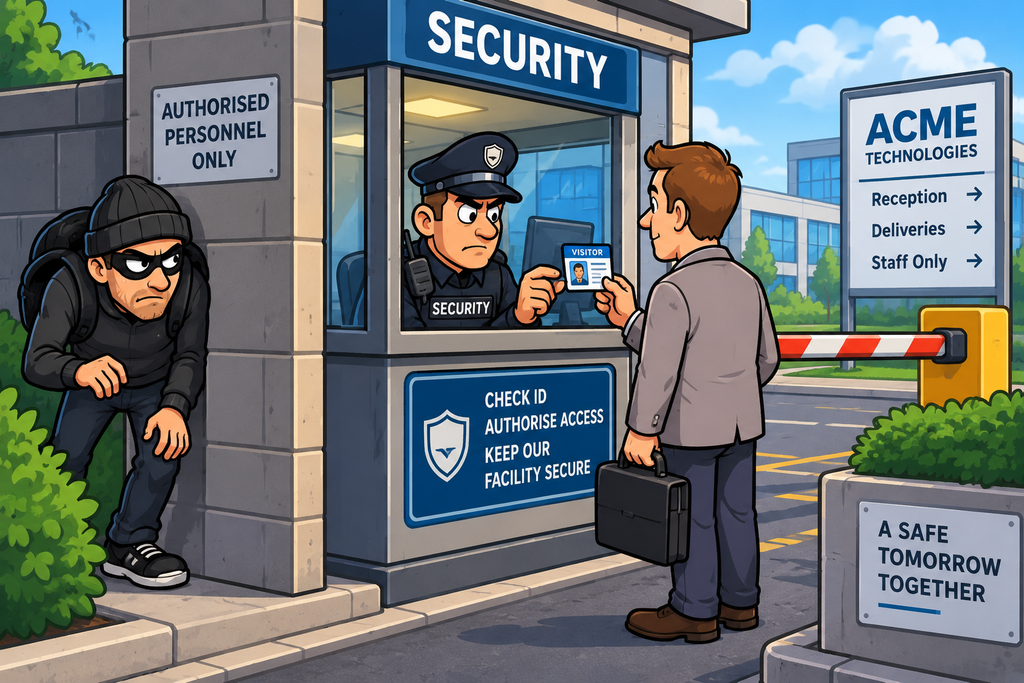
Imagine an office building – Not everyone who works for the organisation should be able to walk through every door.
- A receptionist might be able to enter the reception area.
- A member of the IT team might be able to enter the server room.
- The finance team might have access to the accounts department.
- The security team might have access to areas containing security equipment.
- And some rooms might be restricted to only a handful of people.
The organisation therefore needs to answer three fundamental questions:
- Who are you?
- What are you allowed to access?
- What are you allowed to do with it?
These are the fundamental questions addressed by access controls.
Access controls are one of the most important security mechanisms used by organisations. They can be technical, such as passwords, permissions and network rules, or physical, such as locks, access cards, security guards and biometric readers.
Their purpose is simple:
Allow authorised access and prevent unauthorised access.
What Are Access Controls?
An access control is a mechanism that determines whether a person, device, application or other entity is permitted to access a resource.
They are the mechanisms that allow the enforcement of an organisation’s security policy.
The resource could be:
- A file
- A database
- An application
- A server
- A network
- A building
- A room
- A physical device
- A document
- A cloud service
- A piece of equipment
An organisation needs to control who (or what) can access the resources and what they can do with it.
Authentication, Authorisation and Access Control
Access control is closely connected with the AAA model:
- Authentication — establishing who or what something is
- Authorisation — determining what it is allowed to do
- Accounting — recording what happened
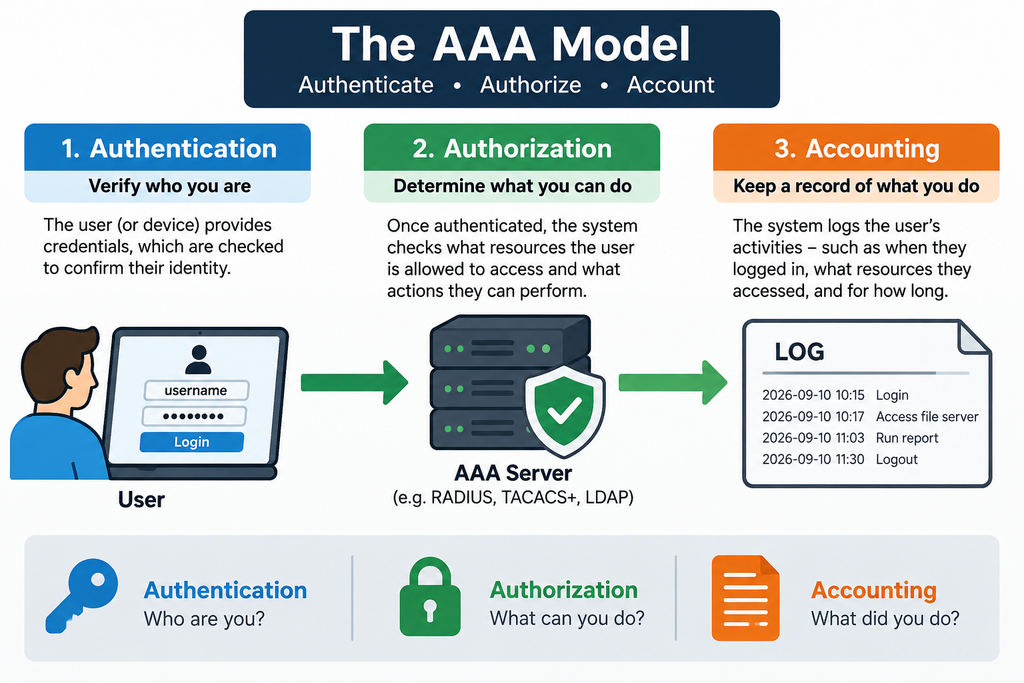
These aren’t interchangeable concepts – A user can successfully authenticate but still be denied access and the results of the authentication decision should always be logged.
It is important to note that authentication doesn’t automatically mean authorisation.
Identification, Authentication and Authorisation
There is another useful distinction.
- Identification – The user claims an identity: “I am Alice.”
- Authentication – The system verifies the claim: “Prove that you are Alice.”
- Authorisation – The system determines what Alice is allowed to do: “Alice can access these resources.”
Access Control is the mechanism which enforces the decision: “Allow Alice into this system, but deny access to that one.”
This distinction becomes particularly important in larger environments.
Technical Access Controls
Technical access controls are implemented using technology.
Examples include:
- Passwords
- Multi-factor authentication
- Access Control Lists
- File permissions
- Database permissions
- Firewalls
- Network segmentation
- VPNs
- Role-based access control
- Attribute-based access control
- Privileged access management
- Encryption
- Security groups
- Application permissions
- API authorisation
- Device controls
These controls can operate at many different levels.
One of the simplest examples is file-system permissions.
Imagine a server containing three different sub directories:
- HR – for HR staff only
- Finance – for Finance staff only
- Public – for all employees
A user in HR might be allowed to read HR documents but not financial records.
The access rights could look like this:
HR-Reports.xlsx

HR Department       READ / WRITE ✓
Finance Department  DENY ✗
Sales Department    DENY ✗
Public              DENY ✗
This is a basic form of access control, and are typically enforced by Access Control Lists (ACLs).
Access Control Lists
An Access Control List (ACL) specifies which users, groups or systems can perform particular actions on a resource.
For example:
RESOURCE: Customer Database

User / Group       Permission
--------------------------------
Sales              READ
Support            READ
Finance            READ
DBA                READ / WRITE
Marketing          DENY
Guest              DENY
The permissions in an ACL typically include:
- Read
- Write
- Modify
- Delete
- Execute
- Create
- Share
- Administer
ACLs are widely used throughout operating systems, networks and applications and often are described as:
- Mandatory Access Control (MAC) – these ACLs are applied via a central authority across the IT estate and cannot be altered by users – They are typically configured according to company policy
- Discretionary Access Control (DACL) – these are typically created by the resource owner and it is at their discretion as to which access rights they wish to allow or deny
Role-Based Access Control
A form of Mandatory Access Control – Role-Based Access Control (RBAC) assigns permissions to roles rather than directly to individual users.
For example,
- Alice might be assigned the Sales role.
- Bob might be assigned HR.
- Charlie might be assigned IT.
If Alice changes department, her role can be changed rather than manually modifying dozens of individual permissions.
RBAC is particularly useful in large organisations.
Attribute-Based Access Control
RBAC isn’t always flexible enough and often can be too restrictive, or not restrictive enough depending on circumstance.
Another form of Mandatory Access Control – Attribute-Based Access Control (ABAC) makes decisions based on attributes which are assessed at the time the request of access to the resource is submitted.
A policy could effectively say:
Allow Finance managers to access financial records when using a compliant company device during normal working hours.
This allows considerably more contextual decisions than simple role-based access.
Privileged Access Management
Some accounts have considerably more power than ordinary users.
For example:
- Domain administrators
- Database administrators
- Cloud administrators
- Network administrators
- Security administrators
These are privileged accounts and should be secured comprehensively as a compromised privileged account can cause enormous damage.
Privileged Access Management (PAM) therefore provides additional controls around these accounts.
These may include:
- Separate administrator accounts
- Multi-factor authentication
- Temporary privilege elevation
- Approval workflows
- Session monitoring
- Credential vaulting
- Detailed logging
- Automatic privilege removal
The goal is to avoid giving administrators permanent, unrestricted access when they don’t need it.
Network Access Controls
Access controls can also determine which systems can communicate with one another.
For example, a workstation may be allowed to access a web server but denied direct access to the database behind it.
This is an example of network access control.
Firewalls, network ACLs, VLANs, security groups and micro-segmentation can all contribute to network access
Application Access Controls
Applications should also enforce their own access controls.
The fact that a user can reach the application doesn’t mean they should automatically have access to every function within it.
This is particularly important because attackers frequently attempt to manipulate application requests to access functionality that they shouldn’t have.
API Access Controls
Modern applications increasingly communicate through APIs to facilitate data access and manipulation
An API might provide:
GET    /customer/profile
POST   /customer/payment
DELETE /customer/account
GET    /admin/users
Different users should have different permissions.
For example a customer could be allowed to execute HTTP GET and POST commands, but not HTTP DELETE commands. Whereas an administrator may be allowed to run HTTP DELETE commands
API authorisation therefore becomes a critical access-control mechanism in modern applications.
Physical Access Controls
Access control isn’t just about computers. Organisations also need to protect the physical access to their environment.
Physical access controls protect:
- Buildings
- Offices
- Server rooms
- Data centres
- Laboratories
- Warehouses
- Secure storage
- Equipment rooms
- Restricted areas
Examples include:
- Mechanical locks
- Electronic locks
- Access cards
- Key fobs
- PIN pads
- Biometric readers
- Security guards
- Turnstiles
- Security gates
- Mantraps
- CCTV
- Visitor management systems
These controls can be just as important as technical controls.
Physical Access Cards
An access card might determine where an employee can go within an organisations campus or building.
The same principle as that with technology applies here – The person has to be authorised for that particular location.
Biometrics
Physical access controls can also use biometric information such as:
- Fingerprints
- Facial recognition
- Iris recognition
- Hand geometry
Biometrics can provide strong convenience and identification capabilities, but they introduce important considerations around privacy, accuracy, spoofing and what happens if biometric data is compromised.
Unlike a password, you can’t change your fingerprint if it is compromised!
Security Guards
A person can also be considered an access control.
For example, a security guard may:
- Check identification
- Verify visitors
- Inspect passes
- Challenge unauthorised people
- Control vehicle access
- Escort visitors
- Respond to suspicious behaviour
This is a useful reminder that access controls can involve people, processes and technology.
Additionally, as security guard can also be considered as a deterrent control – just the physical appearance of the guard can be enough to dissuade an attacker.
Locks and Keys
The door or window lock is one of the oldest access controls. The key for the lock effectively represents a credential
If the key fits – it can turn the lock and open the access. If the key doesn’t fit – no access.
The problem with physical keys however, is similar to the problem with passwords in that they can be lost, stolen, copied or shared.
This is why modern physical access systems often provide additional controls such as logging and central management.
Mantraps
A mantrap (A.K.A. Tigertrap) is a physical access-control system involving two doors which work on an interlock system that prevents both doors from being open simultaneously.
Mantraps can help prevent:
- Tailgating
- Piggybacking
- Unauthorised entry
They are commonly associated with high-security environments such as data centres.
Tailgating and Piggybacking
Physical access controls have their own forms of bypass.
Imagine an employee uses their access card to open a secure door. When the door opens and the employee passes through, an unauthorised person could follow them through before the door closes.
This is known as tailgating or, depending on the circumstances, piggybacking.
The access-control system correctly authorised the first person, but the problem was that the second person entered without being independently authorised.
This is why physical access control often combines:
- Door controls
- Security guards
- CCTV
- Mantraps
- Visitor management
- Security awareness
Access Reviews
Access controls aren’t useful if nobody checks whether they are still appropriate.
- Employees change roles.
- People leave organisations.
- Projects end.
- Systems are retired.
- Temporary permissions become permanent.
This can result in privilege creep.
Regular access reviews should therefore ask – Does this person still need this access?
If the answer is no, it should be removed.
Access Control Bypass
Like firewalls, access controls can be bypassed.
Attackers may attempt to:
- Steal passwords
- Phish credentials
- Steal access tokens
- Exploit application vulnerabilities
- Abuse excessive permissions
- Compromise privileged accounts
- Exploit misconfigured cloud resources
- Use stolen access cards
- Tailgate into secure areas
- Social-engineer employees
- Exploit broken authorisation logic
The attacker hasn’t necessarily “broken” the authentication system – They have stolen a legitimate identity.
This is why authentication, authorisation, monitoring and other controls need to work together.
Broken Access Control
One of the most serious application-security problems is broken access control.
Consider an application where a user can access:
/customer/12345What if they change the number instead?:
/customer/12346If the application returns another customer’s information, the application has failed to enforce proper authorisation.
- The user may be authenticated.
- The request may be technically valid.
- But the user isn’t authorised to access that particular resource.
This demonstrates an important principle:
Authentication should never be treated as proof that a user is authorised to access everything.
Technical and Physical Controls Working Together
The strongest environments don’t treat physical and technical security as completely separate.
Consider the following security surrounding a file server – You might have:
Physical controls
- A Secure building with security guards and mantraps to gain entry
- Access cards to prove identity
- A restricted server room within the main building
- CCTV monitoring access
- A Locked cabinet containing a server rack
Technical controls
- A Network firewall protecting access from the Internet
- A Host firewall protecting the Operating System running the server service
- Authentication mechanisms
- Authorisation mechanisms
- File permissions
- Database permissions
An attacker may need to overcome multiple independent controls before gaining useful access whether physical or technical.
That is precisely what Defence in Depth is intended to achieve.
Access Controls as a Security Control
Access controls are primarily preventive controls – Their purpose is to stop unauthorised access before it happens.
However, access-control systems can also provide detective capabilities.
For example, they can record the who, what, where, and when of an action and the ultimate result and record this data in a log, or send the data to a SIEM.
Physical access systems can similarly record:
- Which card was used
- Which door was opened
- When it happened
- Whether access was denied
In Summary
Access controls are mechanisms that determine who, or what is allowed to access a resource and what they are allowed to do with it.
They can be technical:
- Passwords
- MFA
- File permissions
- ACLs
- RBAC
- ABAC
- Firewalls
- Network segmentation
- PAM
- Application and API permissions
Or physical:
- Locks and keys
- Access cards
- PIN pads
- Biometrics
- Security guards
- CCTV
- Turnstiles
- Mantraps
- Secure rooms
Good access control is built around several important principles:
- Least Privilege
- Need to Know
- Separation of Duties
- Default Deny
- Strong Authentication
- Appropriate Authorisation
- Regular Access Reviews
- Logging and Monitoring
And access controls should be applied throughout the environment rather than relying on a single security boundary.
At every stage, the question remains the same – “Are you authorised to do this?”
And that’s the fundamental purpose of access control
Don’t just identify who someone is. Decide what they should be allowed to access, and enforce that decision.