
For many years, network security was built around a relatively simple idea:
Keep the bad people out and trust the people inside.
Defences were primarily focussed on outside = bad, inside = good. An organisation might have a firewall protecting its internal network from the Internet, so users inside the corporate network were considered trusted, while users outside the network were considered untrusted.
This model made sense when most employees worked in offices, the applications they used were hosted inside the organisation’s own data centre and the network had a clearly defined boundary.
The thing is – modern organisations don’t work that way anymore:
- Employees work from anywhere.
- Applications run in the cloud.
- Third-party contractors need access to internal systems.
- Personal and corporate devices may connect from different locations.
- Employees use Bring Your Own Device (BYOD) systems.
- Applications communicate with other applications – many of which are hosted externally
- Wi-Fi signals reach meters outside the bricks & mortar of the workplace.
- And attackers who successfully compromise one account or device may already be inside the traditional network boundary.
This is where the concept of Zero Trust becomes important.
Zero Trust is based on a fundamentally different approach:
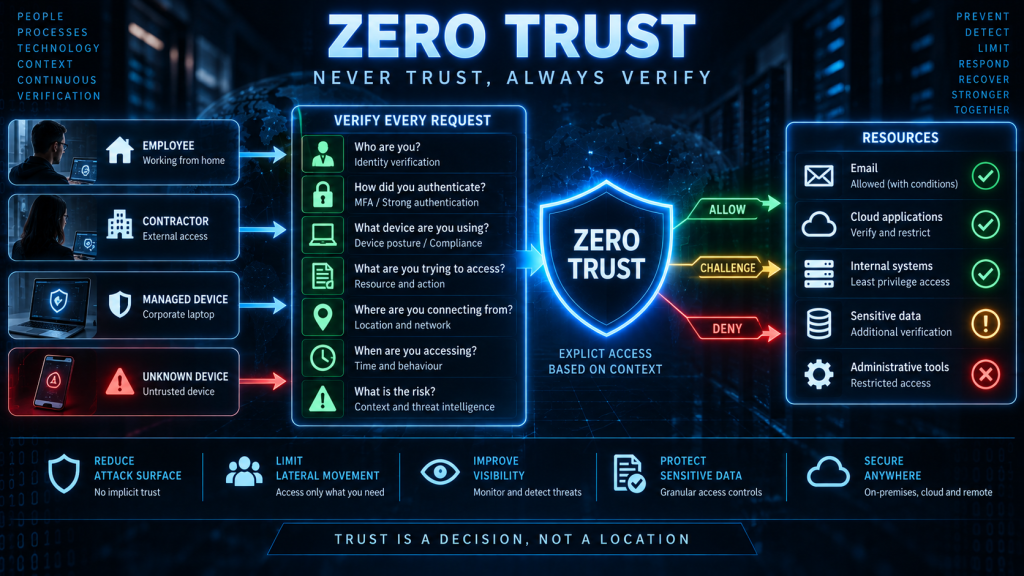
Never assume that a user, device or application should be trusted simply because of where it is or what network it is connected to. Verify the request and explicitly determine whether access should be allowed.
What is Zero Trust?
Zero Trust is a security architecture and approach based on the assumption that trust should not be granted automatically.
Instead of asking “Is this user inside our network?”, Zero Trust asks “Should this particular user, using this particular device, be allowed to access this particular resource, under these particular circumstances?”
That decision may take into account many aspects:
- Who the user is
- How they authenticated
- What device they’re using
- Whether the device is secure
- What resource they are requesting
- What they’re trying to do
- Where the request originated
- When the request was made
- The risk associated with the request
- Other contextual information
Access can then be granted, denied or subjected to additional controls.
The important point is that being inside the network isn’t sufficient evidence of trust.
The traditional security model
To understand Zero Trust, it helps to understand the model it is designed to replace.
A traditional network might look something like this:
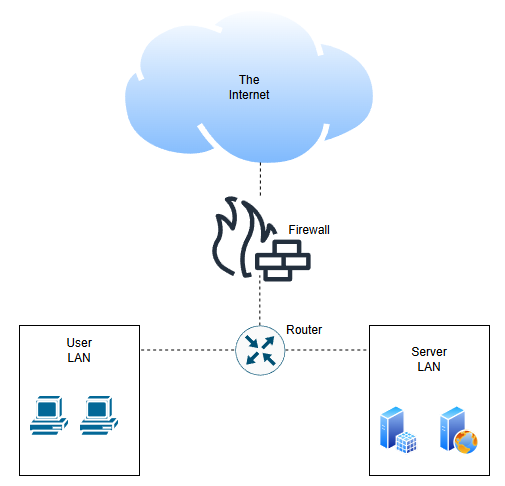
The firewall establishes a boundary. Traffic coming from the Internet is treated as potentially dangerous.
Traffic coming from inside the corporate network is often treated as more trustworthy.
This creates what is sometimes described as a castle-and-moat model where the castle is protected by a moat and everyone or everything behind the moat is classed as trusted
The objective is to keep attackers outside.
But what happens when an attacker gets inside?
The problem with the perimeter
Imagine an attacker sends a phishing email to an employee, and the employee clicks the link.
The attacker obtains the employee’s legitimate, trusted credentials.
The attacker then authenticates to the organisation’s VPN using these credentials
From the perspective of a traditional perimeter-based security model, the attacker is now inside the network.
The firewall may have done its job, the VPN may have authenticated the credentials correctly, but the organisation has a problem.
The attacker is now operating from a position that may be considered trusted.
They can potentially begin looking for:
- Other systems
- File shares
- Databases
- Administrative interfaces
- Other user accounts
- Sensitive information
This is one of the weaknesses Zero Trust attempts to address.
A successful authentication shouldn’t automatically provide broad access to the environment.
Zero Trust changes the question
Traditional security often asks:
“Are you inside or outside?”
Zero Trust asks the questions:
“What are you trying to access, and should you be allowed to access it?”
This is a subtle but important change.
Consider an employee working from home.
- They might need access to the company’s email system.
- They might not need access to the payroll database.
- They might need access to a development application.
- They might not need access to production servers.
The fact that all of these systems belong to the same organisation doesn’t mean the employee should automatically be trusted with all of them, especially from their home location.
Never trust, always verify
The phrase most commonly associated with Zero Trust is:
Never trust, always verify.
This doesn’t mean that an organisation literally trusts nobody – It means that trust should not be assumed simply because of network location, previous authentication or organisational affiliation.
Every access request should be evaluated according to the organisation’s security policies.
The exact implementation varies between organisations, but the underlying principle remains the same.
Identity becomes extremely important
Zero Trust places considerable importance on identity.
In a traditional perimeter-based environment, network location could provide a degree of trust, but we have already established that location is now no longer confined to one place – the location can now be anywhere.
This is why, in a Zero Trust environment, identity becomes much more important.
The organisation needs to know Who is requesting access?
This applies not only to people.
Identities can include:
- Employees
- Contractors
- Administrators
- Applications
- Services
- Devices
- Automated processes
Every identity should have an appropriate level of access.
This is where Zero Trust connects directly with authentication, authorization and least privilege.
Authentication
Before an organisation can decide what somebody should be allowed to access, it needs confidence about their identity – This is where Authentication becomes important.
Authentication can involve:
- Passwords
- Multi-factor authentication
- Security keys
- Smart cards
- Certificates
- Biometrics
Multi-factor authentication is particularly important because a password alone may not provide sufficient assurance – If an attacker obtains a user’s password, MFA provides another barrier.
Zero Trust doesn’t mean authentication happens only once. Depending on the environment and risk, authentication and other security checks may occur repeatedly or when sensitive resources are accessed.
Authorization
If authentication establishes identity, Authorization determines what that identity is allowed to do.
For example:
Sarah’s access rights may look like this:
Email ✓
CRM ✓
HR system ✗
Production servers ✗
Payroll ✗
Sarah may be a completely legitimate employee, but that doesn’t mean she should have access to everything.
This is why Zero Trust works closely with the principle of least privilege.
Zero Trust and Least Privilege
These two concepts are closely related.
Least privilege says Give an entity only the permissions it needs.
Zero Trust says Don’t automatically trust an entity simply because it has successfully connected to the network or authenticated. Evaluate whether access should be granted.
Consider an employee who has legitimate access to a customer database.
Least privilege limits what they can do with that database.
Zero Trust adds additional context to the decision.
For example – IF:
- The user is authenticated.
- The device is managed.
- The request is being made during normal working hours.
- The user is accessing the database they normally use.
Access may be allowed.
However, IF:
- The same credentials are being used from an unknown device.
- The device doesn’t meet security requirements.
- The request is for a highly sensitive database the user has never accessed before.
The organisation may require additional authentication, deny the request or investigate the activity.
Least privilege limits permissions. Zero Trust continually evaluates whether access should be granted.
Device security
Zero Trust isn’t just about the user – The device making the request can also be important.
For example, an organisation may distinguish between:
A Managed corporate laptop
- Encrypted
- Patched
- Endpoint protection enabled
- Security configuration enforced
and:
A Unknown device
- Unknown security state
- Potentially unpatched
- No corporate security controls
An organisation might therefore allow access from the corporate laptop but require additional verification or block access from the unknown device.
This is sometimes described as device posture or device health.
Context matters
Zero Trust can use context to make access decisions.
For example:
IDENTITY – Who are you?
+
DEVICE – Is your device secure?
+
RESOURCE – What are you trying to access?
+
ACTION – What are you trying to do?
+
CONTEXT – Where, when and under what circumstances?
↓
ACCESS DECISION
Here, a user may normally be allowed to access a particular system, but a high-risk change to that system might require stronger authentication or additional approval.
This approach allows organisations to make more granular access decisions.
Continuous verification
The word “continuous” in Zero Trust is important.
Traditional security might authenticate someone when they connect to the network and then largely trust them for the duration of their session.
Zero Trust encourages organisations to continually evaluate whether access remains appropriate.
This doesn’t necessarily mean asking the user for their password every few minutes.
Instead, systems can continuously evaluate signals such as:
- Authentication status
- Device health
- Location
- Network
- Behaviour
- Resource sensitivity
- Risk indicators
If circumstances change, access can be restricted or revoked.
The objective here is to reduce the amount of time an attacker can operate undetected.
Microsegmentation
Traditional network segmentation divides a network into broad areas. Zero Trust can take this further through microsegmentation.
Instead of thinking “Everyone inside this network can communicate with these servers”, microsegmentation can define much more specific communication rules.
A compromised workstation therefore has much less opportunity to move laterally through the environment.
This makes microsegmentation particularly useful when combined with least privilege.
Zero Trust and lateral movement
One of the major benefits of Zero Trust is limiting lateral movement of an attacker once inside the network.
Lateral movement occurs when an attacker who has compromised one system attempts to move to other systems within the environment.
In a poorly segmented environment, this may be possible because internal systems implicitly trust one another – A Zero Trust architecture attempts to introduce controls between these systems.
Every step becomes another opportunity to evaluate the request.
Zero Trust and applications
Modern applications increasingly communicate directly with other applications through things like APIs (Application Programming Interfaces)
Zero Trust principles can be applied to these machine-to-machine communications.
The database shouldn’t automatically trust every application simply because it is inside the corporate network. Instead, the application should authenticate and be authorized for the specific operations it needs to perform.
This is another example of least privilege applied to non-human identities.
Zero Trust and the cloud
Cloud computing makes Zero Trust particularly relevant – There may no longer be a single corporate network containing all of an organisation’s systems.
Instead, resources may exist across:
- Multiple cloud providers
- SaaS applications
- Corporate data centres
- Remote offices
- Employee devices
- Home networks
The traditional idea of putting a firewall around “the network” becomes much less useful when the organisation’s resources are distributed across many environments.
Zero Trust allows security policies to be applied around identities, resources and access requests, rather than relying primarily on network location.
Zero Trust doesn’t replace firewalls
As well as understanding what Zero Trust is, it’s also important to understand what Zero Trust isn’t.
Zero Trust does not mean throw away your firewall.
Firewalls will always remain useful security controls.
The difference is that a Zero Trust architecture doesn’t assume that the firewall protects us from the Internet, therefore everything inside is trusted. Instead, the firewall just becomes one layer within a larger security architecture.
This is another example of defence in depth.
Implementing Zero Trust
Zero Trust isn’t something an organisation can normally implement by purchasing a single product.
It involves architecture, processes, policies and technology.
A typical implementation might include:
- Strong identity management – Ensure users, devices and applications have identifiable identities.
- Multi-factor authentication – Use additional authentication factors to reduce the impact of stolen credentials.
- Least privilege – Limit permissions to what is actually required.
- Device management – Ensure that devices accessing corporate resources meet security requirements.
- Network segmentation – Restrict unnecessary communication between systems.
- Application security – Control how applications and services communicate.
- Continuous monitoring – Monitor authentication, access and system activity for suspicious behaviour.
- Conditional access – Make access decisions based on identity, device, resource and other contextual information.
- Automated response – Automatically restrict or revoke access when risk becomes unacceptable.
The benefits of Zero Trust
A well-designed Zero Trust architecture can help an organisation:
- Reduce the impact of compromised accounts
- Limit lateral movement
- Reduce excessive access
- Protect remote workers
- Secure cloud environments
- Improve visibility
- Reduce reliance on network location
- Protect applications and APIs
- Restrict access to sensitive resources
- Respond more quickly to changing risk
Perhaps the most important benefit is that it changes the organisation’s security mindset.
Instead of asking:
“Is this person inside our network?”
the organisation asks:
“Is this particular request appropriate?”
The challenges of Zero Trust
Zero Trust isn’t without challenges however. Implementing it can require significant changes to large aspects of the organisation:
- Network architecture
- Identity management
- Application design
- Device management
- Access controls
- Monitoring
- Security policies
Older applications can be particularly difficult to adapt to Zero Trust.
Some systems were designed around the assumption that anything inside the network is trusted. Replacing that assumption can require architectural changes.
There can also be operational challenges – If policies are too restrictive, legitimate users may be prevented from doing their jobs.
Additionally, if policies are too permissive, the organisation may not achieve the intended security benefits.
Zero Trust therefore needs to be implemented incrementally and based on risk.
In summary
Zero Trust is an approach to cybersecurity that assumes no user, device, application or network location should automatically be trusted. Access should be explicitly verified and authorized based on identity, context and risk.
The key principles include:
- Verify explicitly
- Use least privilege
- Assume breach
- Continuously evaluate access
- Limit lateral movement
- Protect resources rather than relying solely on network boundaries
Zero Trust can be implemented through controls such as:
- Multi-factor authentication
- Identity and access management
- Conditional access
- Device security
- Network segmentation
- Microsegmentation
- Least privilege
- Application authentication
- Monitoring
- Automated access controls
The fundamental change is one of mindset.
Traditional security asks:
“Can we keep the attacker outside?”
Zero Trust asks:
“If an attacker gets inside, how much can they actually access?”
That is why Zero Trust fits so naturally alongside defence in depth and least privilege.
We assume that attackers will eventually get through one of our defences. We therefore verify every important access request, restrict what users and systems can do, limit movement between systems, monitor activity and make it possible to revoke access when circumstances change.
Don’t assume trust. Verify it. Limit it. Monitor it. And be prepared to revoke it.