
Imagine giving every employee in an organisation a master key – With this, they can open every office, every filing cabinet and every server room.
They probably won’t deliberately misuse it (maybe)…
But if someone steals their key, compromises their account or simply makes a mistake, the consequences could be enormous.
This is the problem that the principle of least privilege is designed to address.
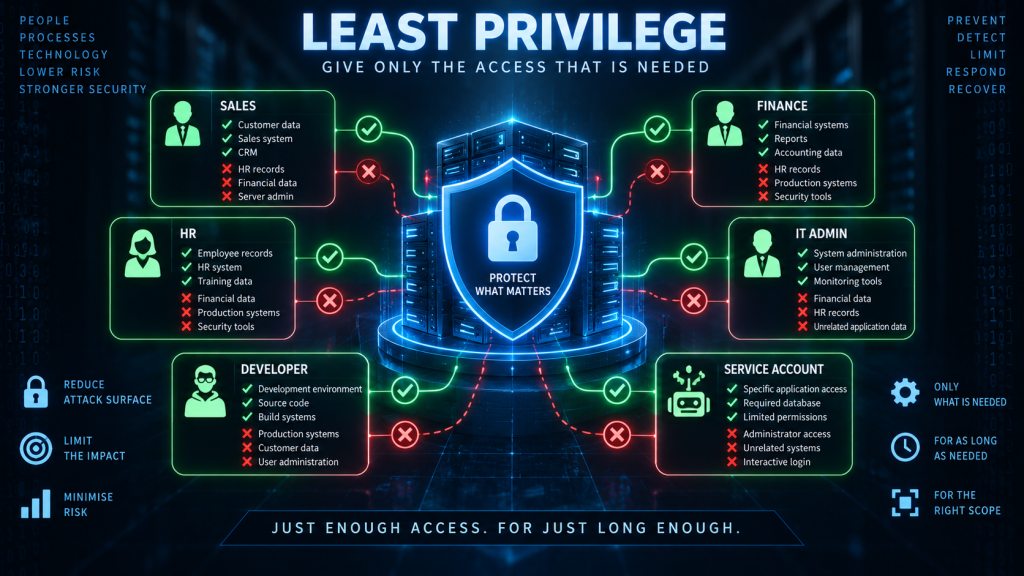
Least privilege is one of the fundamental concepts in cybersecurity and is based on a straightforward idea – Users, applications, devices and other systems should have only the permissions and access they need to perform their intended function — and no more.
The principle sounds simple – however, putting it into practice can be considerably more complicated.
What is Least Privilege?
Least privilege means giving an entity the minimum level of access required to perform a particular task.
An entity is anything, or anyone that requires access. The entity could be:
- A user
- An administrator
- An application
- A service
- A database account
- A computer
- A device
- An automated process
The important part is that access should be limited to what is actually required to fulfil the task at hand.
For example, an employee who needs to read customer records probably doesn’t need permission to:
- Delete customer records
- Modify database structures
- Create new administrator accounts
- Install software
- Access payroll information
- Access backup systems
Giving them those permissions creates unnecessary risk.
So their account should provide only the access required to perform the task of reading the data.
Why is Least Privilege important?
The principle of least privilege helps reduce the potential impact of both mistakes and attacks.
Consider an employee whose account has access to a company’s customer database. If the account has read-only access, a compromised account might allow an attacker to steal customer information, which is a serious thing in it’s own right.
But that read-only access prevents further escalation of the attack – the attacker may not be able to:
- Modify customer records
- Delete the database
- Create new accounts
- Change database permissions
- Access other systems
Now consider an administrator account with unrestricted access – If that account is compromised, the attacker may potentially have control over a much larger part of the organisation.
This leads to an important cybersecurity principle – The more privileges an account has, the greater the potential impact if that account is compromised.
Least privilege therefore attempts to limit the blast radius of a security incident.
Least Privilege and the principle of “just enough”
A useful way to think about least privilege is – Just enough access, for just long enough, to perform the task required.
There are actually three important dimensions here.
- Just enough access – An entity should have only the permissions they require
- Just enough time – If elevated privileges are required temporarily, they shouldn’t necessarily remain available permanently
- Just enough scope – Access should be restricted to the particular systems, files, applications or data that are required
For example, a database administrator who needs elevated privileges to repair a production database might receive those privileges for the duration of the maintenance task. Once the work is complete, the elevated access can be removed.
This is often referred to as Just-in-Time (JIT) access.
Least Privilege applies to more than users
When people first encounter least privilege, they often think about user accounts – But users are only one part of the picture – Remember what we said about “entities” – Applications and automated services can need privileges too.
Consider a web application that needs to read information from a database.
The application might connect using a database account. If that account has full administrator privileges, a vulnerability in the web application could potentially give an attacker access to those same privileges.
Instead, the database account might be given reduced permissions to:
- Read particular tables
- Insert particular records
- Update particular fields
while being prevented from:
- Dropping tables
- Creating administrator accounts
- Modifying database permissions
- Accessing unrelated databases
The application can still perform its intended function, but a compromise of the application doesn’t automatically provide complete control of the database.
Least Privilege in practice
In an organisation, implementing least privilege can involve several different security controls and processes.
Role-Based Access Control
One of the most common ways to implement least privilege is through Role-Based Access Control (RBAC) – With this approach, rather than individually assigning permissions to every employee, an organisation defines roles.
For example:
| Role | Example permissions |
|---|---|
| Sales | Customer and sales systems |
| HR | Employee records |
| Finance | Financial systems |
| IT Support | Support tools |
| Database Administrator | Database administration |
| Security Administrator | Security systems |
A user’s permissions are then determined by their role. If an employee moves from the Sales department to the Finance department, their access can be changed accordingly.
RBAC makes it easier to manage permissions consistently across a large organisation, but RBAC doesn’t automatically guarantee least privilege.
A role can still contain far more permissions than its users actually require.
Least privilege is the principle – RBAC is one mechanism for implementing it.
Access Control Lists
Another common implementation is through the use of Access Control Lists (ACLs).
An ACL defines who, or what can perform particular actions on a resource.
For example, a file might have permissions such as:
Finance Team       Read / Write
Managers           Read
All other users    No Access
Similarly, a network device might use an ACL to determine which systems can communicate with one another.
ACLs are commonly found in:
- File systems
- Databases
- Network devices
- Firewalls
- Cloud environments
- Applications
Privileged accounts
Some accounts naturally require significantly more privileges than others. For example, an administrator may need to:
- Install software
- Modify system configurations
- Create accounts
- Change permissions
- Restart services
- Access sensitive systems
These privileges are necessary for the administrator to perform their job, but they also make administrator accounts particularly attractive to attackers.
This is why organisations often distinguish between:
- Standard accounts – Used for everyday activities such as email and web browsing.
- Privileged accounts – Used when administrative tasks need to be performed.
An administrator might therefore have two accounts:
- jsmith – Normal everyday account
- jsmith-admin – Privileged administrative account
The administrator uses the normal account for routine work and only uses the privileged account when administrative access is actually required.
This reduces the amount of time the administrator is operating with elevated privileges.
Privileged Access Management
Larger organisations may use Privileged Access Management (PAM) systems to control and monitor privileged accounts.
A PAM system can provide capabilities such as:
- Controlling who can access privileged accounts
- Requiring additional authentication
- Providing temporary administrative access
- Recording privileged sessions
- Rotating privileged passwords
- Automatically removing access after a defined period
- Logging administrative activity
This approach reduces the number of permanently privileged accounts and provides greater visibility over their use.
Just-in-Time access
A particularly effective implementation of least privilege is Just-in-Time access. In this scenario, instead of giving an administrator permanent access to a sensitive system, access can be granted only when required.
For example:
- An administrator requests access to production server.
- The system prompts the user to provide some sort of credential and justification for the access
- This generates an request for approval
- Assuming the request is approved, administrative access is granted for a time period (e.g. 30 minutes)
- The Administrator performs the required task, and the access automatically expires after the time limit is reached
This is particularly useful for highly sensitive systems as it reduces the window of opportunity available to an attacker.
If an administrator’s normal account is compromised at 2:00 AM, but the account does not currently have administrative privileges, the attacker doesn’t automatically inherit permanent administrative access.
Application and service accounts
Least privilege is especially important for service accounts.
A service account is an account used by an application or service rather than a human.
For example a web application uses a Database service account to access a customer database
A common mistake is to give the service account excessive permissions because it makes configuration easier. For example, the application database is granted administrator permissions so that we know it can do everything it needs to.
This solves a configuration problem by creating a security problem.
A better approach is to determine exactly what the application needs and provide only those permissions.
If the application only needs to read and update customer records, it shouldn’t have permission to delete the entire database.
Operating system privileges
Least privilege also applies at the operating-system level – A user who only needs to run applications generally shouldn’t need unrestricted administrative access to the computer.
For example, a standard user might be able to:
- Run applications
- Create documents
- Browse the web
- Access permitted network resources
but not:
- Install arbitrary system software
- Modify security settings
- Change system files
- Create privileged accounts
- Disable security controls
This is why organisations commonly restrict users from operating their everyday computers as local administrators – they create standard user accounts
Least Privilege in the cloud
Cloud computing makes the concept of least privilege even more important – Cloud platforms can contain enormous numbers of resources and permissions.
An entity might potentially have access to:
- Virtual machines
- Databases
- Storage
- Network infrastructure
- Encryption keys
- Application services
- Logging systems
- Backups
Cloud platforms therefore provide detailed identity and access management systems that allow organisations to specify exactly what an entity can do.
The principle remains the same regardless of whether the infrastructure is located in the organisation’s server room or in a cloud provider’s data centre.
Least Privilege and Zero Trust
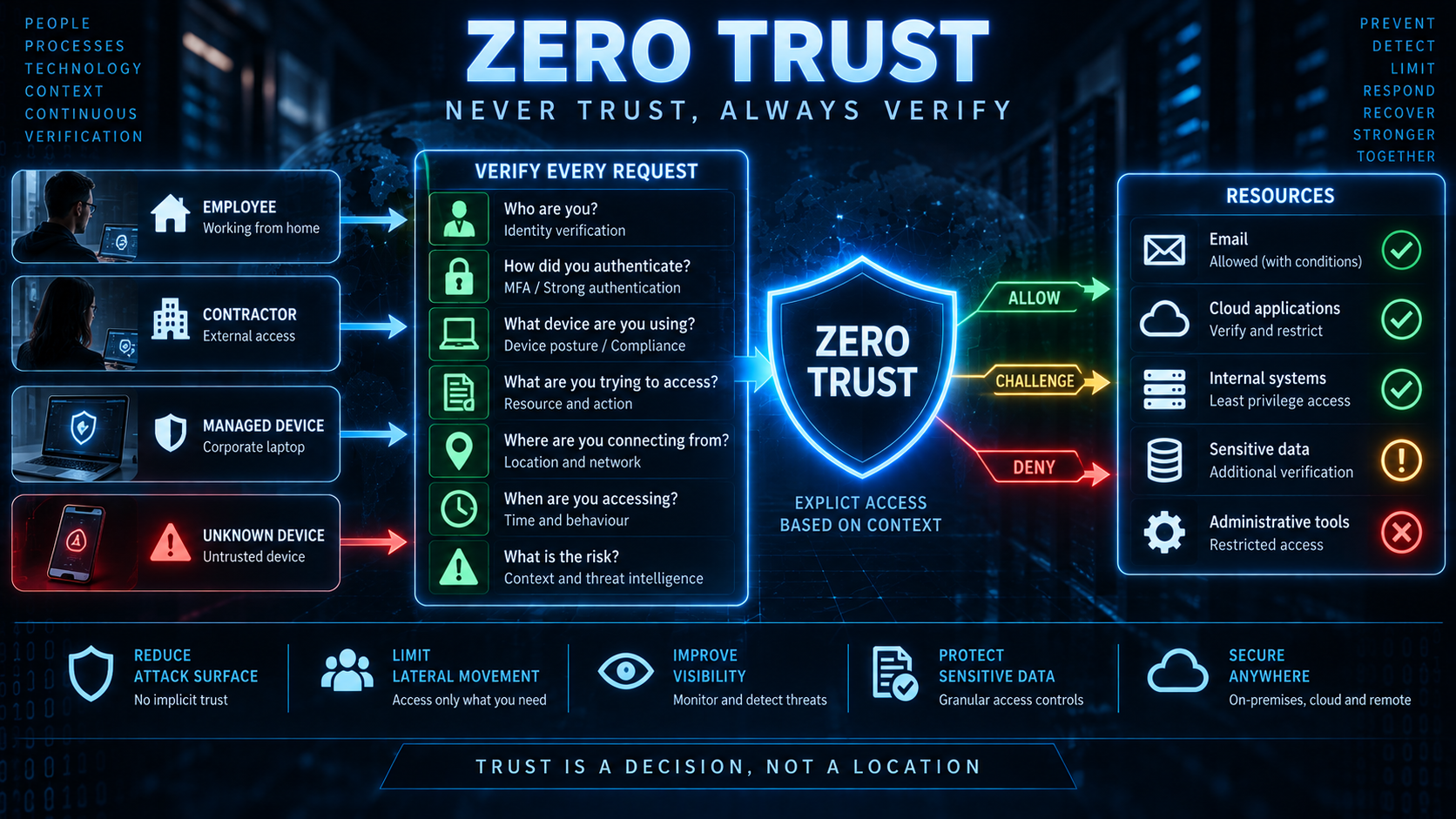
Least privilege is closely related to another important cybersecurity concept – Zero Trust.
Zero Trust is based on the idea that access shouldn’t automatically be granted simply because a user or device is inside a trusted network. Instead, access should be continually evaluated based on factors such as:
- Identity
- Device
- Location
- Risk
- Application
- Resource
- Context
Least privilege complements this approach by ensuring that, even when access is granted, it is appropriately restricted.
More detail on Zero Trust can be read here
Least Privilege and Defence in Depth
Least privilege is also an important component of defence in depth.
Imagine an attacker successfully compromises an employee’s account.
The authentication layer has failed, but if the organisation has implemented least privilege, the compromised account can only access a limited set of resources.
- The attacker attempts to access a database – Access is denied.
- They attempt to access the backup system – Access is denied.
- They attempt to create an administrator account – Access is denied.
The attacker may still have compromised one account, but the damage is limited.
Least Privilege and the CIA Triad
Least privilege contributes to all three elements of the CIA triad, although its most obvious impact is on confidentiality and integrity.
- Confidentiality – Restricting access reduces the number of people and systems capable of accessing sensitive information.
- Integrity – Restricting modification permissions reduces the number of people and systems capable of changing information.
- Availability – Restricting administrative privileges can reduce the ability of an attacker or compromised account to delete systems, disable services or destroy data.
For example, if an ordinary employee account cannot shut down a critical server, compromising that account is less likely to affect the server’s availability.
The problem of privilege creep
One of the biggest challenges organisations face when using the concepts of least privilege is that of privilege creep.
Imagine an employee starts in the Sales department – Here they are given access to several systems in order to do their job.
Six months later, they move into another role, so additional permissions are added for that role
A year later, they move again – More permissions are added.
Eventually they may have accumulated access to systems that they no longer need.
The employee’s responsibilities have changed – but their permissions haven’t.
Their privileges have creeped up – This creates unnecessary risk.
Joiners, movers and leavers
Organisations therefore need processes for managing access throughout an employee’s lifecycle.
These are sometimes described as:
- Joiners – A new employee receives the access required for their role.
- Movers – An employee changes role and their permissions are adjusted accordingly.
- Leavers – An employee leaves the organisation and their access is removed.
The “mover” stage is particularly important.
It is relatively easy to give someone additional permissions – It is much harder to ensure that old permissions are removed.
Good identity lifecycle management should therefore include regular reviews of user access.
Access reviews
Organisations should periodically ask – Does this person still need this access?
For sensitive systems, managers or system owners may be required to review and approve access regularly.
Removing unnecessary permissions reduces the organisation’s attack surface.
Automated systems can also help identify accounts with excessive or unused privileges.
Least privilege doesn’t mean “no access”
There is an important distinction between least privilege and simply restricting access as much as possible.
The objective isn’t – “Give nobody access to anything.”
The objective is – “Give each entity the access necessary to perform its legitimate function, and nothing beyond that.”
- An administrator may legitimately require extensive privileges.
- A database administrator may need to modify databases.
- A developer may need access to source code.
- A finance employee may need access to financial records.
Least privilege doesn’t prevent those activities – rather it ensures that the privileges are appropriate to the role and task.
The danger of making least privilege too restrictive
There is also a practical problem with implementing least privilege incorrectly.
If permissions are too restrictive, employees may be unable to perform their jobs.
This can lead to users finding ways around security controls.
For example, a user might say “I can’t access the file through the approved system, so I’ll copy it to my personal cloud storage.” Or, “I can’t install the software I need, so I’ll download a portable version.”
This creates shadow IT and potentially introduces greater security risks because the shadow IT is effectively invisible to the IT & security departments, but also the alternate solution the user has adopted may not have any security around it making compromise much easier.
Least privilege therefore requires a balance – The objective is to minimise unnecessary privileges without preventing legitimate business activity.
How organisations implement Least Privilege
A mature least-privilege programme typically involves several activities.
- Identify what users need – Understand the tasks each role needs to perform.
- Define appropriate permissions – Determine the minimum permissions required for those tasks.
- Assign access based on roles – Use RBAC or other access-control mechanisms where appropriate.
- Separate privileged accounts – Don’t use administrator accounts for routine activities.
- Use temporary elevation – Where possible, provide elevated privileges only when required.
- Review access regularly – Remove permissions that are no longer necessary.
- Monitor privileged activity – Log and investigate the use of sensitive privileges.
- Automate where possible – Identity management and PAM systems can help manage large numbers of users and permissions.
- Apply the principle to applications – Service accounts and applications should also receive only the permissions they require.
- Remove access when it is no longer needed – Especially when employees change roles or leave the organisation.
In summary
The principle of least privilege states that users, applications, devices and other entities should have only the permissions necessary to perform their intended functions.
It helps organisations:
- Reduce the attack surface
- Limit the impact of compromised accounts
- Protect sensitive information
- Reduce accidental damage
- Limit lateral movement
- Protect critical systems
- Reduce privilege escalation opportunities
It can be implemented using controls and processes such as:
- Role-Based Access Control
- Access Control Lists
- Privileged Access Management
- Just-in-Time access
- Separate administrative accounts
- Service-account restrictions
- Regular access reviews
- Joiner, mover and leaver processes
- Monitoring and auditing
The fundamental idea is simple – Don’t give someone the keys to the entire building when they only need to open one door.
Least privilege doesn’t make an organisation impossible to attack. Instead, it ensures that compromising one account, application or device doesn’t automatically give an attacker access to everything else.
That makes least privilege an important layer of both defence in depth and Zero Trust, and one of the fundamental principles upon which a secure organisation should be built.