
In cybersecurity, there is a dangerous assumption that one good security control is enough.
- A firewall protects the network.
- Antivirus protects the computers.
- Passwords protect the accounts.
But what happens when the firewall is bypassed? What if malware gets past the endpoint protection? What if someone’s password is stolen?
The answer to this problem is defence in depth.
Defence in depth is a fundamental cybersecurity concept based on a simple idea:
Don’t rely on a single security control. Build multiple layers of protection so that the failure or bypass of one control does not result in a complete security compromise.
It is one of the most important principles in cybersecurity because, sooner or later, security controls will fail.
The objective isn’t to create an environment where an attacker can never get through – The objective is to make it increasingly difficult for them to succeed, and to detect and respond to them if they do.
What is Defence in Depth?
Defence in depth is the use of multiple, overlapping security controls to protect systems, networks, applications, data and people.
Each layer provides protection against different threats or compensates for weaknesses in other layers.
Imagine a castle (e.g. the Tower of London)
The castle might have:
- A moat
- An outer wall
- A gate
- Guards
- An inner wall
- Locked rooms
- Guards inside the building

Getting through one layer doesn’t mean the attacker has reached their objective – They have to overcome the next layer as well.
Cybersecurity works in much the same way.
- An attacker might successfully compromise a user’s password, but if the account has MFA enabled, the stolen password may not be enough.
- If they bypass MFA, they might still only have access to the user’s normal account – If least privilege is implemented correctly, that account may not have permission to access sensitive systems.
- If network segmentation is in place, a compromised computer may not be able to communicate with critical servers.
- If monitoring is working, the unusual activity may generate an alert.
- If the organisation has good incident response procedures, the compromised account can be disabled before the attacker achieves their objective.
Each layer buys the organisation additional protection.
Why do we need multiple layers?
Security controls aren’t perfect – They often have multiple aspects which could raise issues
- A firewall can be misconfigured.
- A vulnerability can allow an attacker to bypass a security control.
- A user can be tricked by phishing.
- A password can be stolen.
- An administrator can make a mistake.
- A security product can fail to detect a new piece of malware.
- A previously unknown vulnerability can be exploited.
Defence in depth recognises an uncomfortable reality:
We should assume that individual security controls will eventually fail.
So, rather than asking “How do we make sure this control can never be bypassed?” we should ask “What happens if this control is bypassed?”
That change in mindset is central to the concept of defence in depth.
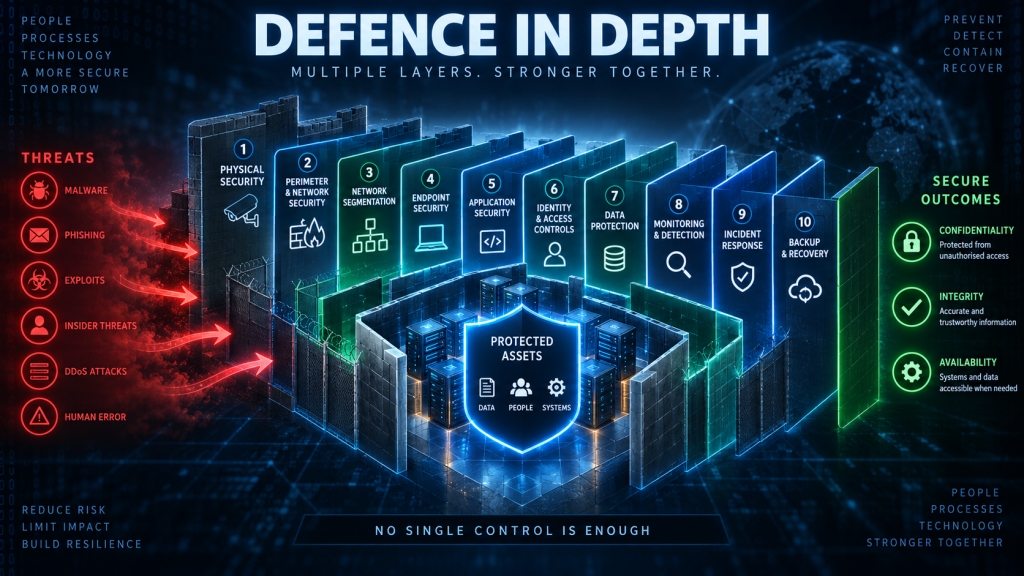
The layers of Defence in Depth
There isn’t one universally defined set of defence-in-depth layers. Different organisations and security frameworks may divide them differently.
However, a typical organisation might use layers such as:
- Physical security
- Perimeter and network security
- Network segmentation
- Endpoint security
- Application security
- Identity and access controls
- Data protection
- Monitoring and detection
- Incident response
- Backup and recovery
These layers are not isolated either – they overlap.
The objective isn’t simply to deploy ten different security products – The objective is to create multiple opportunities to prevent, detect, contain and recover from an attack.
Layer 1 — Physical Security
Cybersecurity starts in the physical world. If an attacker can simply walk into a server room and connect a device to the network, many sophisticated technical controls can potentially be bypassed.
Physical security can include:
- Locks
- Access cards
- Security guards
- CCTV
- Security alarms
- Mantraps
- Visitor management
- Secure server rooms
- Secure disposal of equipment and documents
For example, a database server may have excellent operating-system security, but if an attacker can physically remove its storage device, they may be able to attempt to extract the data directly.
Physical controls therefore form part of the first layers of defence.
Layer 2 — Perimeter and Network Security
The next layer protects the organisation’s networks from unwanted traffic.
Common controls deployed here include:
- Firewalls
- Web application firewalls
- Network access controls
- Proxies
- VPN gateways
- Intrusion prevention systems
- Email security gateways
- DNS filtering
A firewall, for example, can prevent external systems from directly connecting to services that shouldn’t be exposed to the Internet.
But a firewall isn’t enough by itself.
An attacker might gain access through a legitimate service, compromise an employee’s laptop or exploit an application that the firewall has been configured to allow.
That’s why additional layers are required.
Layer 3 — Network Segmentation
Once an attacker gets inside a network, the organisation doesn’t want them to have unrestricted access to everything.
Network segmentation divides a network into separate areas with controlled communication between them.
An attacker who compromises an ordinary employee workstation should not automatically be able to communicate with every server in the organisation.
Segmentation can therefore limit lateral movement.
This is an important part of defence in depth – Getting into one part of the network shouldn’t mean getting into all of it.
Layer 4 — Endpoint Security
Endpoints such as laptops, desktops and servers are another layer of defence.
Controls here can include:
- Endpoint protection
- Antivirus
- Endpoint Detection and Response (EDR)
- Host-based firewalls
- Application allowlisting
- Device encryption
- Patch management
- Secure configuration
- Removal of unnecessary software and services
Suppose an employee accidentally opens a malicious attachment. Email security might have failed to detect it so the endpoint security layer provides another opportunity to detect or block the malicious activity.
If the malware gets past that layer, Endpoint Detection & Response (EDR) may detect suspicious behaviour and generate an alert.
Again, the objective is overlapping protection.
Layer 5 — Identity and Access Controls
Not every user should have access to every system. Identity and access controls provide another important layer.
These include:
- Strong authentication
- Multi-factor authentication
- Role-based access control
- Least privilege
- Privileged Access Management
- Account lifecycle management
- Conditional access
- Regular access reviews
Consider an attacker who has stolen an employee’s password. Without additional controls, that may be enough to access the employee’s account.
However, with Multi-Factor Authentication (MFA), the attacker may need another authentication factor (such as a hardware token, or fingerprint)
If they somehow obtain that as well, least privilege can limit what the account is able to access.
This illustrates an important characteristic of defence in depth – One control can compensate for the failure of another.
Layer 6 — Application Security
The applications we use also need to be protected.
Security controls can include:
- Secure coding
- Input validation
- Output encoding
- Authentication
- Authorization
- Vulnerability scanning
- Web application firewalls
- Dependency management
- Security testing
- Secure software development practices
Consider a web application vulnerable to SQL injection.
A network firewall might not recognise the attack, but secure application coding and input validation could prevent it.
A web application firewall could provide another layer of defence, database permissions could provide another.
Least privilege could limit what the application’s database account is able to do.
Logging could provide another opportunity to detect the attack.
Again, there isn’t necessarily one perfect control – There needs to be multiple opportunities to stop or limit the attack.
Layer 7 — Data Protection
Ultimately, organisations are usually trying to protect something valuable.
Often, that something is data.
Data protection controls include:
- Encryption
- Access controls
- Data classification
- Data Loss Prevention (DLP)
- Database security
- Backup protection
- Secure deletion
- Digital signatures
- Integrity monitoring
Encryption is particularly useful because it can protect data even when other controls have failed.
For example, if an attacker steals a laptop, full-disk encryption may prevent them from simply removing the drive and reading its contents.
- The physical security layer failed.
- The endpoint was stolen.
But another security layer still protects the data.
That is defence in depth in action.
Layer 8 — Monitoring and Detection
Prevention alone isn’t enough unfortunately.
Organisations should also assume that some attacks will eventually succeed.
Monitoring provides another layer by attempting to identify suspicious activity and prevent is from becoming a more serious issue.
Controls can include:
- Security logs
- SIEM
- EDR
- Network monitoring
- Intrusion detection
- File integrity monitoring
- User behaviour analytics
- Security alerts
For example, imagine an attacker successfully obtains an employee’s credentials.
The authentication controls have been bypassed, so monitoring might identify an attribute such as the fact that the user normally logs in from the UK.
If the stolen credentials are used by an attacker, then monitoring might detect a successful login from an unexpected non-UK location, or the user account accessing systems it has never previously accessed.
The attack hasn’t necessarily been prevented – But it may have been detected.
That detection would be seen as an unusual event – unusual events should be examined closely to see if they should be escalated to the status of an incident which requires actions to be conducted.
Layer 9 — Incident Response
Eventually, an attacker may get through several preventative controls.
At that point, another layer becomes important – Incident response.
An organisation needs processes for:
- Detecting incidents
- Investigating them
- Containing the attack
- Eradicating the threat
- Recovering systems
- Learning from the incident
For example, if a compromised account is detected, the response might include:
- Disable the account
- Revoke active sessions
- Reset credentials
- Identify affected systems
- Investigate activity
- Remove malicious software
- Restore affected systems
- Review how the compromise occurred
The earlier layers attempted to prevent the attack – Incident response provides protection when prevention wasn’t successful.
Layer 10 — Backup and Recovery
This final layer is often overlooked.
What happens if the attacker succeeds?
For example, ransomware may successfully encrypt an organisation’s systems.
At this point, prevention has failed. Detection may have failed. But now, the organisation now needs to recover.
Backups, disaster recovery and business continuity plans therefore form an important part of defence in depth.
Good backups can allow an organisation to restore systems without paying a ransom.
But backups themselves need protection.
If an attacker can access and delete the backups, the final layer of defence may disappear.
This is why organisations often use:
- Offline backups
- Immutable backups
- Multiple backup locations
- Restricted backup credentials
- Regular restoration testing
The principle is simple – If everything else fails, make sure you can recover.
Defence in Depth isn’t just technology
It’s tempting to think of defence in depth as a collection of security products, but it isn’t.
Effective defence in depth combines people, processes and technology.
People
Employees can provide an additional layer of defence through:
- Security awareness
- Phishing awareness
- Reporting suspicious activity
- Following security procedures
- Appropriate handling of sensitive information
But people can also introduce risk – A well-designed security architecture therefore shouldn’t assume that users will always make the correct decision.
Processes
Processes provide another layer of defence.
Examples include:
- Vulnerability management
- Patch management
- Access reviews
- Change management
- Incident response
- Security testing
- Backup testing
- Security policies
Technology
Technology implements many of the technical controls:
- Firewalls
- EDR
- MFA
- Encryption
- SIEM
- Network segmentation
- Backups
A strong security programme combines all three working together.
Defence in Depth and the CIA Triad
Defence in depth works particularly well when considered alongside the CIA triad.
The CIA triad describes the security objectives:
- Confidentiality
- Integrity
- Availability
Defence in depth describes an approach to achieving those objectives.
For example:
- Confidentiality – MFA + least privilege + encryption + network segmentation + monitoring
- Integrity – Access controls + change management + hashing + logging + file integrity monitoring
- Availability – Redundancy + backups + DDoS protection + monitoring + disaster recovery
Defence in Depth isn’t “more security is always better”
There is an important caveat about defence in depth – Adding security controls isn’t automatically beneficial.
Controls have costs.
- Financial costs
- Performance costs
- Administrative costs
- User inconvenience costs
- False positive costs
- Configuration costs
- Complexity costs
Poorly designed security controls can even create new vulnerabilities:
- An overly complicated authentication process might encourage users to write passwords down.
- A badly configured firewall might block legitimate business operations.
- An incorrectly implemented security monitoring system might generate thousands of alerts that nobody has time to investigate.
Effective defence in depth therefore isn’t about adding as many controls as possible. It is about selecting appropriate, complementary controls based on risk.
In summary
Defence in depth is the practice of using multiple, overlapping security controls so that the failure of one control does not result in the complete compromise of an organisation.
It can involve:
- Physical security
- Network security
- Network segmentation
- Endpoint security
- Application security
- Identity and access controls
- Data protection
- Monitoring and detection
- Incident response
- Backup and recovery
The controls should work together to prevent, detect, contain and recover from attacks.
The goal isn’t to create an impenetrable system – No such system exists.
The goal is to make successful attacks more difficult, more detectable and less damaging.
And perhaps the most important lesson is this:
Never assume that one security control will always work. Design your security architecture on the assumption that eventually, one of your defences will fail.