
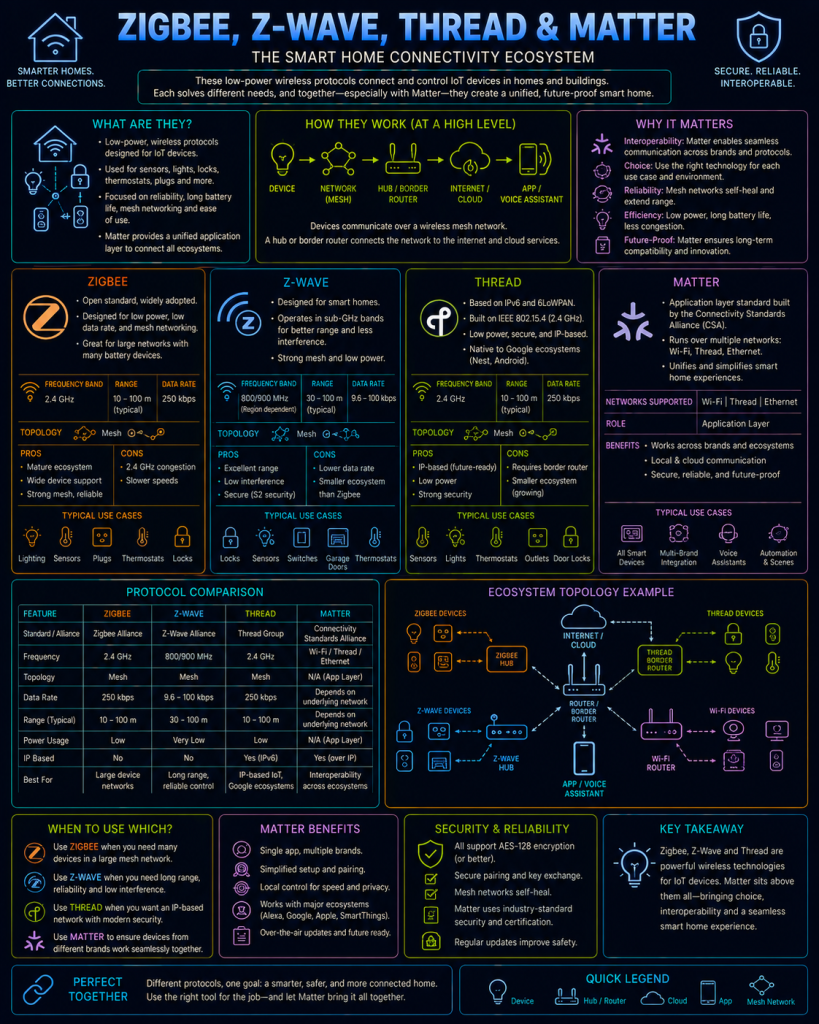
“IoT” (Internet of Things) refers to the growing category of small, often low-power, network-connected devices — smart bulbs, door sensors, thermostats, plugs, locks — that don’t fit neatly into traditional networking.
Many of these devices were never designed to connect to Wi-Fi directly at all; instead, an entire family of specialised, lower-power wireless protocols has grown up specifically to serve them. This page covers the main ones you’re likely to encounter, particularly if you’re running a home automation platform like Home Assistant (see the Self-Hosting series).
Why IoT needs its own protocols
Wi-Fi is a perfectly capable protocol, but it’s a poor fit for many IoT devices for a few practical reasons:
- Power consumption: A battery-powered door sensor might need to run for years on a single coin-cell battery. Wi-Fi’s radio is relatively power-hungry, and simply isn’t designed with multi-year battery life as a priority.
- Cost and complexity: A full Wi-Fi radio and the processing power to run a TCP/IP stack adds meaningful cost to a device that might otherwise be extremely simple and cheap to manufacture.
- Network congestion: A home with dozens of individual smart devices all competing for the same 2.4GHz Wi-Fi spectrum as phones, laptops, and streaming devices can quickly become congested.
This gap is what Zigbee, Z-Wave, and Thread were each independently designed to fill — low-power, low-bandwidth wireless protocols purpose-built for exactly this category of device.
Zigbee
Zigbee is a wireless protocol built on top of the IEEE 802.15.4 radio standard, operating primarily in the 2.4GHz band (the same general frequency range as Wi-Fi and Bluetooth, though using it very differently).
Mesh networking
Zigbee’s defining architectural feature is that it forms a mesh network. Rather than every device needing to communicate directly with a central hub, mains-powered Zigbee devices (like smart plugs and bulbs) act as routers, relaying messages on behalf of other devices further from the hub. This means a Zigbee network’s effective range and reliability actually improves as more mains-powered devices are added, since each one becomes another potential relay point — a useful practical difference from Wi-Fi, where more devices generally means more congestion rather than more coverage. Battery-powered devices (like sensors) are typically end devices only, communicating through the mesh without needing to relay traffic for others themselves, in order to preserve their battery life.
The role of a coordinator
Every Zigbee network requires exactly one coordinator — typically a USB dongle or a built-in radio inside a smart home hub (such as a Home Assistant setup using a Zigbee USB stick) — which forms and manages the network. Individual Zigbee devices pair to this coordinator, not directly to each other, even though the actual traffic itself may hop through several other devices in the mesh to get there.
Z-Wave
Z-Wave is a broadly similar concept to Zigbee — a low-power mesh networking protocol purpose-built for home automation — but with a key technical difference: Z-Wave operates in the sub-1GHz radio band (the specific frequency varies by region — around 908MHz in the US, 868MHz in Europe) rather than the crowded 2.4GHz band.
This has a real, practical benefit: because Z-Wave doesn’t share spectrum with Wi-Fi, Bluetooth, and Zigbee, it experiences less interference in a busy smart home, and sub-1GHz signals generally penetrate walls slightly better too, giving Z-Wave a modest range advantage. Z-Wave also forms a mesh network in a similar way to Zigbee, with mains-powered devices relaying traffic for others.
Z-Wave has historically been more tightly controlled than Zigbee, with certification managed centrally by the Z-Wave Alliance, which has generally meant stronger, more consistent interoperability between different manufacturers’ Z-Wave devices, at the cost of being a somewhat more closed ecosystem than Zigbee’s more loosely governed standard.
Thread
Thread is a newer mesh networking protocol, also built on the same underlying IEEE 802.15.4 radio standard as Zigbee, but with one significant architectural difference: Thread is natively IP-based. Where Zigbee and Z-Wave use their own custom networking layers requiring a hub to translate between them and a normal home network, every Thread device gets its own IPv6 address (see the IP systems page) and can, in principle, be reached directly using standard IP-based tools and protocols, rather than needing protocol-specific translation.
Thread still requires a Border Router — a device that connects the Thread mesh network to your regular home IP network (many modern smart speakers and hubs from various manufacturers now include one built in) — but this is a bridging role rather than the more central, everything-must-pass-through-it coordinator role a Zigbee network relies on.
Matter
Matter isn’t really a competitor to Zigbee, Z-Wave, or Thread in the way it’s sometimes described — it’s a different kind of thing entirely: an application-layer standard sitting on top of an existing network, defining a common language for how smart home devices describe themselves and how commands like “turn on” or “set brightness to 50%” are structured, regardless of which underlying network protocol is actually carrying that command.
Matter can run over either Thread (for low-power devices) or ordinary Wi-Fi (for devices where power isn’t a major constraint, like a mains-powered smart plug), and uses standard IP networking underneath either way.
The problem Matter is specifically trying to solve is interoperability — historically, a smart bulb from one manufacturer often couldn’t be controlled by a hub from a different manufacturer without going through that first manufacturer’s own cloud service and app, creating a fragmented ecosystem of incompatible walled gardens. Matter defines a single, shared standard that any compliant device and any compliant hub or controller can speak, regardless of who made either one, with the explicit goal of a device working the same way whether it’s being controlled by, for example, Apple Home, Google Home, Amazon Alexa, or a self-hosted platform like Home Assistant.
Comparing the four
| Zigbee | Z-Wave | Thread | Matter | |
|---|---|---|---|---|
| What it is | Network protocol | Network protocol | Network protocol | Application-layer standard |
| Radio band | 2.4GHz | Sub-1GHz | 2.4GHz | Runs over Thread or Wi-Fi |
| Topology | Mesh | Mesh | Mesh | N/A (sits above the network layer) |
| Native IP | No (needs a hub/gateway) | No (needs a hub/gateway) | Yes | Yes (via Thread or Wi-Fi) |
| Governing body | Connectivity Standards Alliance | Z-Wave Alliance | Thread Group | Connectivity Standards Alliance |
In practice, many modern smart home hubs (including recent Home Assistant setups) support several of these simultaneously — for example, using a combined Zigbee/Thread USB radio, with Matter used as the common language for any Matter-compliant devices regardless of which underlying radio actually carries their traffic.
IoT protocols and security
IoT devices carry a somewhat different security profile from the general-purpose computers and servers covered elsewhere on this site — they’re often cheap, produced in enormous volume, rarely updated after purchase, and frequently overlooked by the very people who’d otherwise carefully secure the rest of their network.
Default and weak credentials remain a huge, persistent problem. Many IoT devices ship with a default administrative password, and a significant proportion of deployed devices are never had that default changed. This exact weakness was the foundation of the Mirai botnet, covered on the Botnets page — Mirai spread by scanning the Internet for IoT devices (mostly IP cameras and home routers) and simply trying a short, hardcoded list of common factory-default username/password combinations, compromising hundreds of thousands of devices with no sophisticated exploit required at all.
Firmware updates are inconsistent, and often nonexistent. Unlike a modern phone or laptop, a huge portion of IoT devices are never designed to receive security patches after they leave the factory, or are abandoned by the manufacturer within a year or two of release. A vulnerability discovered in a device’s firmware may simply never be fixed, leaving it permanently exploitable for the rest of its working life.
Weak or absent encryption at the protocol level has historically affected some of the protocols covered above. Early Zigbee deployments, for example, were sometimes found using a well-known, standard default encryption key rather than a properly randomised one specific to each network, effectively making the encryption close to meaningless for anyone aware of the default. Modern implementations have generally improved this significantly, but it’s a good illustration of how a technically sound protocol can still end up weak in practice if a manufacturer takes an insecure shortcut during implementation.
Pairing processes can be a weak point. The moment a new device joins a network — the pairing process — is often less rigorously secured than the network’s day-to-day operation, since it needs to be simple enough for an ordinary consumer to complete without technical expertise. An attacker within range during this pairing window may, in some implementations, be able to intercept key material being exchanged, or in poorly designed systems, inject a rogue device of their own into the network.
A compromised IoT device is a foothold into the rest of the home network. Even a seemingly low-value target, like a smart bulb, sits on the same network as more sensitive devices once compromised — an attacker who gains control of one weak IoT device can potentially use it as a launching point to scan for and attack other devices on the same network, similar in principle to how a compromised machine anywhere on a corporate network can become a stepping stone for further lateral movement.
Given all this, sensible practical steps include changing default credentials on every IoT device immediately after setup, keeping devices on a separate, isolated network segment or VLAN from more sensitive devices (a common recommendation specifically because of the lateral-movement risk above), preferring devices from manufacturers with a track record of ongoing firmware support, and being cautious about which devices are granted direct Internet access at all, versus being reachable only through a trusted local hub.