
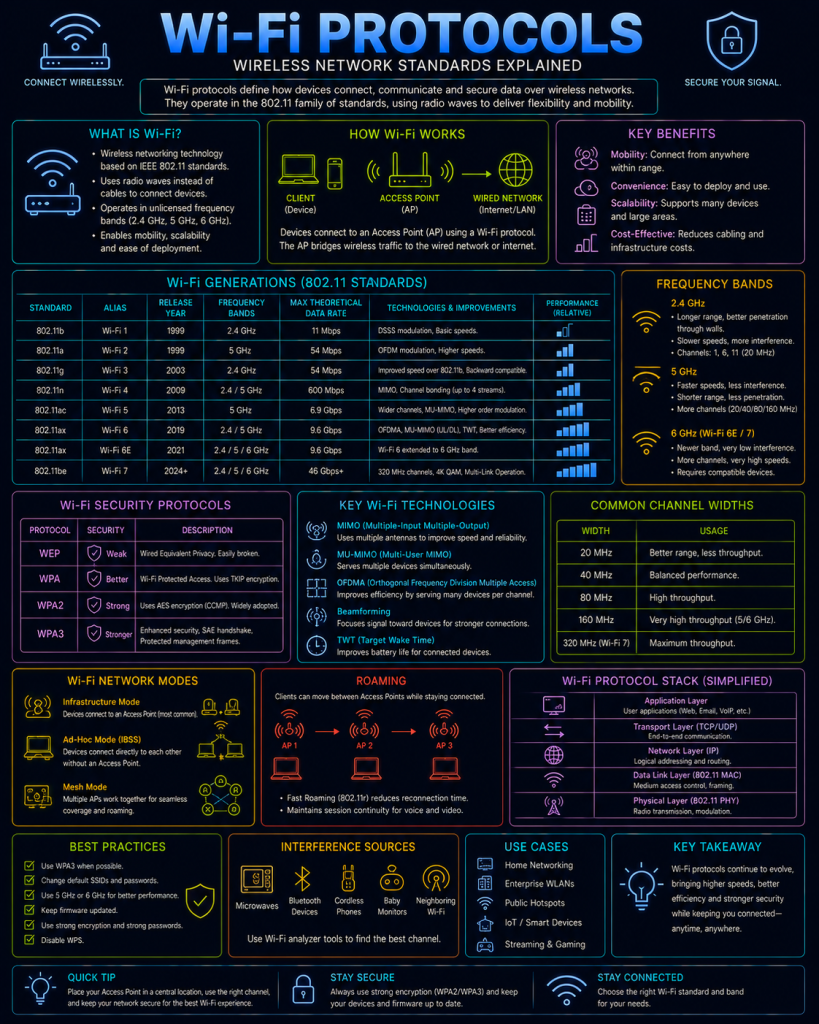
Wi-Fi is a family of wireless networking standards, formally known as IEEE 802.11, that allows devices to connect to a network without a physical cable. Wi-Fi covers two related but distinct areas worth separating clearly: the underlying radio/data standards (802.11a/b/g/n/ac/ax, and so on) that govern speed and range, and the security standards (WEP, WPA, WPA2, WPA3) that govern how a connection is authenticated and encrypted — this page focuses mainly on the latter, since that’s where most of the meaningful security history lies.
802.11 standards, briefly
Each generation of Wi-Fi is defined by an amendment to the 802.11 standard, generally bringing faster speeds, better efficiency with more connected devices, or both:
- 802.11b/g/n: Operate primarily in the 2.4GHz band, offering longer range and better wall penetration, but slower speeds and more susceptibility to interference from other household devices sharing the same crowded frequency (microwaves, Bluetooth devices, cordless phones).
- 802.11ac: Operates in the 5GHz band, offering significantly higher speeds at the cost of shorter range and worse wall penetration compared to 2.4GHz.
- 802.11ax (Wi-Fi 6 / 6E): The current generation, improving efficiency particularly in crowded environments with many connected devices at once, and (via 6E) adding access to the newer, less congested 6GHz band.
These standards are typically marketed to consumers using the simpler “Wi-Fi 4/5/6” naming introduced by the Wi-Fi Alliance, rather than their formal 802.11 designations.
Wi-Fi security standards
This is where the more significant security story lies — Wi-Fi’s approach to authentication and encryption has gone through several major revisions, each addressing serious weaknesses discovered in the one before it.
WEP (Wired Equivalent Privacy)
WEP was the original Wi-Fi security standard, and is now considered completely broken — modern tools can recover a WEP key in minutes, sometimes seconds, regardless of how strong the chosen passphrase is, due to fundamental, structural flaws in how WEP generates and uses its encryption keys (rather than the passphrase itself simply being guessable). WEP should never be used today, and virtually all modern hardware no longer supports configuring it at all.
WPA (Wi-Fi Protected Access)
WPA was introduced as an urgent, interim fix once WEP’s weaknesses became widely known and exploited, designed to be deployable via a firmware update to existing WEP-era hardware rather than requiring entirely new equipment. It replaced WEP’s broken key generation with TKIP (Temporal Key Integrity Protocol), a meaningful improvement, but TKIP itself was later found to have its own weaknesses. WPA is now also considered obsolete.
WPA2
WPA2 became the standard for well over a decade, replacing TKIP with AES-CCMP, a much stronger, properly vetted encryption method built on the same AES algorithm used throughout modern cryptography generally (including, for example, within the TLS cipher suites covered on the TLS page). WPA2 remains widely supported and reasonably secure when configured correctly today, though it has been superseded by WPA3 for new deployments, and has one well-known weakness of its own (see KRACK, below).
WPA3
The current generation, introduced in 2018, bringing several meaningful improvements:
- SAE (Simultaneous Authentication of Equals): Replaces WPA2’s handshake method with one specifically designed to resist offline password-guessing attacks (see “WPA2’s four-way handshake weakness” below) — even a weak, guessable Wi-Fi password is significantly harder to crack under WPA3 as a direct result.
- Forward secrecy: Similar in principle to the Perfect Forward Secrecy concept covered on the TLS page — traffic captured today can’t later be decrypted even if the Wi-Fi password is discovered at some point in the future.
- Individualised data encryption on open networks: A significant improvement for public Wi-Fi (via a feature called Wi-Fi Enhanced Open), meaning that even on a network with no password at all, one device’s traffic can no longer be trivially read by another device connected to the same open network.
WPA-Personal vs WPA-Enterprise
Separate from which version (WPA2 or WPA3) is in use, Wi-Fi security also comes in two distinct authentication modes, suited to very different environments:
WPA-Personal (PSK)
Uses a single, shared Pre-Shared Key (the Wi-Fi password) that every device on the network uses identically. Simple to set up, and well suited to home networks — but it doesn’t scale well to larger environments, since everyone shares the exact same credential, there’s no way to identify which specific device or person used the network at a given time, and revoking one person’s access means changing the password for every single device on the network.
WPA-Enterprise (802.1X)
Uses individual credentials per user or device instead of one shared password, authenticated via 802.1X — a framework that, behind the scenes, typically hands the actual authentication decision off to a RADIUS server (see the RADIUS/TACACS+ page), rather than the Wi-Fi access point itself checking credentials directly. This is the standard approach in office and enterprise environments, since it allows each user to have their own login, access can be revoked individually without affecting anyone else, and detailed accounting records (again, courtesy of RADIUS) show exactly who connected and when.
Wi-Fi protocols and security
Beyond the encryption standard itself, Wi-Fi networks face several attack techniques that specifically exploit the wireless medium.
WPA2’s four-way handshake can be captured and attacked offline. When a device connects to a WPA2-Personal network, it performs a four-way handshake with the access point to establish an encryption key. An attacker within radio range can passively capture this handshake (or actively force it to happen again by sending a deauthentication attack, described next), then attempt to crack the Wi-Fi password offline, away from the network entirely — meaning there’s no login-attempt limit or lockout to slow the attacker down, and success depends heavily on how strong and unique the Wi-Fi password actually is. WPA3’s SAE, described above, was specifically designed to close this exact weakness.
Deauthentication attacks exploit the fact that the management frames used to disconnect a device from a Wi-Fi network are, in older Wi-Fi security standards, not authenticated or encrypted. An attacker can forge a deauthentication frame appearing to come from the legitimate access point, forcibly disconnecting a target device from the network — used both as a standalone Denial of Service technique against a specific device, and as a way to force the handshake-capturing attack described above by making a device reconnect while the attacker is listening. WPA3 introduces Protected Management Frames as a standard requirement, specifically closing this gap.
Evil Twin attacks involve an attacker setting up a rogue access point broadcasting the same network name (SSID) as a legitimate, trusted network — a coffee shop’s Wi-Fi, or a company’s guest network — hoping nearby devices (or unsuspecting users) connect to the attacker’s fake version instead of the real one. Once connected, the attacker sits directly in the path of all the victim’s traffic, a direct and particularly easy-to-set-up example of the Man in the Middle attacks covered elsewhere on this site.
KRACK (Key Reinstallation Attack), disclosed in 2017, was a serious vulnerability in WPA2’s four-way handshake implementation itself, allowing an attacker to trick a device into reinstalling an already-in-use encryption key, weakening or defeating the encryption on some of the victim’s traffic. It affected the WPA2 standard’s handshake logic broadly, not just one vendor’s implementation, and required patches across a huge range of devices as a result — a useful reminder that even a well-regarded, widely trusted standard like WPA2 can still contain a serious flaw discovered years after widespread adoption.
WPS (Wi-Fi Protected Setup) PIN vulnerabilities are a further, separate weakness from the core protocol issues above. WPS was designed as a convenience feature, allowing a device to join a network using a short 8-digit PIN rather than typing the full Wi-Fi password. A significant flaw in how many implementations validated this PIN made it practical to brute-force via nearby radio access, regardless of how strong the actual underlying Wi-Fi password was — leading to the now-common advice to disable WPS entirely on a router unless it’s genuinely needed.
Given all of this, the practical baseline recommendation is straightforward: use WPA3 where supported (or WPA2 with AES/CCMP, never TKIP or WEP, where it isn’t), use WPA-Enterprise with RADIUS in any environment with more than a handful of users needing individual accountability, disable WPS, and treat an unexpected duplicate SSID nearby as a potential sign of an Evil Twin attack worth investigating.