
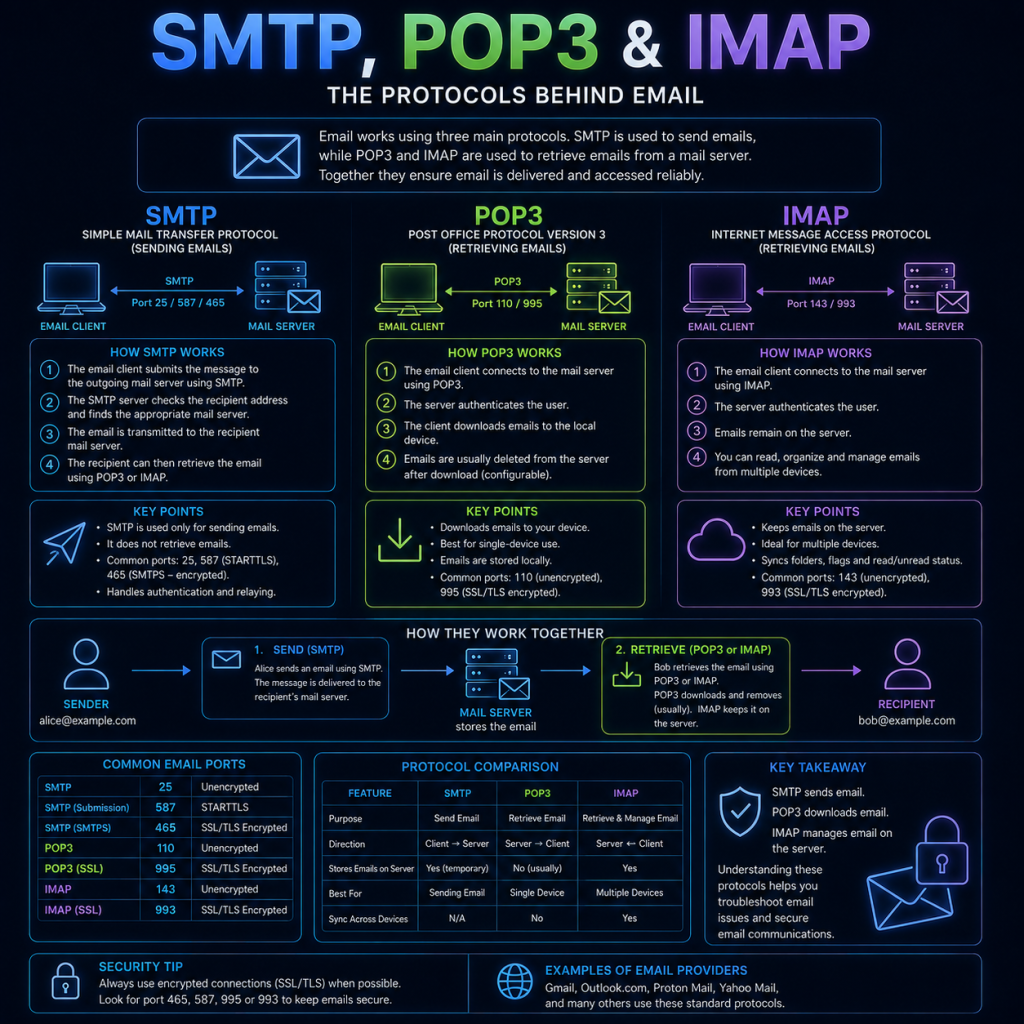
Email relies on several different protocols working together — one for actually sending a message, and others for retrieving it once it’s arrived. Understanding how they fit together also explains why email spoofing is so easy, and what modern defences exist to combat it.
Sending mail: SMTP
SMTP (Simple Mail Transfer Protocol) is the protocol used to send email from a client to a server, and between mail servers themselves, on its way to the recipient’s inbox. SMTP typically operates on port 25 for server-to-server delivery, and on port 587 (with encryption) when a mail client submits a message to its outgoing server.
A simplified version of the journey a message takes:
- You compose a message in your email client and hit send.
- Your client connects to your provider’s outgoing mail server (e.g.
smtp.gmail.com) and hands the message over using SMTP. - Your provider’s server looks up the recipient’s domain via a DNS MX (Mail Exchange) record, which tells it which mail server is responsible for that domain.
- Your provider’s server connects to the recipient’s mail server, again using SMTP, and delivers the message.
- The recipient’s mail server stores the message in their mailbox, ready to be retrieved.
SMTP is a “push” protocol — it’s only responsible for getting a message from A to B. It has no role in actually letting a user read or manage their inbox; that’s handled separately.
Retrieving mail: IMAP and POP3
Once a message has arrived at the recipient’s mail server, the recipient needs a separate protocol to actually retrieve and read it. There are two in common use:
IMAP (Internet Message Access Protocol)
IMAP keeps mail stored on the server, and the client synchronises with it. Reading, deleting, or organising messages into folders is reflected on the server, meaning multiple devices (phone, laptop, webmail) all stay in sync with the same mailbox. This is the standard choice for most modern email use. IMAP typically uses port 143, or port 993 when encrypted.
POP3 (Post Office Protocol v3)
POP3 takes a simpler approach — it downloads messages from the server to a single device, and (by default) deletes them from the server afterwards. This made sense when people only checked email from one computer, but works poorly across multiple devices, since a message downloaded to your laptop won’t then appear on your phone. POP3 typically uses port 110, or port 995 when encrypted.
Encryption in transit
Like HTTP, none of SMTP, IMAP, or POP3 were originally designed with encryption in mind — by default they send everything, including login credentials, as plain, readable text.
Modern mail servers address this with STARTTLS, which upgrades an existing plain connection to an encrypted one (similar in spirit to how HTTPS wraps HTTP), or by using a protocol’s dedicated encrypted port outright (587 for SMTP submission, 993 for IMAP, 995 for POP3). Any mail server still only offering unencrypted connections on the older, unencrypted ports should be treated as a security weakness.
Why email spoofing is so easy
SMTP was designed in an era when the Internet was small and trusted, and it shows: the “From” address on an email is essentially just a text field the sender fills in themselves. Nothing about the core SMTP protocol verifies that whoever is sending a message actually controls the domain they claim to be sending from.
This means, without any additional protection, an attacker can send a message that claims to be from security@yourbank.com just as easily as the real bank can — and it will arrive looking completely legitimate to a basic mail client. This is the technical foundation underneath most Phishing attacks.
Fighting back: SPF, DKIM, and DMARC
Three DNS-based mechanisms, usually used together, exist specifically to let a receiving mail server verify that an incoming message really did come from who it claims.
SPF (Sender Policy Framework)
SPF lets a domain owner publish a DNS TXT record listing which mail servers are authorised to send email on behalf of their domain. When a receiving server gets a message claiming to be from that domain, it checks whether the sending server’s IP address appears in that list.
A typical SPF record looks like this:
v=spf1 include:_spf.google.com ~allThis example authorises Google’s mail servers to send on behalf of the domain, and the ~all at the end tells receiving servers how to treat mail from anywhere else (in this case, treat it with suspicion rather than outright rejecting it).
DKIM (DomainKeys Identified Mail)
DKIM takes a different approach — cryptographic rather than list-based. The sending mail server digitally signs each outgoing message using a private key, and publishes the corresponding public key in a DNS TXT record. The receiving server can then verify that signature, confirming both that the message really was sent by a server holding that domain’s private key, and that the message’s key contents weren’t altered in transit.
DMARC (Domain-based Message Authentication, Reporting & Conformance)
DMARC ties SPF and DKIM together and tells receiving servers what to actually do when a message fails those checks. A domain publishes a DMARC policy via DNS specifying whether failing messages should be delivered normally, flagged as suspicious, or rejected outright — and can also request that reports be sent back, showing the domain owner who is sending mail (legitimately or otherwise) claiming to be from their domain.
A simple DMARC record might look like:
v=DMARC1; p=reject; rua=mailto:reports@yourdomain.comHere, p=reject tells receiving servers to reject any message that fails SPF and DKIM checks outright, rather than delivering it or just marking it as spam.
Checking these records yourself
Since SPF, DKIM, and DMARC are all just DNS TXT records, they can be queried the same way covered on the DNS page, using nslookup or dig:
nslookup -type=TXT cybertrainer.ukDMARC and DKIM records are typically published under a subdomain (_dmarc.yourdomain.com for DMARC, and a selector-specific subdomain for DKIM), rather than the root domain itself.
Email protocols and security
Even with SPF, DKIM, and DMARC correctly configured, email remains one of the most common attack vectors, for a few reasons:
Not every domain enforces DMARC strictly. A domain can publish an SPF and DKIM record but set a weak DMARC policy (p=none), meaning failing messages still get delivered — the checks exist, but nothing is actually done about failures.
Lookalike domains bypass these checks entirely. SPF/DKIM/DMARC verify that a message really came from the domain it claims — they do nothing to stop an attacker registering a similar-looking domain (e.g. cybertra1ner.uk or cybertrainer-support.uk) and sending genuinely authenticated mail from it. This is why checking the exact sending domain matters far more than simply seeing a familiar-looking display name.
Display name spoofing exploits the fact that most email clients prominently show a sender’s display name (e.g. “IT Support”) while hiding or de-emphasising the actual email address behind it, making it easy to disguise a suspicious address behind a trustworthy-looking name.
Compromised legitimate accounts bypass all of the above entirely — if an attacker gains access to someone’s real mailbox (for example, via a successful earlier phishing attempt or Password attack), any mail they send passes SPF, DKIM, and DMARC perfectly, since it genuinely was sent by an authorised sender.
This is why email authentication protocols are best understood as raising the bar rather than eliminating the risk — they’re a valuable and important layer of defence, but not a substitute for the human judgement covered on the Phishing page.